
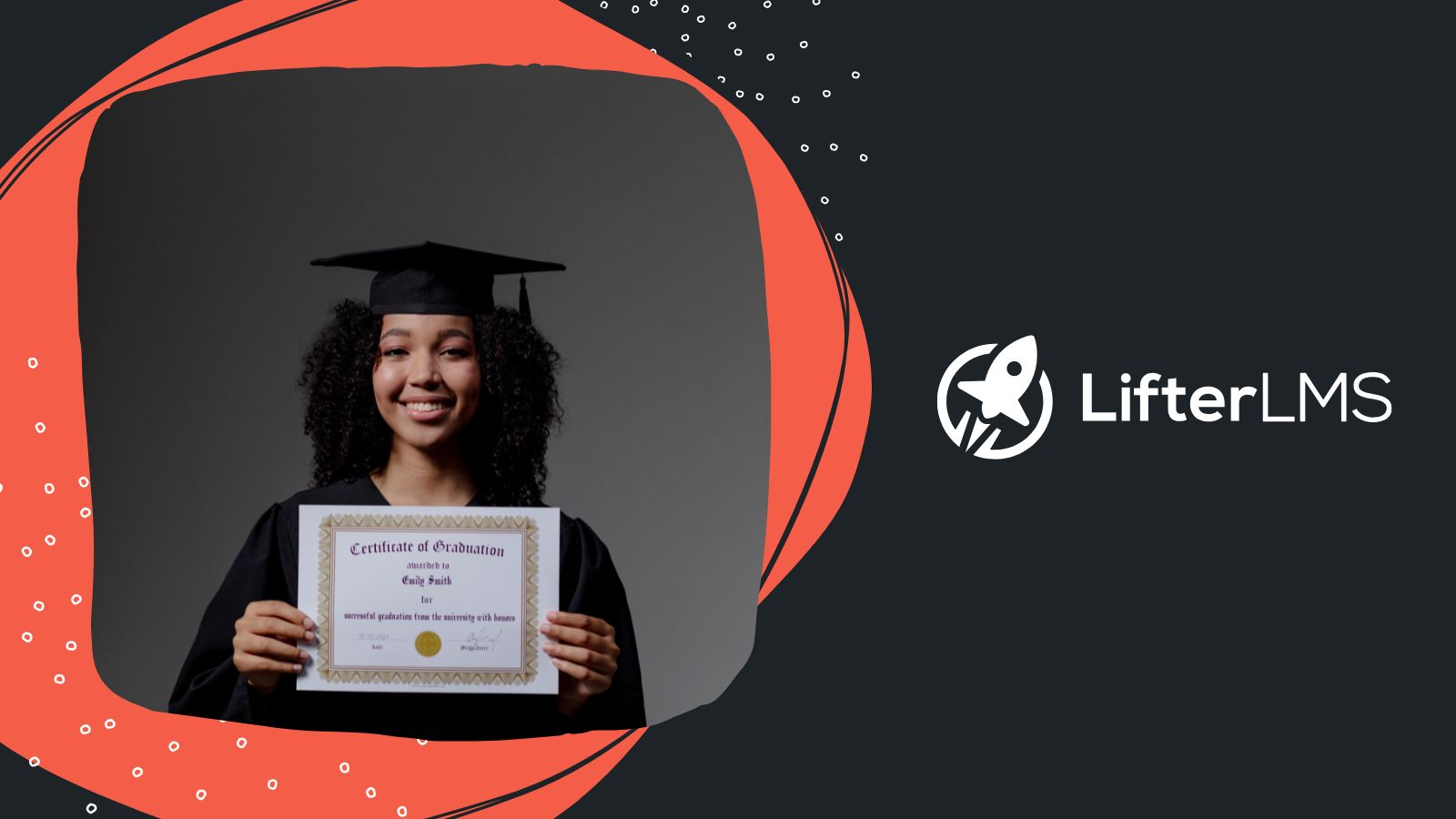
A certification program is more than a course with a certificate at the end.
A well-designed program defines what someone needs to know or be able to do, gives them a structured way to learn it, assesses whether they have met that standard, and issues a credential that records the result.
If you want to create your own certification program, the process looks broadly like this:
- Define what you are certifying.
- Map the skills and competencies someone needs to demonstrate.
- Design the curriculum and learning path.
- Build the assessment process.
- Decide whether accreditation matters.
- Set your pricing and access model.
- Issue and verify credentials.
- Plan for renewals or continuing education.
- Measure the results and improve the program.
You can run that entire process on WordPress. LifterLMS provides the learning management system, while WordPress gives you control over your website, admissions process, branding, integrations, and the wider experience around the credential.
This guide walks through each step.
Create a Certification Program Online From Scratch – Full Video Tutorial
If you prefer to watch the process first, this step-by-step tutorial shows how to create a certification program with LifterLMS.
The example uses a continuing education course in nursing where nurses earn continuing education units and receive a certificate of completion.
The tools shown in the tutorial include LifterLMS and several optional add-ons. You do not need every add-on for every certification program. Your setup should depend on the kind of training, assessment, payment, reporting, and renewal process you actually need.
The software tools used in this video to create a certification program online:
- LifterLMS (Free Download)
- LifterLMS Infinity Bundle (Includes all the add-ons below)
What Is a Certification Program?
A certification program is a structured learning and assessment process that confirms someone has met a defined standard.
That makes it different from a normal online course.
A course may simply teach a subject. A certification program normally combines three things:
- A defined standard for what the learner needs to know or do
- An assessment that checks whether they have met that standard
- A credential that records the successful result
That credential might be useful to an employer, client, professional body, partner organization, or the learner themselves.
A certificate of completion only tells you that somebody finished something. A stronger certification program should answer another question:
What did this person prove?
That question should shape everything that follows.
How to Create a Certification Program Step by Step
Step 1: Define What You Are Certifying
Start with the credential, not the software.
Be specific about what someone will be certified to do and why that credential matters.
For example, a vague goal such as “sales certification” does not tell you enough to build the program.
A better starting point might be:
- Who is the certification for?
- What role, skill, or professional outcome does it represent?
- What should a certified person know?
- What should they be able to demonstrate?
- Who will care that they have earned it?
- Does the credential expire or require renewal?
For example, you might create certification programs for life coaching, CPR, wedding photography, sales, professional services, technical skills, trades, coaching, internal company training, or many other fields.
Your credential also needs a clear name.
That name should describe what the learner has actually achieved rather than promising more than the program can prove.
For example, “Certified Consultative Sales Professional” implies something very different from “Certificate of Completion: Introduction to Consultative Selling.”
The assessment needs to match that difference.
| Certification Topic | Ideal Learner | Certification Name | Certification Issued |
| Life Coaching | Aspiring Life Coach | Certified Life Coach | Certified Life Coach Certificate |
| CPR | Lifeguard | CPR Certification | Lifeguard CPR Certificate Valid For 1 Year |
| Wedding Photography | Aspiring Photography Entrepreneur | Certified Wedding Photography | Certified Wedding Photographer Certificate |
Step 2: Map the Competencies and Standards
Once you know what the credential represents, work backward from it.
What does someone need to know, understand, or demonstrate before you are comfortable issuing that credential?
For a professional sales certification, the required competencies might include:
- Discovery and qualification
- Consultative selling
- Objection handling
- Pipeline management
- Written account planning
- Live or recorded sales conversations
A technical certification might use a different mix of knowledge tests, practical work, and observed tasks.
The important point is that your assessment standard comes before the certificate.
A learner should not receive a credential simply because they reached the end of the content unless finishing the content genuinely proves what the credential claims.
Define your passing standard at this stage too.
That could mean:
- A minimum quiz score
- Completion of required assignments
- A passing grade from an instructor
- Successful completion of a practical exercise
- Passing a live assessment
- Completing several required courses
- A combination of these
LifterLMS lets you build those requirements into the learning process rather than tracking them separately.
Step 3: Design the Curriculum and Learning Path
Now turn those competencies into a learning path.
Some certifications need only one course. Others need several courses covering different parts of the standard.
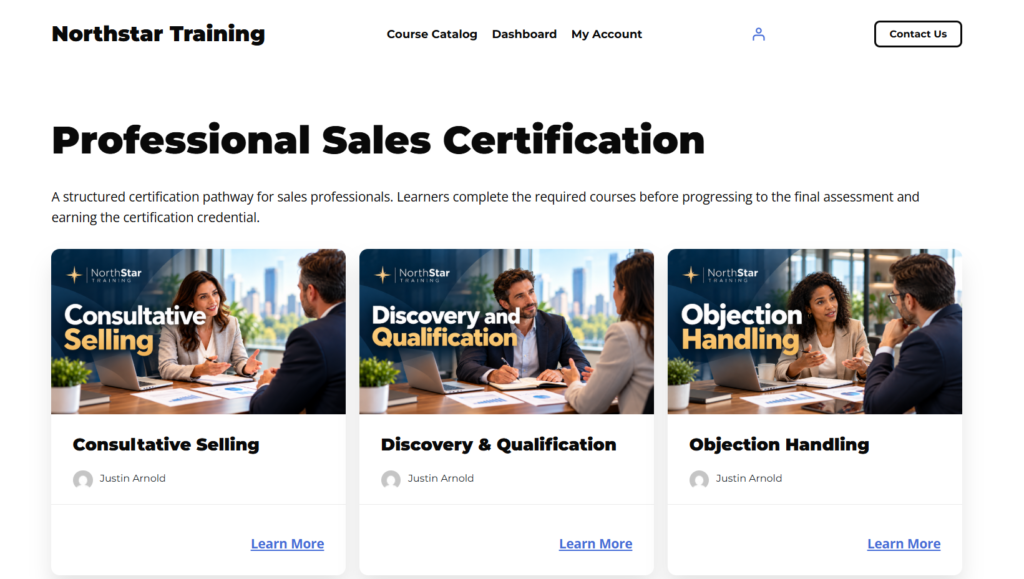
LifterLMS Course Tracks let you group related courses together. A learner can complete the courses in a track, and completion of the whole track can trigger an engagement such as a certificate. A completed Course Track can also act as a prerequisite for more advanced training.
Prerequisites help when the order matters.
For example, you could require learners to complete Sales Foundations before they can access Advanced Discovery Skills, then require the full training track before they can enter a final assessment course.
Memberships give you another option when your certification program includes more than a single course or track. A membership can package several courses and other members-only resources into one learner experience.
This is useful if your program includes training, exam preparation, reference material, continuing education, community access, or other content that sits around the main certification pathway.
Step 4: Build the Assessment
The assessment is what separates a meaningful credential from a completion certificate.
Simple certification programs may only need automated quizzes.
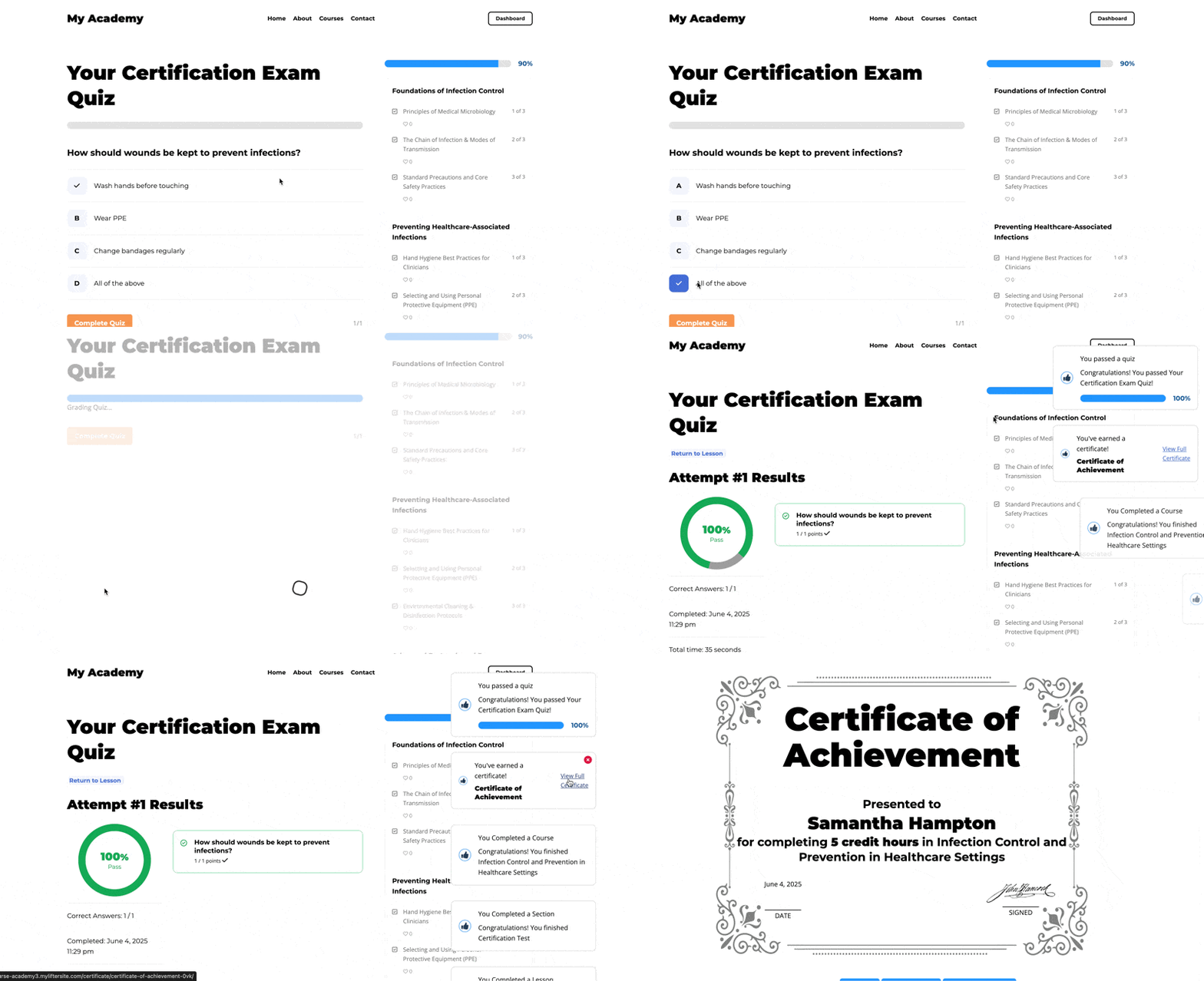
LifterLMS includes automatically graded quiz questions in the core plugin. Advanced Quizzes adds question banks, more question types, uploads, short and long answers, and manual grading, making it useful for competency testing and certification assessments.
Assignments can add another layer.
You can ask learners to:
- Upload a file
- Submit written work
- Complete a task
- Provide evidence for instructor review
Assignments can also be configured so the learner cannot continue until the work has been reviewed or graded.
That makes them useful for assessment that cannot be judged automatically.
A professional sales certification, for example, might use:
- Automatically graded methodology quizzes
- A written discovery plan
- A recorded objection-handling exercise
- A final live role-play
For a live or practical assessment, the assessor can record the result using a manually graded quiz or assignment. If the learner must achieve a passing grade, the lesson or course remains incomplete until the assessor records that pass. A manually graded quiz with a required minimum score does not complete the lesson until grading is finished and the threshold is met.
That means the certificate isn’t issued until the learner has passed the required assessment, rather than simply because they reached the final lesson.
Step 5: Decide Whether You Need Accreditation
You do not need third-party accreditation to create and issue your own credential. In a licensed or regulated field, check what the licensing body requires first, and never present your credential as a professional license.
Accreditation, such as ANAB’s Certificate Accreditation Program under ANSI/ASTM E2659-24, is an optional later step. See Do You Need Accreditation for a Certification Program? below.
Step 6: Set Pricing and Access
Next, decide how learners enter the program and what they pay for.
A certification program might use:
- Free enrollment
- One-time tuition
- Recurring payments
- A membership
- Cohort-based enrollment
- Employer-sponsored seats
- Separate exam or renewal fees
LifterLMS access plans let you control how learners enroll in courses and memberships.
Payment add-ons such as Stripe, PayPal, and WooCommerce can support paid programs. You can start with the free LifterLMS core plugin and add paid bundles when you need features such as ecommerce, advanced assessment, assignments, Groups, Continuing Education, or PDFs.
Do not choose a plan only around the first version of the program.
If you already know that you will need advanced quizzes, manual assignments, continuing education, multiple learner environments, or company groups, include those requirements in the decision now.
Step 7: Issue and Verify the Credential
Once a learner meets the required standard, the credential should be issued consistently.
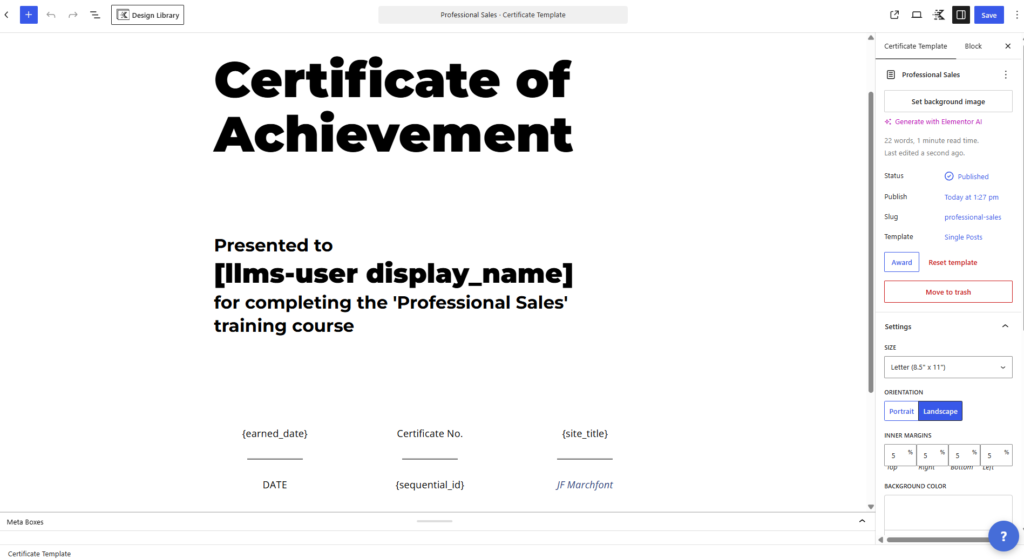
LifterLMS certificates can be awarded through engagements triggered by events such as completing a course, passing a quiz, or completing a Course Track.
A certificate can include details such as:
- Learner name
- Course or credential title
- Earned date
- Issuing organization
- Signatory
- A unique sequential ID
LifterLMS supports sequential certificate IDs, which give each awarded credential its own number.
Public verification
A credential becomes more useful when somebody outside the program can check it.
LifterLMS allows learners to make an earned certificate publicly shareable. The learner can then give an employer, client, or other third party a public URL.
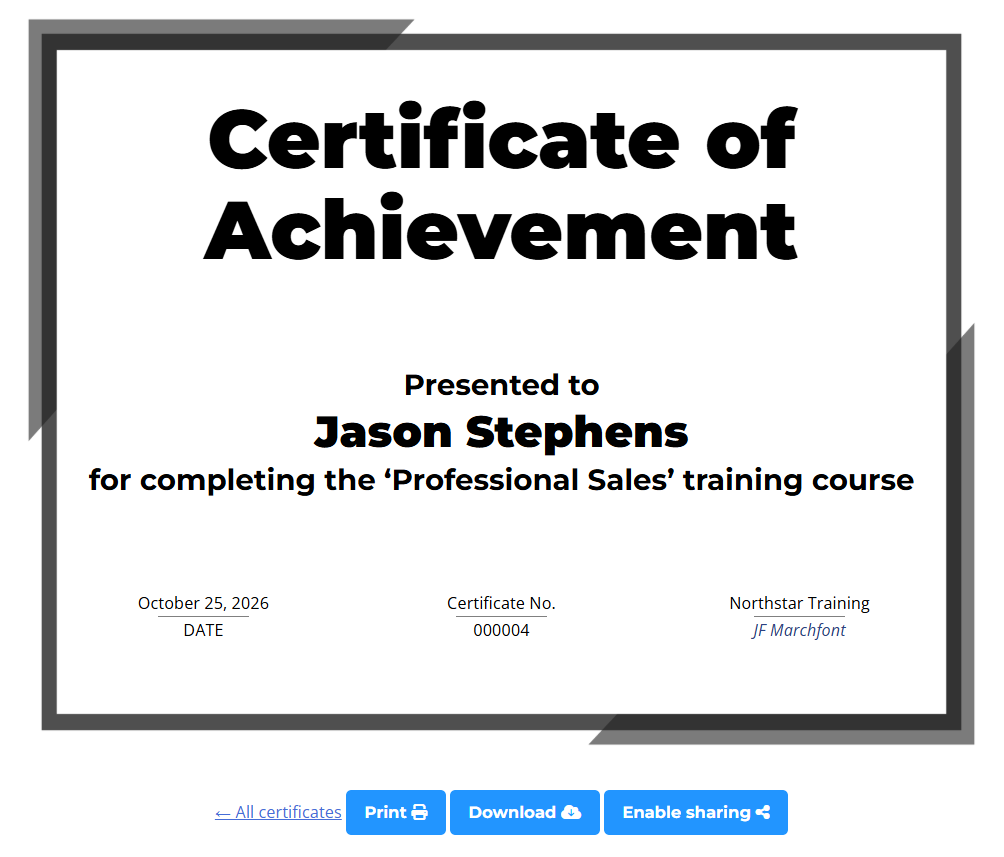
When public certificate sharing is enabled, the same certificate can be viewed through its public URL without requiring the visitor to log in.
The logged-out public view displays the learner name, issue date, issuer information, and any sequential credential number included on the certificate. If the learner disables sharing, that public certificate URL is no longer available.
That gives you public verification by URL.
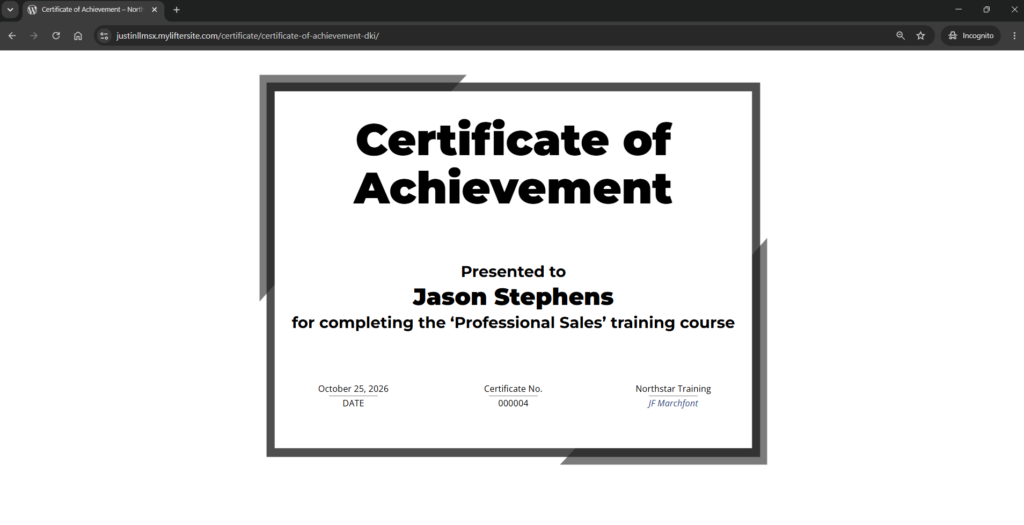
It is not the same thing as a searchable credential registry.
If you want somebody to visit a verification page, enter credential number 000001, and retrieve the matching record, you will need a separate WordPress verification layer or another credentialing system.
Step 8: Plan Renewals and Continuing Education
Some credentials are permanent.
Others need to be renewed because knowledge, standards, technology, or professional requirements change over time.
If your certification needs periodic renewal, define that process before launch.
Decide:
- How long the credential or continuing education period lasts
- What learners need to do to remain current
- Whether they need another assessment
- Whether they need continuing education credits
- Whether renewal involves another payment
The LifterLMS Continuing Education add-on can assign Continuing Education Units, or CEUs, to courses and set those units to expire after a defined period from the date they were earned. It can also include CE information on certificates and reports.
There are two limits to keep in mind.
CE expiry applies to the continuing education units rather than the certificate itself. LifterLMS does not currently provide a separate certificate-expiry setting.
Automated CE renewal reminders are not currently available and are listed as coming soon.
If recertification matters to your program, build the workflow around CE expiry, learner access, and your own renewal process rather than assuming the certificate itself will automatically expire and notify the learner.
For a real example, Tim McIvor of SchoolPsych.com uses LifterLMS to run a credentialed continuing professional development site for school psychologists, who must renew their certification every three years. Read the SchoolPsych story.
Step 9: Measure and Improve the Program
A certification program should not stay frozen after launch.
Look at what learners are actually doing.
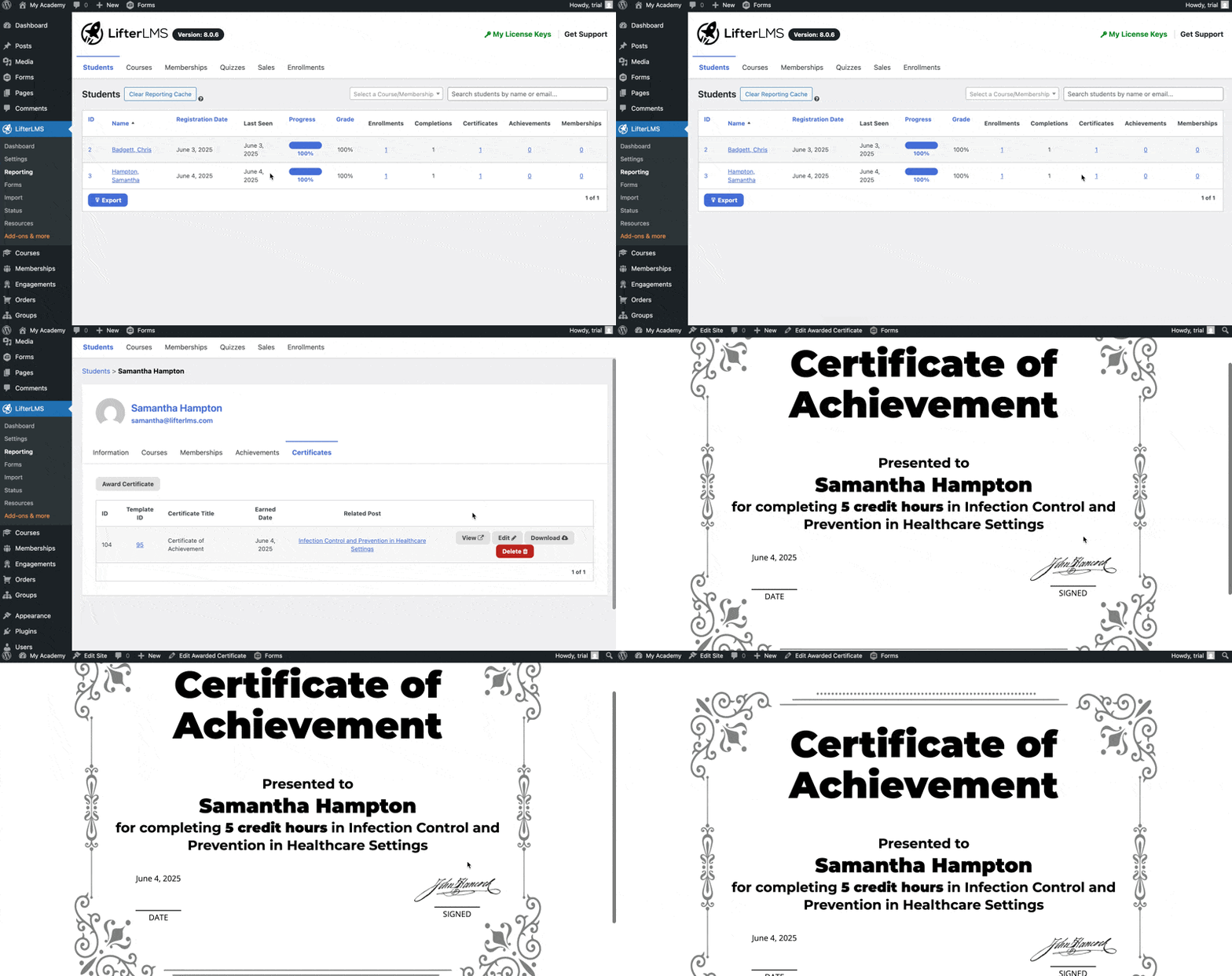
LifterLMS reporting can show course progress, quiz attempts, grades, enrollments, certificates, and other learner activity. Quiz reporting also includes attempts, average grades, and items awaiting review.
Use that information to ask practical questions:
- Where do learners struggle?
- Are assessment scores too high or too low?
- Are people dropping out at a particular stage?
- Are some questions unclear?
- Is practical work revealing weaknesses that the written assessment misses?
- Are learners completing renewal requirements?
- Are employers or other stakeholders asking for information your credential does not currently show?
Certification standards should remain consistent, but the way you teach and assess them can improve over time.
Can Anyone Create a Certification Program?
Yes.
A business, educator, coach, training provider, professional institute, or other organization can create its own certification program.
What matters is being clear about what the credential represents.
If you create your own private credential, you control the requirements and the standard. That does not automatically make it an accredited qualification, professional license, or government-recognized certification.
Be precise about those distinctions.
For many independent professional skills programs, the value comes from the standard you set, the quality of the assessment, the reputation of the issuer, and whether employers or clients trust the credential.
How Much Does It Cost to Build a Certification Program?
The cost depends on the complexity of the program.
At the simplest end, you need:
- A website
- Hosting
- WordPress
- An LMS
- Your course and assessment content
The LifterLMS core plugin is free and includes unlimited courses, memberships, students, and teachers. Paid bundles add the ecommerce, assessment, and other add-ons a certification program usually needs. See LifterLMS pricing for current plans and site limits.
Those software costs are only one part of the budget.
You may also need to account for:
- Course production
- Subject-matter experts
- Assessment design
- Instructor or assessor time
- Accreditation
- Video or live assessment tools
- Marketing
- Support
- Hosting
- Development or custom verification features
A small program can start simply.
A professional institute with admissions, several courses, practical assessments, public verification, renewals, partner portals, and multiple WordPress environments will naturally cost more to build and operate.
How Do You Create an Internal Certification Program?
An internal certification program uses the same core process as a public one.
The main difference is the audience.
Instead of selling a credential to the public, you might certify employees, contractors, franchisees, partners, or members of a particular organization.
Start by defining what somebody needs to demonstrate in their role.
Then build the learning path, assessments, and passing requirements around those competencies.
LifterLMS Groups can be useful when different companies, departments, or teams need their own learners and reporting.
An internal credential may not need public verification at all.
You may care more about:
- Employee completion
- Assessment results
- Manager reporting
- Renewal dates
- Role eligibility
- Compliance records
The same WordPress LMS can support either model.
Do You Need Accreditation for a Certification Program?
No.
You can issue your own credential without third-party accreditation.
If your certification relates to a licensed or regulated profession, check whether the relevant licensing body requires an approved provider or recognized training route.
Do not describe your credential as a professional license unless it legally is one.
Third-party accreditation can be added when it serves a real purpose.
For example, ANAB’s Certificate Accreditation Program assesses qualifying certificate programs against ANSI/ASTM E2659-24, a standard distinct from personnel certification under ISO/IEC 17024. It is an optional quality-assurance route for suitable programs, not a requirement for every organization that wants to issue a credential.
What Software Do You Need to Build a Certification Program?
At minimum, you need software that can deliver the training, control progression, assess learners, and record the result.
For a WordPress certification program, that normally means:
- WordPress for the website
- A learning management system such as LifterLMS
- Payment tools if you charge tuition
- Assessment tools appropriate to the standard
- Certificate or credential tools
- Reporting
- Optional continuing education, groups, events, CRM, forms, or verification tools
The exact stack should follow the certification model.
Do not choose software first and then force the program around what it happens to support.
Define the credential, competencies, assessment, and learner journey first.
Then choose the tools that can run that process reliably.
Going Further: From Certification Program to Certification Institute
A simple certification program may live comfortably inside one course site.
A certification institute is a broader operating model.
It may include admissions, several courses, a separate assessment environment, public credential verification, continuing education, career services, partners, cohorts, and several websites.
The strongest setup separates those functions where doing so makes the operation clearer.
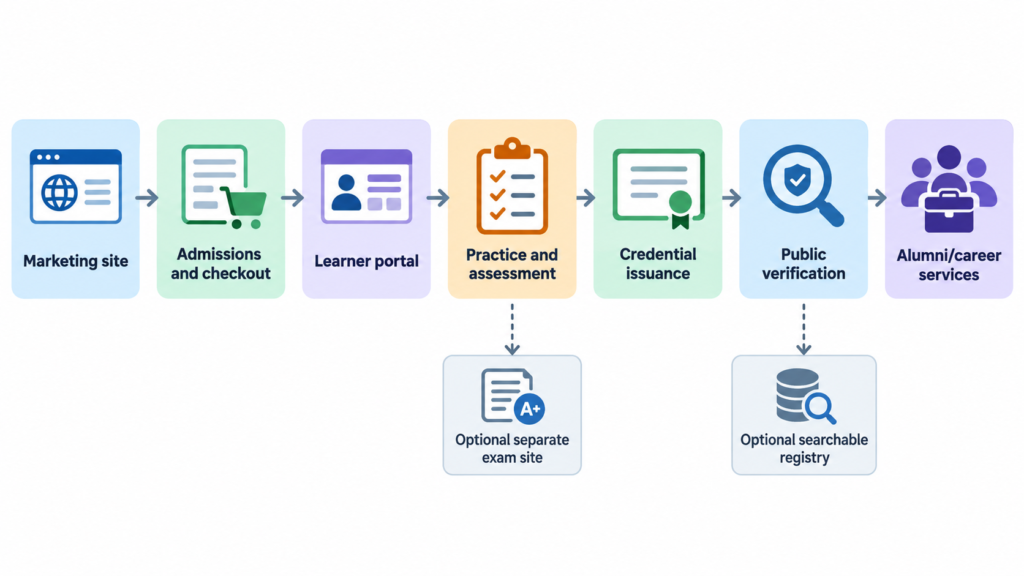
A typical architecture might look like this:
1. Marketing and Admissions
Your public site explains the credential, who it is for, admission requirements, curriculum, assessment standards, tuition, and application process.
Some programs allow immediate purchase.
Others use an application, interview, prerequisite check, or admissions review.
WordPress gives you room to connect forms, CRM tools, scheduling, analytics, and other admissions systems around the LMS.
2. Learner Portal
Once admitted, the learner enters the training environment.
LifterLMS manages courses, lessons, Course Tracks, prerequisites, memberships, and learner access.
You can structure the learning around the certification standard rather than presenting everything as a flat content library.
3. Practice and Assessment
This is where the learner moves from instruction to evidence.
Early quizzes might test knowledge.
Later assignments can require analysis, files, written work, or recorded submissions.
A final practical assessment may happen in person or over video, with the result recorded in LifterLMS so the learner cannot progress until they pass.
4. Credential Issuance and Verification
Once the required conditions are met, the certificate can be awarded.
Treat it as a credential record rather than just a decorative PDF.
Depending on your program, that record might include:
- Credential title
- Learner name
- Earned date
- Unique ID
- Issuing organization
- Signatory
- Continuing education information
For many programs, a public certificate URL is enough for verification.
A searchable registry is a separate requirement.
5. Alumni, Career Services, and Renewals
The relationship does not need to end when the certificate is issued.
Your site can also support:
- Continuing education
- Renewal training
- Advanced credentials
- Alumni resources
- Coaching
- Career resources
- Employer or partner access
That is where a course site starts to look more like an institute.
Example: A Sales Certification Institute
Consider a fictional institute offering a professional sales designation.
The program could work like this.
Stage 1: Training
Learners complete courses covering discovery, qualification, consultative selling, pipeline management, and objection handling.
Stage 2: Knowledge Exams
Each major section ends with a graded quiz.
The final knowledge exam draws from a question bank rather than presenting every candidate with exactly the same questions.
Stage 3: Applied Work
Candidates submit practical work such as a discovery plan, account strategy, or recorded sales exercise.
An instructor reviews the submission.
Stage 4: Live Assessment
Candidates attend a scheduled role-play or practical exam with an assessor.
The assessor records the result through a manually graded activity.
The learner cannot complete the final certification stage until they pass.
Stage 5: Credential
Once all required components are complete, the learner receives the institute’s credential with a unique ID.
Stage 6: Verification
The credential holder enables public certificate sharing and gives the issuer-hosted URL to an employer.
If the institute later needs lookup by credential number, it can add a searchable registry as a separate WordPress layer.
The same model can work for coaching, software skills, trades, professional services, and other programs where the credential represents assessed competence. You can see more programs built on LifterLMS in the LifterLMS showcase.
Common Certification Program Mistakes
Treating Completion as Competence
Finishing the curriculum can be part of the standard.
It should not automatically become the whole standard unless completion itself genuinely proves what the credential claims.
Work backward from the credential.
Ask what evidence would make you comfortable certifying someone.
Issuing a Credential Nobody Can Check
A PDF can become separated from the organization that issued it.
If verification matters, give credential holders an issuer-hosted route they can share.
If your market expects registry lookup, plan for that separately rather than assuming a certificate number creates one.
Letting the Platform Define the Program
Do not design the certification around whatever your software happens to make easiest.
Start with the standard.
Then ask whether your system lets you build the admissions process, assessment workflow, learner experience, verification, and reporting you actually need.
Building One Overloaded Site
One WordPress site is often enough.
It becomes less attractive when very different audiences need very different environments.
Candidates, public visitors, examiners, partners, employers, and administrators may not all need the same site.
Separate environments can make sense when security, ownership, branding, or administration genuinely benefits from the separation.
Choosing Licensing Around Today’s Smallest Setup
Think about the roadmap.
If you already expect to have a learner portal, exam environment, partner sites, or several advanced add-ons, include those requirements in your software decision from the start.
LifterLMS Infinity currently supports unlimited active sites and includes the advanced add-ons, while Universe covers up to five live sites and Earth covers one.
Development, staging, and test sites do not count as active live sites under the current licensing model.
Build the Credential System, Not Just the Course
Creating a certification program starts with a simple question:
What should somebody have to prove before you put your name behind their credential?
Once you know that, you can build the curriculum, assessment, credential, verification, renewal process, and technology around it.
WordPress and LifterLMS give you a flexible way to run that process on infrastructure you control.
You can start with a single certification course and grow into a larger institute with multiple courses, practical assessment, continuing education, partner access, public verification, and several sites when the program calls for it.
Ready to Build Your Certification Program?
LifterLMS gives you the tools to build and run a certification program on WordPress, from structured courses and assessments to certificates, reporting, continuing education, groups, and multi-site setups.
Compare LifterLMS plans to see which features and site limits fit your certification program.
Not ready to choose a plan yet? Try LifterLMS on a demo site and explore the platform before you build your production site.
Frequently Asked Questions
Install WordPress and an LMS such as LifterLMS, define what learners need to achieve, build the required courses and assessments, set the completion rules, and configure the credential to be issued when those requirements are met.
Use a WordPress LMS that already includes courses, quizzes, learner accounts, certificates, and reporting. LifterLMS lets you build the core certification workflow without writing code, while optional add-ons can handle advanced assessment, assignments, continuing education, groups, and other needs.
Any organization can issue its own training certificate. The important distinction is what that certificate represents. A private training credential is not automatically an accredited qualification or professional license.
Yes, when public certificate sharing is enabled. A learner can send the public certificate URL to an employer or another third party, who can view the credential without logging in. A searchable registry that retrieves credentials by number requires a separate setup.
Yes. LifterLMS can manage the learning and grading workflow around a live exam. The assessment itself can happen over video or in person, while the assessor records the result through a manually graded quiz or assignment so the learner cannot complete the certification process until they pass.
You can set expiry rules for Continuing Education Units with the LifterLMS Continuing Education add-on. LifterLMS does not currently provide a separate certificate-level expiry setting, so treat credential expiry and CEU expiry as separate requirements.
Yes. The LifterLMS Continuing Education add-on can assign CEUs to courses, set CEU expiry rules, and report on earned credits. Automated CE renewal reminders are not currently available and are listed as coming soon.
Not necessarily. Many certification programs can run on one WordPress site. Separate sites become useful when you need distinct marketing, learner, exam, partner, or verification environments.
Yes. LifterLMS certificates can be awarded through engagements when defined events occur, such as completing a course, passing a quiz, or completing a Course Track.
You can start with the free LifterLMS core plugin, which includes courses, memberships, quizzes, certificates, students, and teachers. You will still need a WordPress website and hosting, and some certification models require paid add-ons or other services.