

If you build courses in Articulate 360, how and where those courses are delivered may already be determined by your organization, client, or existing LMS.
For instructional designers working within those constraints, WordPress provides another way to publish existing Articulate content without rebuilding it from scratch. With the right plugin, you can upload Articulate packages to WordPress, display them to learners, and capture some xAPI activity and progress data.
LifterLMS can then provide the LMS layer around that content, managing course structure, access, native assessments, assignments, learner progression, and reporting.
This guide shows the workflow using Articulate Rise 360, the Premium version of Insert or Embed Articulate Content into WordPress, and LifterLMS. It also explains what worked in our testing, where the integration has limits, and where native LifterLMS features provide a stronger option.
Quick Answer: How Do You Publish Articulate 360 Courses?
Articulate Rise 360 courses can be published as LMS packages using xAPI and uploaded to WordPress using the Premium version of Insert or Embed Articulate Content into WordPress.
In our testing, the Premium plugin successfully captured named-user xAPI activity from Rise 360, including course attempts, individual lesson activity, and course progress. LifterLMS can then be used alongside the Articulate content for course structure, access control, native quizzes and assignments, completion rules, and LMS reporting.
- Publish the Rise 360 course as an LMS package using xAPI
- Upload the ZIP file through the Premium eLearningFreak e-Learning block
- Choose how the course will appear in WordPress, including iframe or Lightbox display
- Use LifterLMS for the LMS-native parts of the learner experience, including access, assessments, assignments, completion, and reporting
For organizations with existing Articulate courses, this hybrid approach allows those courses to remain in use while moving more of the learning management and reporting into LifterLMS.
Articulate Rise 360 is widely used to create browser-based learning content, but authoring and delivery remain separate concerns. An instructional designer may build the course in Rise while another platform controls learner access, course structure, completion, and reporting.
WordPress can provide the delivery layer, while LifterLMS adds LMS functionality on top of that content.
For a broader overview of how WordPress handles eLearning standards such as SCORM, read the LifterLMS guide to displaying SCORM in WordPress.
For the workflow tested in this guide, we published Rise 360 courses as xAPI LMS packages and uploaded them using the Premium version of Insert or Embed Articulate Content into WordPress.
This allowed the Articulate course to run inside WordPress while the plugin captured named-user xAPI activity and progress. LifterLMS remained separate from the Articulate package itself and can be used for course organization, access, native assessments, assignments, progression, and reporting.
The result is a practical hybrid setup: keep existing Articulate content where it makes sense, while using LifterLMS for the parts of the learning experience that benefit from deeper LMS integration.
Which eLearning Authoring Tools Work with WordPress?
WordPress is not tied to a single authoring tool. Any tool that exports content as a web package (HTML, CSS, and JavaScript) can be embedded and delivered in a browser.
This means instructional designers are not limited to one ecosystem. Tools such as Articulate Storyline, Rise 360, Adobe Captivate, Lectora, and iSpring can all be used alongside WordPress.
Common authoring tools that follow this approach include:
- Articulate Storyline: advanced interaction-based desktop authoring.
- Articulate Rise 360: responsive, block-based course builder.
- iSpring Suite: PowerPoint-based course creation.
- Adobe Captivate: simulation and scenario-based training.
- Lectora: flexible authoring with strong accessibility support.
- Camtasia: video-based training and screen recordings.
- dominKnow: cloud-based collaborative authoring.
- Evolve Authoring: responsive HTML5 course builder.
- Gomo: multi-device cloud authoring.
- Elucidat: enterprise-level course authoring.
- Obsidian Black: structured rapid authoring.
In practical terms, browser-compatible packages from many authoring tools can be delivered through WordPress with the right plugin.
Tracking is a separate consideration. WordPress core doesn’t provide xAPI tracking, but the Premium eLearningFreak plugin used in this guide can receive and store xAPI statements from compatible Articulate packages.
In our Rise 360 tests, this included named-user course attempts, lesson activity, and progress data. Assessment and completion reporting were less consistent, so these should be tested with your own course before relying on them for formal reporting.
Why LifterLMS Is a Strong WordPress LMS for Instructional Designers
Many hosted LMS platforms use pricing models based on learners, active users, administrator seats, or feature tiers.
If you’re already paying for an authoring platform such as Articulate 360, these LMS costs become another part of the overall delivery budget.
LifterLMS takes a different approach:
- Flat annual pricing
- Unlimited courses
- Unlimited learners
- Unlimited administrators
- Unlimited instructors
- Unlimited assistant instructors
- LMS Manager roles
- Full control over your WordPress platform and data
This can be particularly useful for organizations that need multiple people to build, manage, or support courses without adding administrator or instructor seats individually.
This is particularly relevant for:
- Training providers scaling course libraries
- Organizations training large internal teams
- Instructional designers delivering courses to multiple clients
With LifterLMS, WordPress can provide the course structure, access control, learner management, and delivery environment without requiring a separate hosted LMS.
How to Publish an Articulate Rise 360 xAPI Course in WordPress
Before you start, you will need:
- Access to the Rise 360 course you want to publish
- A WordPress site
- The Premium version of Insert or Embed Articulate Content into WordPress
- A valid Premium plugin license
- Permission to install plugins and edit the WordPress content where the course will appear
The Premium version is important for this workflow because it includes xAPI tracking tools, Reports, and the Statement Viewer.
The Articulate package is uploaded to WordPress through the eLearningFreak plugin. LifterLMS doesn’t import or process the Articulate package itself. Instead, it can provide the surrounding LMS structure, access controls, assessments, assignments, and reporting.
Step 1: Install and Activate the Premium Plugin
- Go to Plugins > Add New > Upload Plugin
- Upload the Premium Insert or Embed Articulate Content into WordPress ZIP file
- Install and activate the plugin
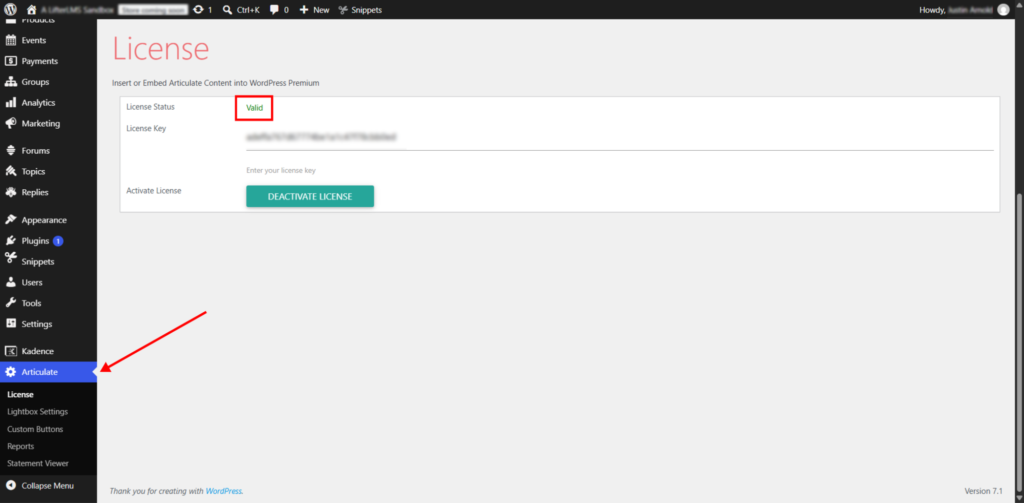
- Open the plugin license screen and enter your Premium license key
- Confirm that the license status shows as valid
Once Premium is active, the plugin adds reporting tools, including Reports and Statement Viewer.
Step 2: Export the Rise Course as an xAPI LMS Package
- Open your course in Articulate Rise 360
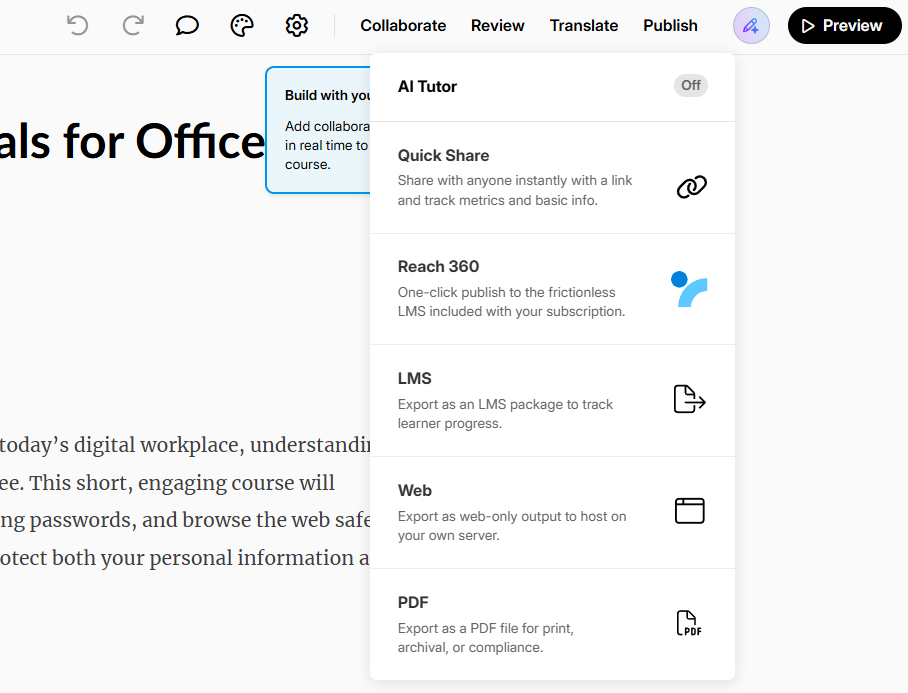
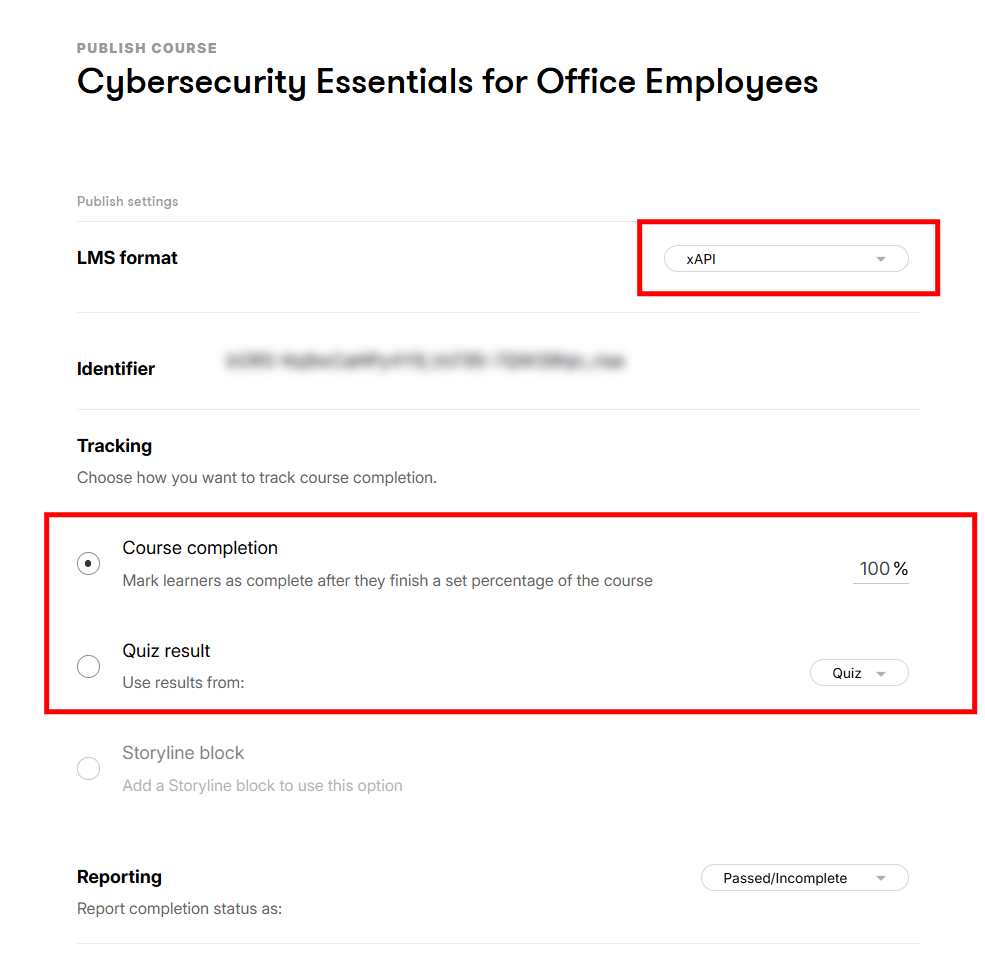
- Click Publish in the top-right corner
- Select “LMS”
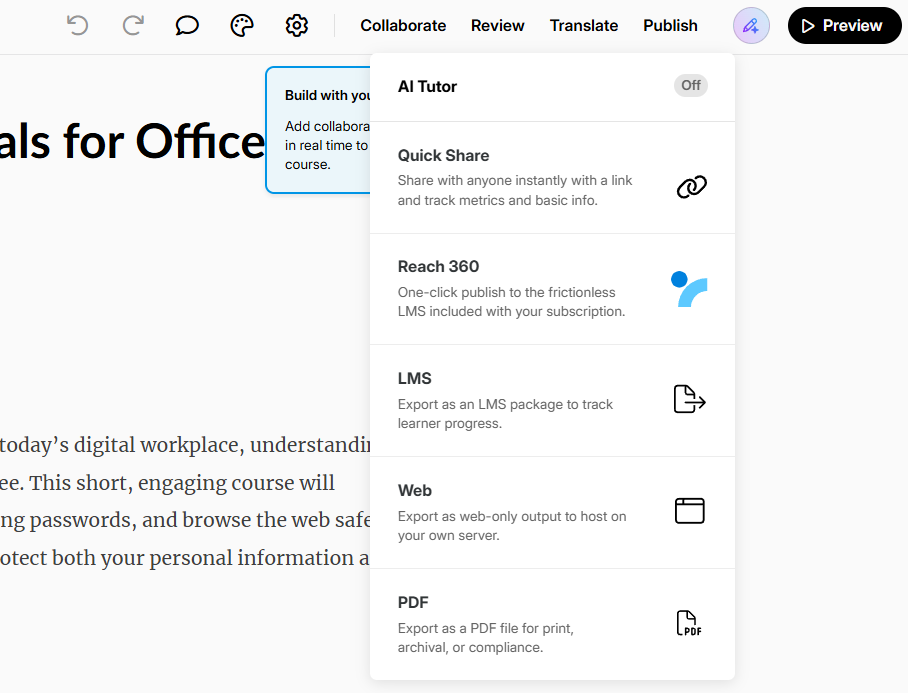
- Set LMS format to “xAPI”
- Choose how Rise should determine course completion
- Choose the Reporting option that matches how you want Rise to report completion status
- Download the resulting ZIP package
Rise provides several LMS formats, including SCORM, AICC, xAPI, and cmi5. For the workflow tested in this guide, use xAPI.
The Tracking option controls what Rise uses to determine completion. Depending on your course, this can be based on course completion or a quiz result.
Step 3: Add the e-Learning Block in WordPress
- Create or edit the WordPress page or post where the course will appear
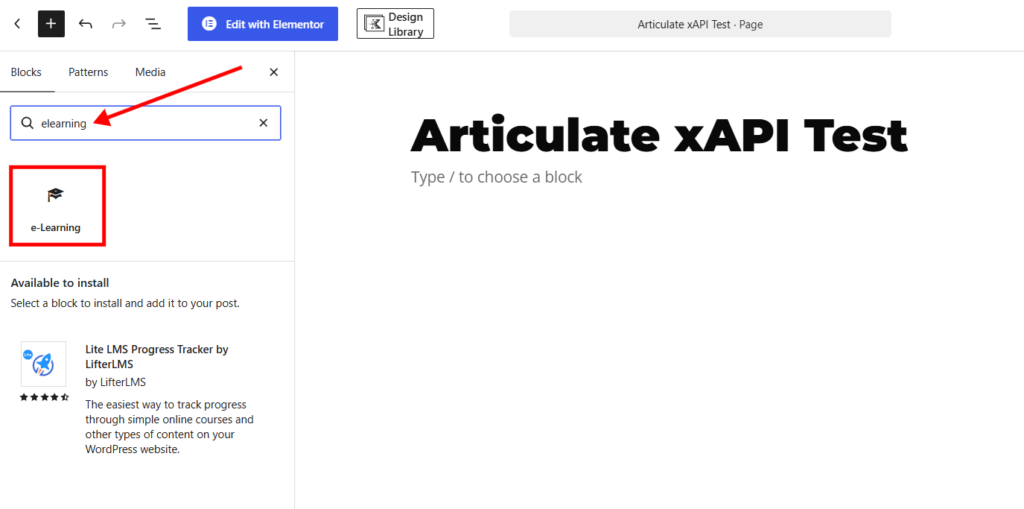
- Open the block inserter
- Search for “eLearning”
- Add the e-Learning block provided by the Premium plugin
If you’re building a hybrid LifterLMS course, this WordPress content can then sit alongside native LifterLMS lessons, quizzes, assignments, or other course elements.
Step 4: Upload the xAPI Package
- Click Upload in the e-Learning block
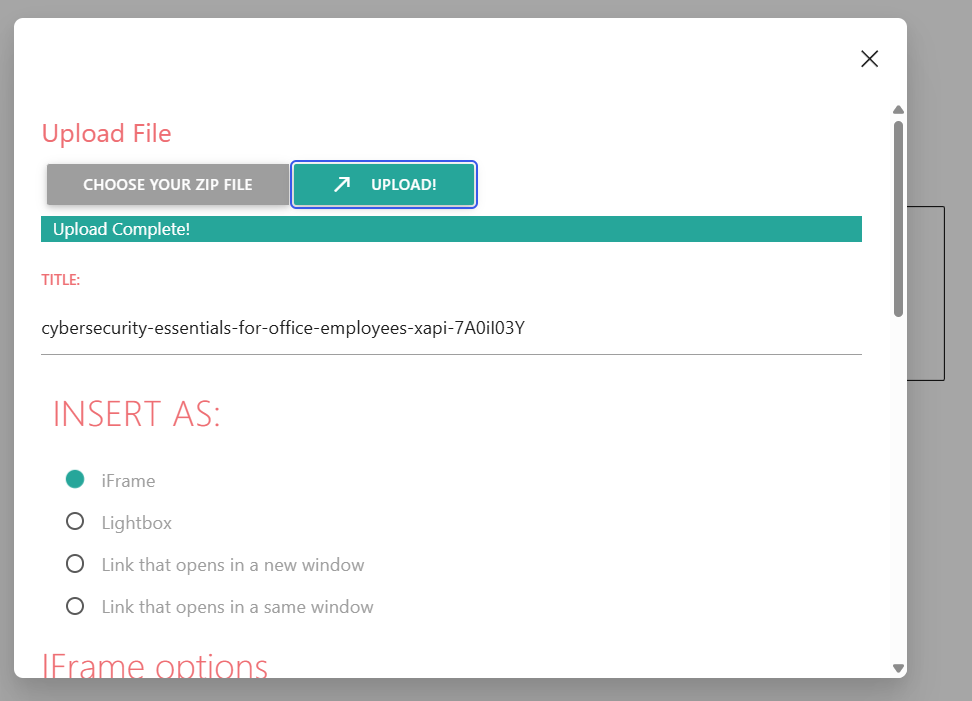
- Click Choose Your ZIP File
- Select the xAPI ZIP downloaded from Rise 360
- Upload the package without extracting it
Once the upload completes, the Premium plugin displays several options for how the course will be presented to learners.
Step 5: Choose How the Course Will Be Displayed
The Premium plugin provides several display options:
- iFrame embeds the Articulate content directly within the WordPress page
- Lightbox opens the course in an overlay above the WordPress page
- A new-window link opens the course in a separate browser window
- A same-window link replaces the current WordPress page with the Articulate content
For a substantial Rise course, Lightbox can provide considerably more screen space than a fixed iframe while keeping the learner on the WordPress page.
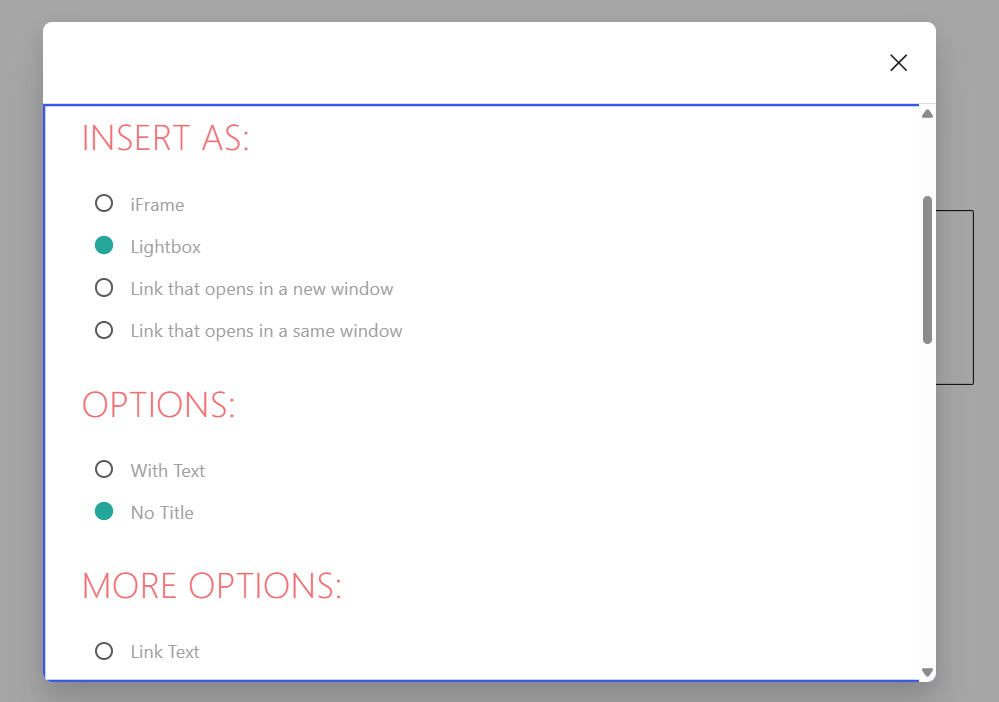
In our test, we used a Lightbox sized to 90% of the available height and width. The course opened in a large overlay and retained the normal Rise interface.
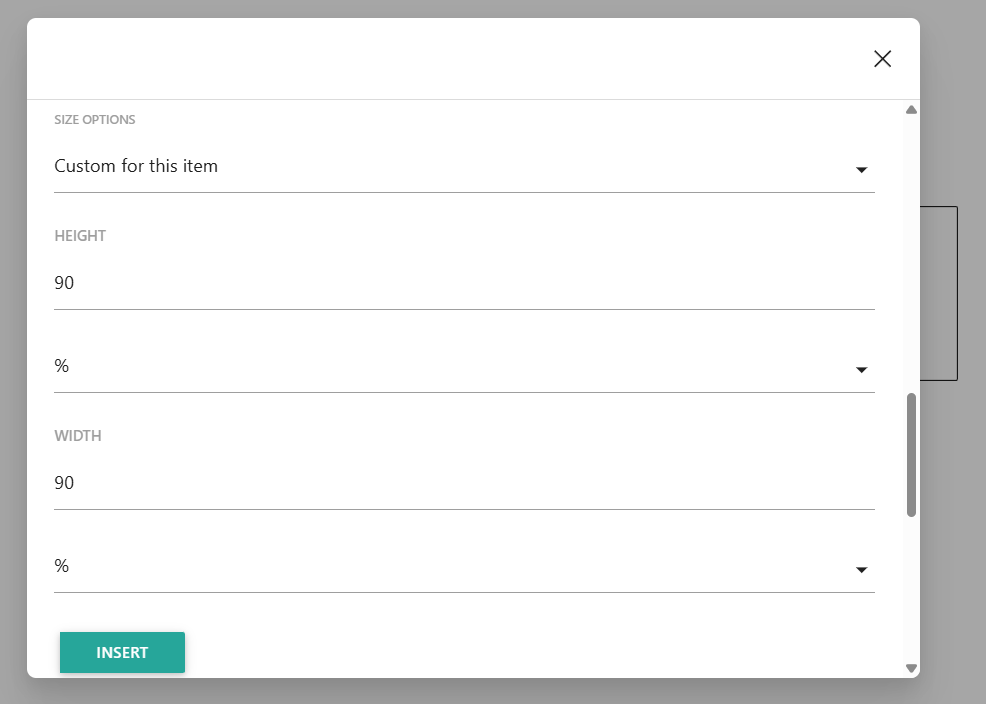
The Lightbox can be closed by clicking outside the course area. In our test, the Escape key did not close it, and no close button was visible once the learner was inside the course, so test this behavior with your own theme and learner flow.

Step 6: Publish and Test the Course as a Learner
- Publish or preview the WordPress page
- Open the course from the front end
- Work through the course using a normal learner account rather than only testing as an administrator
- Confirm that lessons, interactions, navigation, and completion behave as expected
- If the course contains a quiz, complete it and confirm that Rise displays the expected result
An Articulate package running inside WordPress can behave differently from the same course in another LMS environment, so test the finished learner experience rather than relying only on the Rise preview.
Step 7: Check the xAPI Data
The Premium plugin includes a Statement Viewer under Articulate > Statement Viewer.
After a logged-in learner opens the Rise course, use the Statement Viewer to confirm that xAPI activity is reaching WordPress.
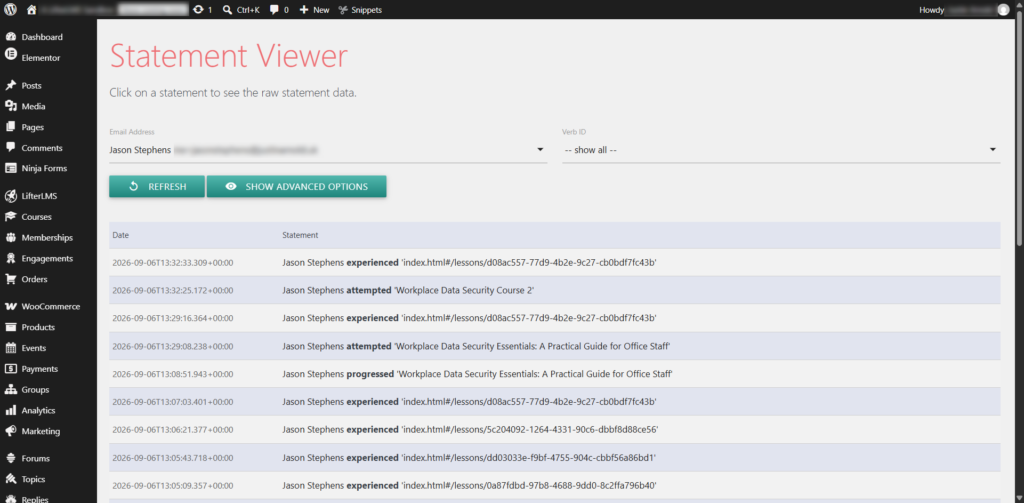
In our tests, the plugin successfully identified the WordPress learner and recorded statements, including:
- attempted when the learner launched the course
- experienced as individual lessons were opened
- progressed as the learner moved through the course
The raw progress statement also recorded course progress reaching 100%.
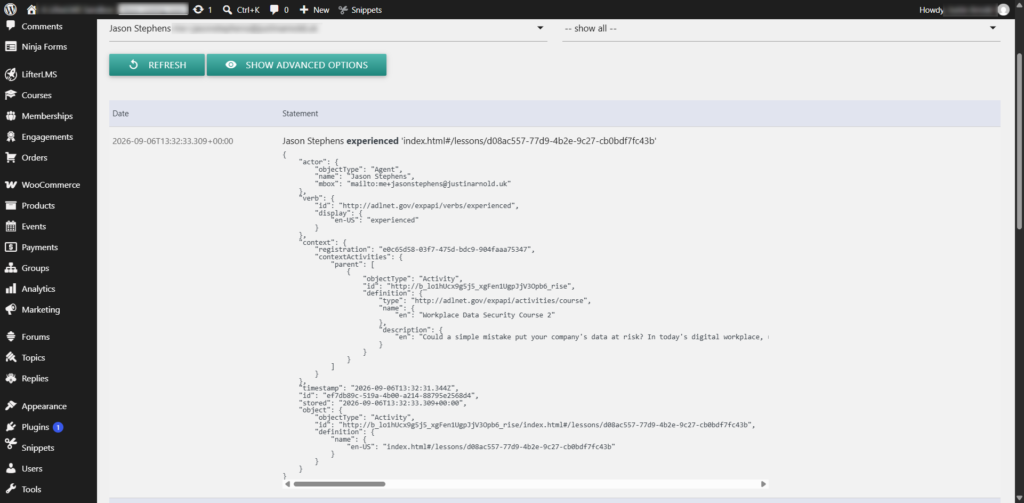
Don’t assume that every type of Rise activity will appear automatically. In our testing, assessment, and terminal completion data behaved differently, which we cover later in this guide.
At this stage, your Articulate course is live in WordPress. The next step is deciding how you want to structure, manage, and scale access to that content.
Learner Experience with Articulate Content in WordPress
The learner experience depends partly on the display method you choose in the Premium plugin.
With the Lightbox configuration used in our test, the Rise course opened in a large overlay above the WordPress page. The standard Rise interface remained intact, including lesson navigation, interactive elements, progress indicators, and quizzes.
We confirmed that:
- Rise lessons and interactive content worked normally
- The learner could move between lessons using the Rise navigation
- Course progress updated inside Rise
- A final Rise quiz could be completed and graded normally
- The learner’s WordPress identity was passed into the xAPI statements recorded by the plugin
- xAPI progress data was recorded as the learner moved through the course
The course remained separate from LifterLMS’s own native lesson completion and reporting. Completing the Articulate course did not automatically turn it into a native LifterLMS lesson or assessment.
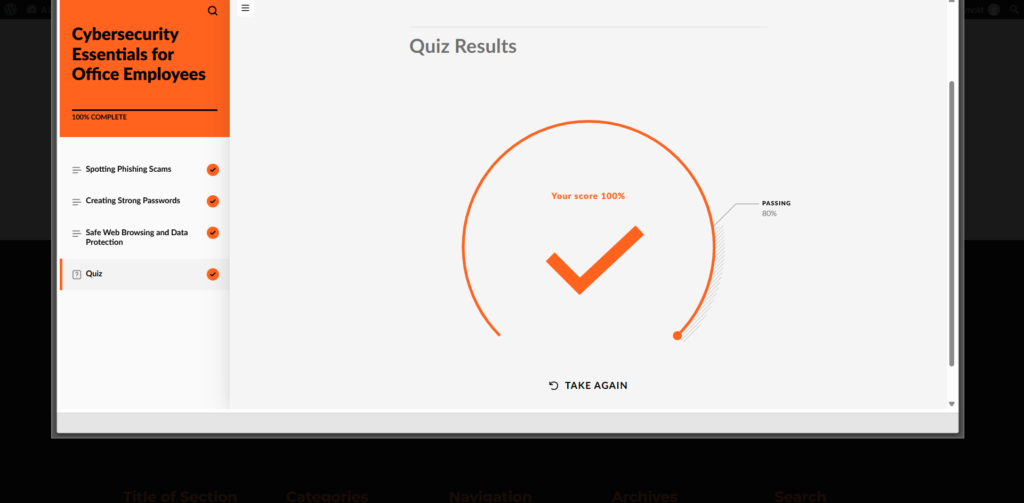
For this reason, a practical hybrid workflow is to use Articulate for the content experience while using LifterLMS for LMS-native activities that need reliable completion and reporting.
Using Articulate Content in WordPress vs Native LifterLMS Features
Embedding existing Articulate content in WordPress is a practical option, particularly when courses have already been built and rebuilding them would add unnecessary time and cost.
The question is not necessarily whether to use Articulate or LifterLMS. In many cases, the stronger setup is to use both for the parts of the learner experience they handle best.
| Use Articulate Content in WordPress When | Use Native LifterLMS Features When |
| You already have Rise or Storyline courses | You want to build and manage learning content directly in WordPress |
| You want to reuse existing course content without rebuilding it | You want assessments and assignments managed directly by the LMS |
| You rely on Articulate for rich interactions and authoring | You want completion rules tied directly to LMS-native activity |
| You want to retain xAPI activity and progress data where the Articulate package and plugin support it | You want reporting based directly on LifterLMS quizzes, assignments, and course progression |
| You need to publish existing material quickly | You want course structure, access, assessments, and reporting managed within the same LMS |
A common hybrid approach is to use Articulate for content delivery while using LifterLMS for quizzes, assignments, access, progression, and reporting.
This moves the completion and assessment heavy lifting into LifterLMS without requiring an organization to abandon an existing Articulate library.
xAPI Tracking: What We Verified
The Premium eLearningFreak plugin does support xAPI communication from Articulate Rise 360 packages.
In our testing, a logged-in WordPress learner was correctly identified in the Statement Viewer. The plugin recorded:
- Attempted statements when the learner launched the course
- Experienced statements as individual lessons were opened
- Progressed statements as the learner moved through the course
- A progress value of 100 when the learner reached the end of one test course
This means the Premium plugin can capture useful named-user activity and progress data from a Rise xAPI package.
Assessment reporting was less complete in our tests.
We tested two separate Rise courses configured to use a final quiz result for tracking. In both cases, the learner completed the course and scored 100% in Rise, but we didn’t receive answered, passed, or completed statements in the Statement Viewer. The plugin’s score report also remained empty.
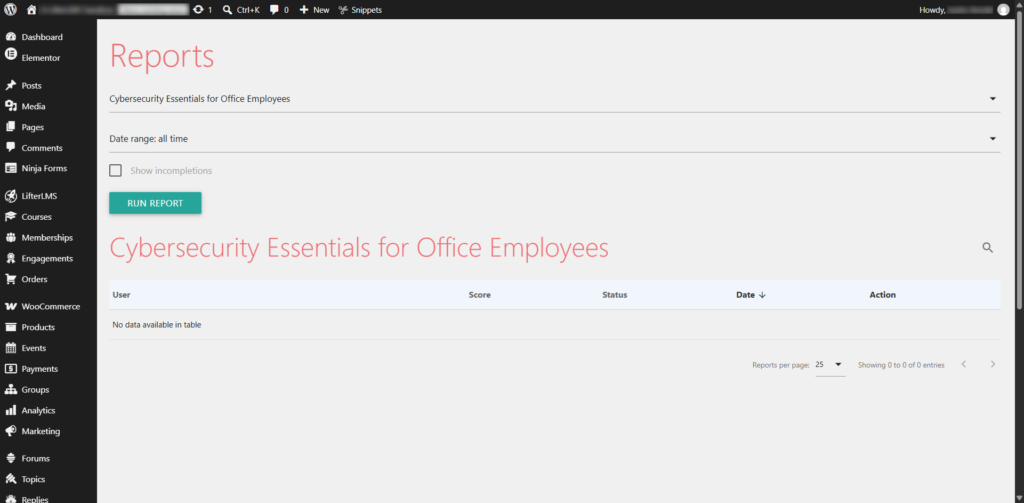
We then tested a separate Rise course configured for 100% course-completion tracking rather than quiz-result tracking. The plugin again captured course activity, but no completed statement appeared.
These results don’t mean that every Rise configuration will behave in the same way. They do mean that you should test the specific xAPI data and reports you rely on before using the embedded Articulate package as the sole source of assessment or completion reporting.
For LMS-critical assessments, assignments, completion rules, and reporting, native LifterLMS features provide a more direct approach because those actions are handled by the LMS itself.
What About cmi5 in This Workflow?
We also tested a Rise 360 cmi5 export. The package uploaded successfully, but when launched through this WordPress workflow, Rise displayed “Content launched outside of a supported LMS environment”.
For this reason, cmi5 is not part of the workflow recommended in this guide.
Building eLearning Courses Directly in WordPress with LifterLMS
Articulate and LifterLMS solve different parts of the course-delivery problem. Rise is designed primarily as an authoring environment, while LifterLMS manages the wider LMS structure around lessons, learners, assessments, access, and reporting.
The comparison below shows where each approach is strongest and why a hybrid setup can make sense for organizations with existing Articulate content.
| Task | Articulate Rise 360 + Premium Plugin | LifterLMS |
| Rich authored interactions | Designed for interactive authored course content | Built using WordPress and LMS-native tools |
| Reusing existing course content | Existing Rise courses can be retained | Content must be built or migrated into WordPress |
| Assessments | Rise quizzes work inside the course, but assessment reporting should be tested | Native quizzes and assignments are handled directly by the LMS |
| Activity and progress tracking | xAPI activity and progress were captured in our tests | Native course and learner progress |
| Completion and reporting | Depends on the data returned by the Articulate package and integration | Managed directly by LifterLMS |
| Access and course structure | Requires a surrounding WordPress/LMS layer | Native courses, sections, lessons, memberships, and access rules |
Publishing existing Articulate content through WordPress is a practical way to preserve courses that have already been built.
The trade-off is that the Articulate player remains a separate learning environment inside the wider WordPress site. LifterLMS does not automatically turn the internal Rise lessons, quiz questions, or completion state into native LMS records.
This is where the hybrid approach becomes useful.
You can keep Articulate for content and interaction design while moving quizzes, assignments, completion requirements, and reporting into LifterLMS. That allows the LMS to handle the activities where reliable learner records matter most.
LifterLMS can manage these LMS-native elements directly within WordPress. For example:
Quizzes and knowledge checks: You can create quizzes using native blocks, define pass marks, and control progression based on results.
Assignments and submissions: Learners can upload work for review, making it possible to support portfolio-based or practical learning.
Content structure: Courses can be broken into sections and lessons, with clear progression paths that are managed within the LMS.
Certificates and completion rules: Certificates can be issued automatically when learners meet defined criteria.
Media and interactive content: Video, downloads, and supporting materials can be integrated directly into lessons.
This approach keeps course structure, assessments, progression, and reporting inside the LMS rather than relying on the Articulate package to manage those elements separately.
Migration Strategy: Publish Existing Articulate Courses First, Then Expand in WordPress
A full migration doesn’t have to mean rebuilding every Articulate course at once. Existing Rise content can be published through WordPress first, while LifterLMS is introduced alongside it to provide structure, access, assessments, and reporting.
This staged approach allows organizations to preserve existing course content while deciding which parts of the learner experience are worth rebuilding natively over time.
Example Use Case
A training company with an existing library of Rise courses needs to migrate to WordPress without immediately rebuilding every course.
The existing Rise courses are published as xAPI packages and uploaded to WordPress using the Premium eLearningFreak plugin.
LifterLMS provides the surrounding course structure and learner access. Native LifterLMS quizzes and assignments can then be added after selected Articulate content so that important assessment, completion, and reporting data is handled directly by the LMS.
Over time, the organization can decide which Articulate content should remain embedded and which parts are worth rebuilding as native LifterLMS lessons.
This approach preserves the existing investment in Articulate while allowing the LMS-native part of the learner experience to expand gradually.
For instructional designers with existing Rise libraries, a full rebuild is rarely practical as a first step. A staged approach allows content to be published quickly while retaining flexibility for future changes.
A typical workflow looks like this:
| Stage | Description |
| Publish | Export existing Rise courses as xAPI LMS packages and upload them to WordPress using the Premium eLearningFreak plugin |
| Structure | Use LifterLMS to organize the wider course, sections, lessons, and learner access |
| Deliver | Provide the Articulate content as part of the learner journey |
| Assess | Add native LifterLMS quizzes or assignments where LMS-level results are required |
| Report | Use LifterLMS reporting for the native activities that determine learner progression or completion |
| Expand | Replace or extend selected Articulate content with native LifterLMS features when it makes sense |
This lets you launch quickly and improve or restructure content later.
It also allows instructional designers to test how learners interact with the LMS before committing to larger changes.
Frequently Asked Questions (Articulate 360, WordPress, and LifterLMS)
The questions below cover the most common practical issues when combining Articulate Rise 360, WordPress, the Premium eLearningFreak plugin, and LifterLMS.
Can you embed Articulate Rise 360 in WordPress?
Yes. Rise 360 content can be uploaded to WordPress using a compatible plugin such as the Premium Insert or Embed Articulate Content into WordPress plugin. The Premium version supports several display methods, including iframe and Lightbox, as well as links that open the content in the same or a new window.
Does LifterLMS support Articulate 360 content?
LifterLMS does not natively import or interpret Articulate packages. The Articulate content is uploaded and displayed by a separate plugin.
LifterLMS can then provide the surrounding course structure, access rules, native quizzes, assignments, completion requirements, and reporting. This makes a hybrid Articulate + LifterLMS workflow possible without implying that LifterLMS itself processes the Articulate package.
Can WordPress track xAPI data from Articulate courses?
WordPress core does not track xAPI data by default, but compatible plugins can add this functionality.
In our testing, the Premium eLearningFreak plugin successfully captured named-user xAPI activity and progress from Rise 360, including attempted, experienced, and progressed statements.
Quiz answers, pass results, and separate completion statements did not appear in our tested configurations, so verify the specific reporting data your course requires before depending on the integration for formal assessment records.
Does cmi5 work with this WordPress embedding method?
Not in the configuration we tested. A Rise 360 cmi5 package uploaded successfully, but when we launched it through the plugin, Rise displayed “Content launched outside of a supported LMS environment”.
For this workflow, xAPI is the more practical Articulate LMS export format.
Is embedding Articulate content the best approach?
Embedding is a strong option when you already have Articulate courses and want to keep using them rather than rebuilding everything immediately.
For many sites, the better long-term approach is hybrid: use Articulate where its authored content and interactions are valuable, then use native LifterLMS features for assessments, assignments, completion rules, and reporting.
When should you use native LifterLMS lessons instead?
Native lessons are more suitable when you need structured progression, detailed assessments, assignment submissions, or certification workflows. These features are managed directly by the LMS rather than within embedded content.
Can you sell Articulate courses in WordPress?
Yes. LifterLMS can be used to sell and control access to the wider course experience, while the Articulate package itself continues to be displayed through the eLearningFreak plugin.
Getting Started with LifterLMS (Optional Next Step)
If you plan to manage learners, control access, or sell courses, you can introduce LifterLMS as the LMS layer alongside your embedded content.
One practical pattern is to place the Articulate content earlier in the learner journey, then use a native LifterLMS quiz or assignment to confirm learning.
For example:
Articulate content → LifterLMS quiz or assignment → LifterLMS completion and reporting
This allows the Articulate material to remain in use while moving the reporting-critical activity into the LMS.
A typical setup involves:
| Task | Location in WordPress |
| Install and activate LifterLMS | Plugins > Add New |
| Create a course | Courses > Add New |
| Organize sections and lessons | Course builder within the course editor |
| Control access | Course pricing or membership settings |
You can begin with a small pilot course, using embedded content where needed, and then add native lessons for assessments or supporting materials. This allows you to validate the structure and learner flow before expanding further.
LifterLMS Infinity Bundle
If you are already paying for an authoring platform such as Articulate 360, LMS pricing becomes another part of the delivery budget.
The LifterLMS Infinity Bundle uses a flat annual model and includes:
- Unlimited courses
- Unlimited learners
- Unlimited administrators
- Unlimited instructors
- Unlimited assistant instructors
- LMS Manager roles
- No per-user pricing
- Full ownership of your platform
If you are comparing LMS platforms, this pricing model is often the point where WordPress becomes a serious alternative.
| Feature Area | Included Capability |
| Course delivery | Unlimited courses and learners |
| Monetization | Course sales, memberships, and bundles |
| Assessments | Quizzes, assignments, and grading |
| Certification | Certificate generation based on completion rules |
| Engagement | Email notifications and learner management tools |
This is useful when moving from standalone authoring tools to a system that manages both content and delivery. Instead of combining multiple platforms, course structure, access control, and learner management can be handled within WordPress.
For pricing details, see the LifterLMS pricing page.
Conclusion
Publishing existing Articulate 360 content in WordPress allows organizations to keep using courses they have already invested in rather than rebuilding them immediately.
The Premium eLearningFreak plugin can provide the delivery layer and capture useful xAPI activity and progress data. Our testing also showed why the surrounding LMS still matters: not every Articulate assessment or completion event appeared in the plugin’s reporting tools.
That makes LifterLMS particularly useful as the LMS layer around the Articulate content. Native quizzes, assignments, access rules, completion requirements, and reporting can remain under direct LMS control while Articulate continues to provide the authored course experience.
You don’t have to choose between keeping Articulate and moving to a more integrated WordPress LMS. A hybrid approach lets you preserve existing content now and move more of the learning experience into LifterLMS, where it provides clear benefits.



