
LifterLMS 11.0 is officially here.
The students most likely to drop out rarely announce it. They stop logging in, never open the course they just bought, or fail the same quiz three times and quietly move on.
Version 11.0 gives you a way to reach them while it still matters.
It adds 14 new engagement triggers, a rebuilt view of your orders and subscriptions, and a self-serve subscription area for your students.
Everything in this post ships in the free LifterLMS core plugin unless we label it as an add-on.
Here’s what’s new:
Introducing 14 New Engagement Triggers: Reach Students Before They Drift Away
An engagement is an automated action that runs when a student does something, such as enrolling in a course, completing a lesson, or passing a quiz.
Until now, most engagement triggers focused on what students had achieved. With LifterLMS 11.0, you can also spot when students are struggling, losing momentum, or stopping altogether – and step in before they fall behind.
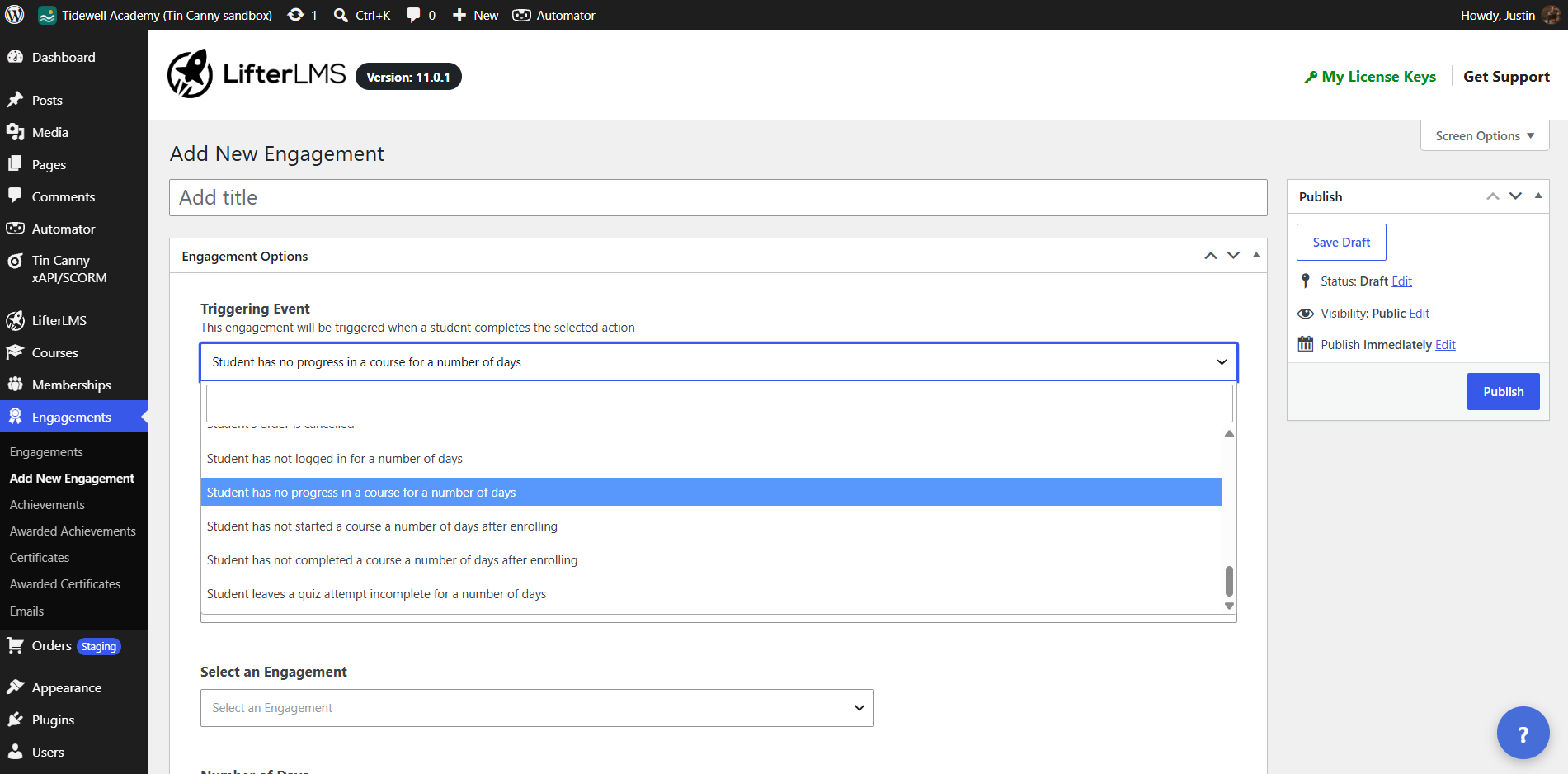
Follow Progress and Performance
Celebrate a student’s progress, or step in with support when they’re struggling. These new triggers let you respond when:
- A student reaches a certain percentage of course completion
- A student finishes a course with a grade below your chosen threshold
- A student fails a quiz multiple times
You set the thresholds. Want to send an encouraging email when a student reaches 50% completion? Or offer help after three failed quiz attempts? You decide what happens and when.
Spot Inactive Students
These triggers look for something that has not happened, which is exactly when a nudge helps most:
- A student hasn’t logged in for a set number of days
- A student hasn’t made any progress in a course for a set number of days
- A student hasn’t started a course within a set number of days after enrolling
- A student hasn’t completed a course within a set number of days after enrolling
- A student has left a quiz attempt unfinished for a set number of days
LifterLMS checks these triggers daily, using the “Number of Days” value you set for each engagement. You can also add an “Engagement Delay” if you want to wait a little longer before sending an email or triggering another action.
Two safeguards prevent a new engagement from emailing your entire student history on day one. The “Activity on or after” setting limits it to students who have been active since your chosen date. And if a daily check would trigger emails to more than 200 students, sending pauses until you enable “Allow sending above the volume limit” and save the engagement.
Respond to Enrollment and Order Changes
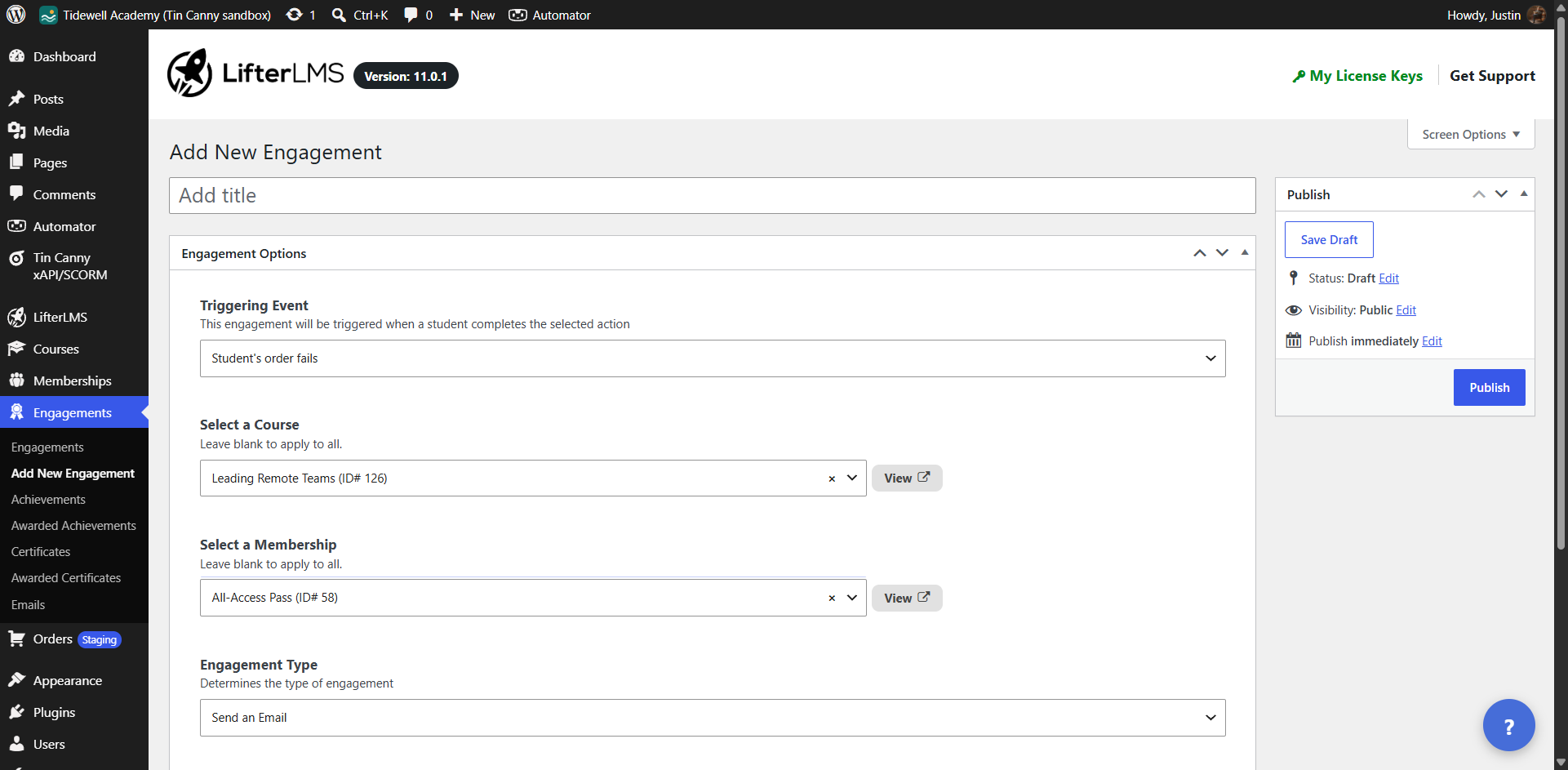
Keep students informed and connected when their course access or payment status changes. These new triggers let you respond when:
- A student’s course or membership enrollment is canceled
- A student’s course or membership enrollment expires
- A student’s order fails, is refunded, or is canceled
Whether it’s inviting a former student back or helping someone resolve a failed payment, you can reach out at the right moment.
Name the Course or Lesson in Your Messages
No more creating separate emails or certificates for every course, lesson, or quiz. With the new Related Post Title merge code, {related_post_title}, LifterLMS automatically inserts the title of whatever triggered the engagement. One message, personalized to the right content, without the extra work.
See Every Order, Transaction, and Subscription in One Place
The Orders area in your WordPress admin now opens on a new “Orders & Transactions” page, which lists your transactions and free orders together. Subscriptions get their own “Subscriptions” page.
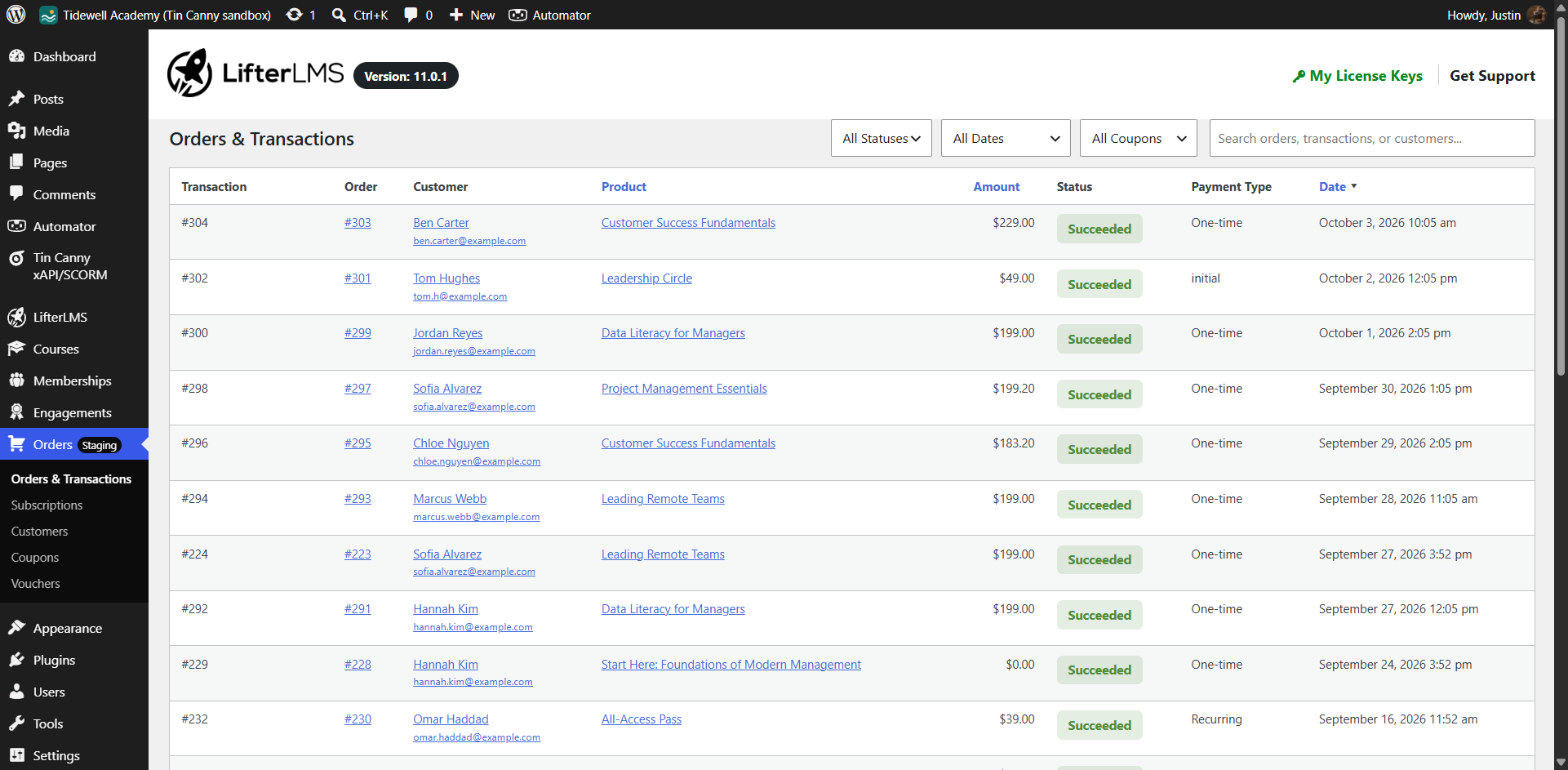
Both pages support CSV exports, making bookkeeping and reporting quicker. You can also search for customers by their full name, and we’ve rebuilt the order lookup to keep reports fast, even on large stores.
Introducing My Subscriptions: Self-Serve Billing for Your Students
Students now have a “My Subscriptions” tab on their student dashboard. It lists each subscription with its product, status, and next payment date, plus a Manage button that opens the order. The tab only appears for students who have a recurring order, so one-time buyers won’t see an empty page.
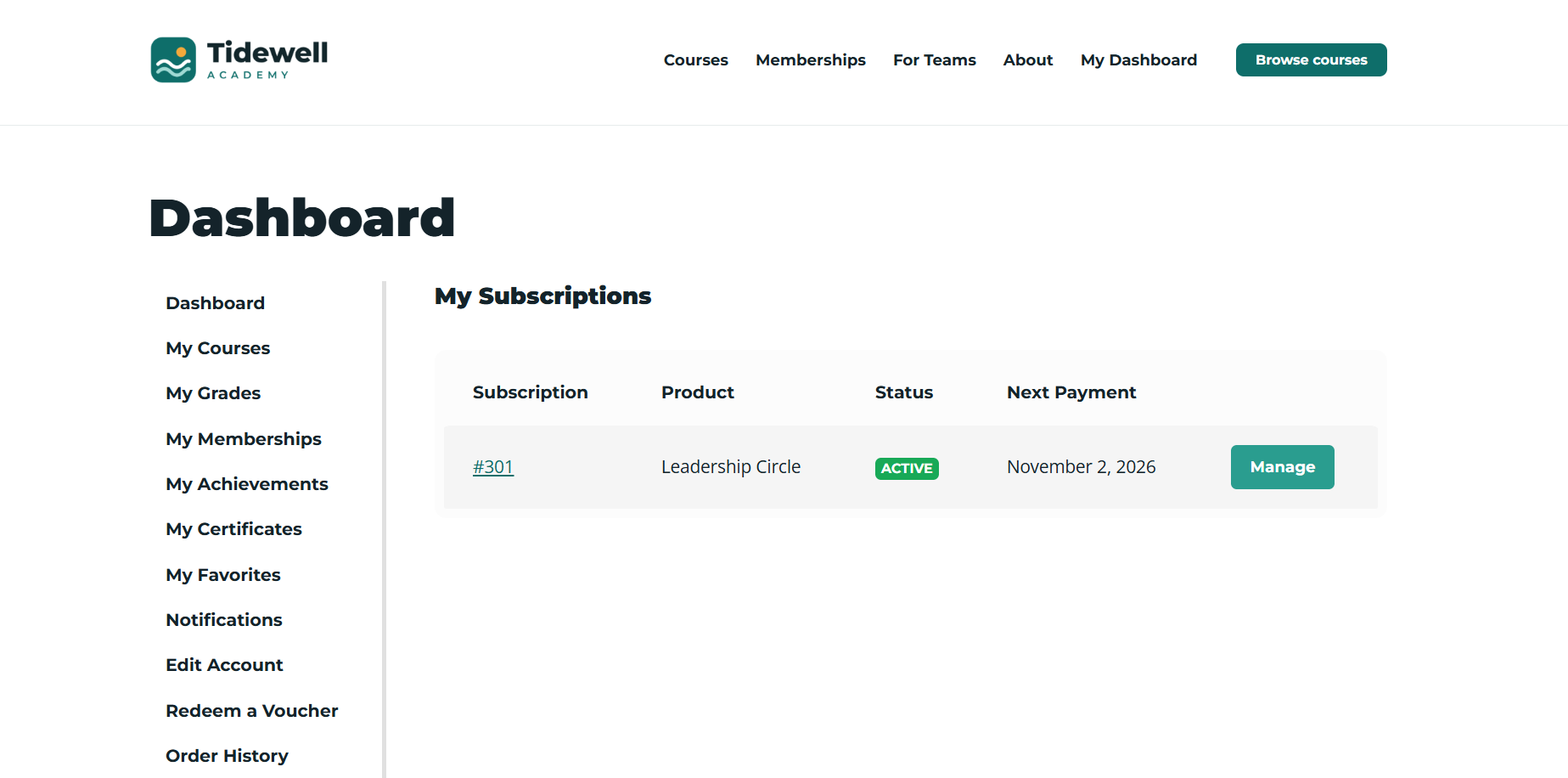
Students can also download receipts for individual transactions, not just an entire order. And with version 2.6.0 of the LifterLMS PDFs add-on, those receipts are available as PDFs.
New Notifications for Failed Orders and Unenrollments
LifterLMS 11.0 adds two new notifications. Both are disabled by default, so nothing changes on your site until you turn them on:
- Order Failed: an email sent when an order fails at checkout or after recurring payment retries run out. You can send it to the customer, the product author, and custom recipients.
- Unenrollment: a popup and email notification for when a student is unenrolled from a course or membership.
A More Accessible Student Experience
We improved the heading structure, labels, tables, and page titles across quizzes, Focus Mode, and the student dashboard, so people using screen readers get clearer pages to navigate.
Course and membership cards in your catalog got the same attention. Screen readers now announce a single title link, and the whole card stays clickable for everyone else.
If your theme uses a custom loop template, the previous link behavior remains until you update that template.
Match Your Brand With a Single CSS Override
LifterLMS now uses CSS custom properties (reusable style values you set once in your stylesheet) for frontend colors, corner radius, border width, border style, and surface hover states.
Change one value and the related hover states, focus styles, and tinted backgrounds update with it. If you’ve ever hunted through a stylesheet to change one brand color, this one is for you.
Security and Reliability Improvements
LifterLMS 11.0 adds further security checks to protect your content and your students’ data. These cover protected media, REST API requests, quiz attempts, timed quiz answers, reporting requests, and webhook topics.
We’ve also tightened the checks that prevent restricted content from appearing in listings, feeds, search results, and archives.
Other Improvements
Beyond the headline features, LifterLMS 11.0 includes a range of updates and fixes:
- Add-on updates now link to the WordPress Plugins or Themes screen, instead of installing from “Add-ons & more”
- The checkout form now shows an error message when a security token has expired, instead of silently reloading
- Help text for course enrollment, course time period, and access plan sale dates now shows the exact time each date starts or ends
- Password messages are clearer, including when a password is rejected because it includes other information from the form
- Sites on WP Engine with protected media now get an admin notice linking to instructions for more efficient file serving
- The bundled Action Scheduler library is now version 3.9.3, improving compatibility with PHP 8.4
- The student dashboard’s mobile navigation now goes to the selected page when you click the Go button
- Dates typed by hand into a date picker now parse correctly on sites using a non-US date format
- Frontend notifications no longer overlap when several appear at once
You can read the full LifterLMS 11.0.0 release notes for every change, including the list of updated templates.
Updates to LifterLMS Add-Ons and Sky Pilot
Several add-ons and our theme were also updated alongside 11.0:
- LifterLMS Advanced Quizzes (3.9.0): Answer fields now use the question text as their accessible name, plus fixes for picture reorder questions and for replacing a file on file upload questions
- LifterLMS Assignments (2.8.1): Additional checks on content visibility, submissions, and notification emails
- LifterLMS PDFs (2.6.0): PDF receipts for individual transactions
- Sky Pilot (2.7.0): Cards and dashboard styling updated to match the new markup, with fixes for order status badges, mobile order tables, and the dashboard login form
What’s Next
Version 11.0 keeps us on the same path we have been on since 2013: helping course creators lift up others through education.
Keep a close eye on LifterLMS as we continue to innovate faster than ever as the most powerful, customizable, AI empowered WordPress LMS.
If you have any questions, suggestions, or feedback, please get in touch.
- For feature requests, please use this form.
- For support as a customer, please get in touch here.
- For any questions about getting started with LifterLMS, reach out to us at team@lifterlms.com or by submitting a form to us.
Ready to Upgrade?
Ready to upgrade? Make a backup first, as you would with any major release. Then head to your WordPress Plugins screen to install LifterLMS 11.0, along with the latest updates for your add-ons and theme.
Once you’ve updated, start with one engagement: pick the “Student has not started a course a number of days after enrolling” trigger and write a short, friendly email. It’s the simplest way to see what 11.0 can do for your students.
One More Thing: Start With LifterLMS 11.0 at 60% Off
LifterLMS 11.0 arrives in the middle of our Black Friday All November Sale.
Through November 30, you can get 60% off any LifterLMS bundle, plus $6,420 in bonuses, with the code BLACKFRIDAY26.
Your bundle unlocks the add-ons that build on what’s in 11.0, and you keep the flat annual price no matter how many courses, memberships, and students you add.
It’s great to be with you on the journey.
Together, we build the future of online education.
– Chris Badgett
Founder & CEO of LifterLMS