

Finding the best free LMS isn’t really about picking the platform with the longest feature list.
Some free LMS platforms are open-source products that you host and manage yourself. Others offer a permanently free hosted plan with limits on users, courses, storage, or features. Some provide a free core product that you can expand later with paid add-ons.
The right choice comes down to what you’re actually trying to build.
A university running thousands of learners has very different needs from a solo course creator selling training through WordPress. A small business may want a hosted system that works without technical setup, while an organization with its own development team may prefer open-source software it can control.
In this guide, we compare 15 free LMS platforms from the perspective of people who build and sell courses with WordPress. We look at what you can actually do without paying, who each platform is built for, and where the free version starts to feel restrictive.
What Does “Free LMS” Actually Mean?
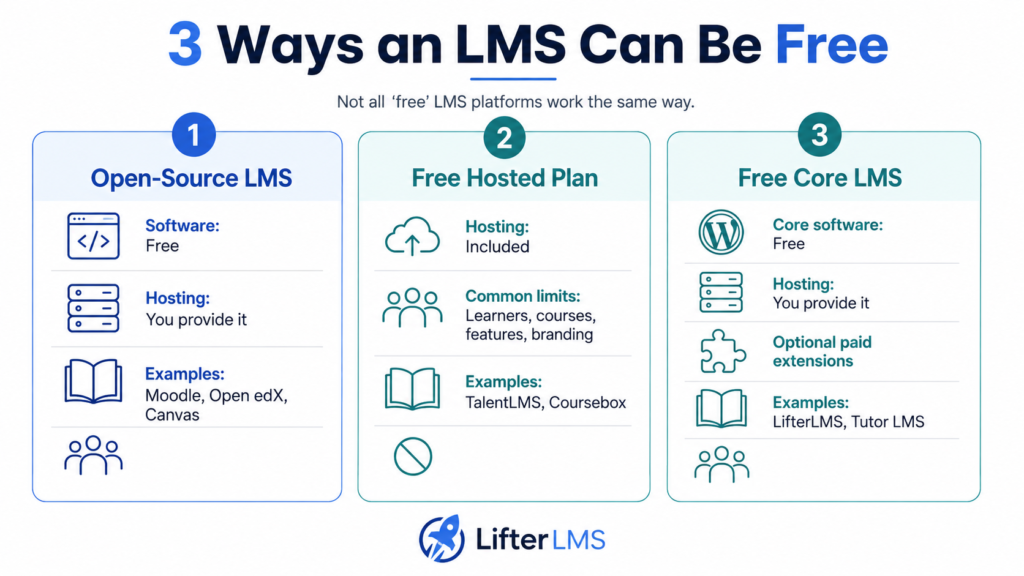
When people say “free LMS,” they can be talking about three quite different things.
1. Free open-source LMS software
Platforms such as Moodle, Open edX, Canvas LMS, Chamilo, Sakai, and ILIAS make their software available without a licensing fee.
You can install it, modify it, and run it on your own infrastructure.
But that doesn’t mean the finished LMS costs nothing to run.
You may still need to pay for:
- Web hosting or cloud infrastructure
- System administration
- Updates and maintenance
- Technical support
- Backups and security
- Custom integrations
Open-source software can be very cost-effective when you already have the technical skills in-house. If you need outside help for hosting, maintenance, or development, the costs can add up quickly.
2. Permanently free hosted LMS plans
Platforms such as TalentLMS, SC Training, Coursebox, and systeme.io provide hosted plans that you can continue using without paying.
The provider handles the infrastructure, so you can usually get started much faster.
The catch is that the free plan usually comes with limits. A free hosted LMS may restrict:
- Number of learners
- Number of courses
- Available features
- AI usage
- Branding
- Storage
- Ecommerce functionality
For example, TalentLMS limits its free plan to five users and 10 courses, while Coursebox allows unlimited learners but restricts the number and size of courses you can create.
3. Free core LMS products
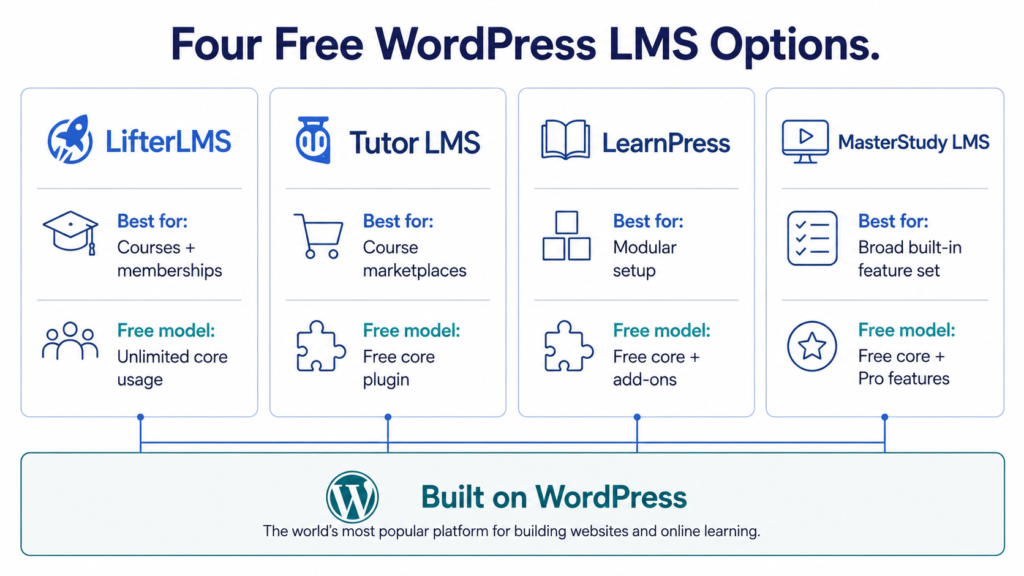
WordPress LMS plugins such as LifterLMS, Tutor LMS, LearnPress, and MasterStudy LMS take a different approach.
You install the core LMS on your own WordPress site and can keep using it without paying a recurring software license.
You can then add paid features if you need them.
This gives you more control than most hosted free plans, although you’ll still need a WordPress site and hosting.
Our Quick Verdict
For WordPress course creators, our top pick is LifterLMS.
Its free core supports unlimited courses, memberships, students, and teachers, without forcing you into a learner-based pricing model. You also retain control over your WordPress site and course data.
That doesn’t mean LifterLMS is the right choice for everyone.
Moodle is a stronger fit for many schools and academic institutions. Google Classroom suits qualifying schools already using Google Workspace, while Open edX is built for larger organizations with technical resources. TalentLMS may be simpler for a five-person team that wants a hosted system with almost no setup.
What matters most is whether the platform fits the job you need it to do.
Best Free LMS Platforms Compared
| Platform | Best For | Type of Free Access | Main Free Limitation | Model | Can You Sell Courses? |
|---|---|---|---|---|---|
| LifterLMS | WordPress course creators and membership sites | Free core WordPress plugin | Hosting and some extensions cost extra | Self-hosted | Yes |
| Moodle | Schools, universities, and training organizations | Open-source software | You manage hosting and maintenance | Self-hosted | Yes, with additional setup |
| Tutor LMS | WordPress users wanting an alternative to LifterLMS | Free core WordPress plugin | Advanced features require Pro | Self-hosted | Yes |
| Google Classroom | Qualifying schools using Google Workspace | Free through Education Fundamentals | Limited to qualifying educational organizations | Hosted | No, not designed for commercial course selling |
| Open edX | Large educational organizations and technically capable teams | Open-source software | Significant hosting and administration requirements | Self-hosted | Yes, with additional setup |
| TalentLMS | Very small teams | Permanently free hosted plan | 5 users and 10 courses | Hosted | Possible, but not its main focus |
| SC Training | Mobile and frontline workplace training | Permanently free hosted plan | The current free plan is limited to 10 learners | Hosted | Not its main focus |
| Coursebox | AI-assisted course creation | Permanently free hosted plan | 3 mini courses, branding, and feature limits | Hosted | Yes – 30% commission on free-plan Stripe sales |
| Canvas LMS | Organizations that want to self-host Canvas | Open-source software | Requires technical hosting and administration | Self-hosted | Not its main focus |
| LearnPress | WordPress users wanting a modular LMS | Free core WordPress plugin | Many advanced features require paid add-ons | Self-hosted | Yes |
| MasterStudy LMS | WordPress sites wanting a broad free feature set | Free core WordPress plugin | Advanced functionality requires Pro | Self-hosted | Yes |
| Chamilo | Smaller organizations wanting an open-source LMS | Open-source software | Hosting and administration are your responsibility | Self-hosted | Possible with additional setup |
| Sakai | Colleges and universities | Open-source software | Primarily designed for institutional use | Self-hosted | Not its main focus |
| ILIAS | Universities and public-sector organizations | Open-source software | Requires technical administration | Self-hosted | Not its main focus |
| systeme.io | Solo creators selling their first course | Permanently free hosted plan | Limited course allowance | Hosted | Yes |
How We Evaluated the Platforms
We focused on what each free option lets you do in real use, not how impressive its feature list looks on a pricing page.
We compared course and learner limits, hosting, course creation and assessment tools, reporting, ecommerce costs, branding, integrations, learning standards, mobile access, support, and the point at which a paid upgrade becomes necessary. We also judged each platform by the audience it is built to serve.
The reviews below concentrate on what you actually get for free, the restrictions you’re likely to notice, and who each platform makes sense for.
1. LifterLMS – Best Free LMS for WordPress Course Creators
LifterLMS is a WordPress LMS plugin for building, selling, and managing online courses and membership-based learning sites.
One of LifterLMS’s biggest advantages is how much of the core LMS you can use for free. You can create unlimited courses and memberships, enroll unlimited students, add unlimited teachers, build lessons and quizzes, issue certificates and achievements, send engagement emails, and track learner progress without paying for the core plugin.
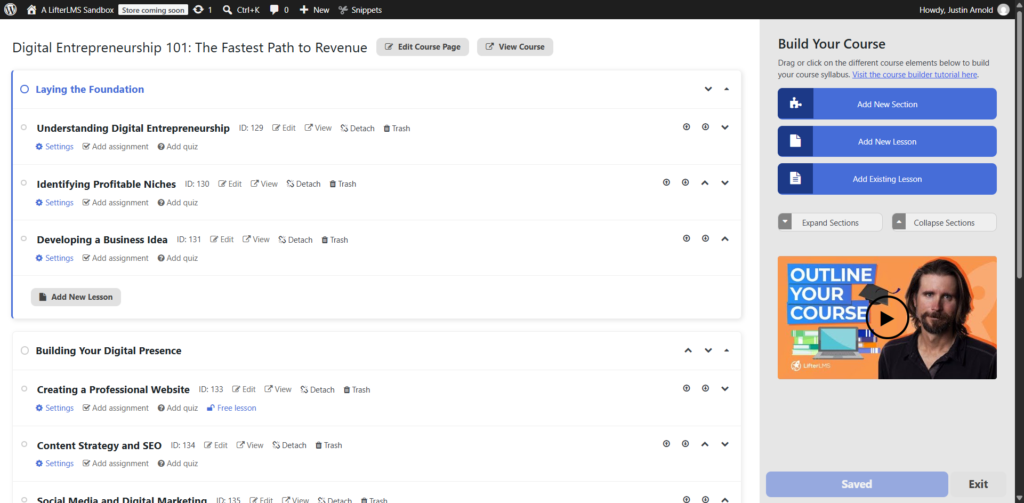
For course creators who want to build on WordPress without paying per user or per course from day one, that’s a strong starting point.
Because LifterLMS runs on your own WordPress site, you also control your content, customer data, branding, and hosting environment. You aren’t tied to a hosted LMS provider’s learner limits or course caps.
The catch is that “free” doesn’t mean there are no other costs. You still need WordPress hosting, a domain, and any other site tools you choose to use. Some functionality also requires paid extensions.
For example, you can accept manual payments with the free core. If you want direct integrations with payment services such as Stripe and PayPal, you’ll need a paid add-on or bundle. Paid extensions also add more advanced ecommerce, automation, reporting, and integration options.
If your main priority is getting online with as little technical setup as possible, an all-in-one hosted platform will be simpler.
That gives you more ownership and control than a hosted platform, but it also makes you responsible for the underlying WordPress site.
LifterLMS is best for independent course creators, coaches, training businesses, and membership sites that already use WordPress or want control over their platform.
If you need a hosted LMS for a five-person internal training team, TalentLMS may be simpler. If you’re running a university-scale learning environment, Moodle or Open edX may be a better fit.
For a commercial course business built on WordPress, LifterLMS offers the strongest free starting point here.
2. Moodle – Best Established Open-Source LMS
Moodle is one of the most established open-source LMS platforms, with a long history in schools, universities, government, nonprofits, and professional training.
The Moodle LMS software itself is free and open source. You can download it, install it on your own server, and run as many courses and users as your infrastructure can support.
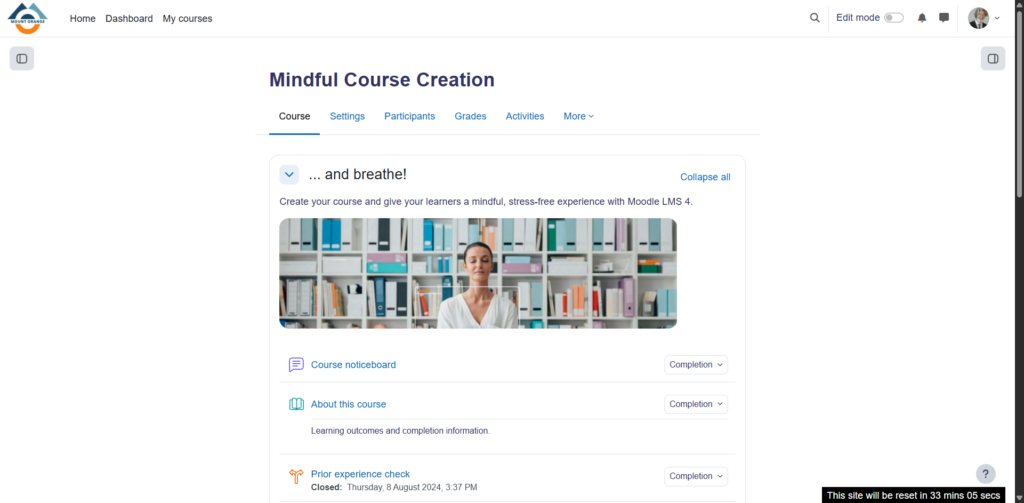
The free software includes course creation, assignments, quizzes, grading, reporting, discussion tools, SCORM support, mobile access, and a large ecosystem of plugins and extensions.
The key distinction is between Moodle itself and MoodleCloud.
Self-hosted Moodle has no licensing fee. MoodleCloud is Moodle’s hosted service and is not permanently free. It currently offers a 28-day trial, followed by paid plans.
That distinction matters because self-hosting Moodle requires more technical work than using most hosted LMS platforms. You’ll need to arrange hosting, updates, backups, security, and ongoing administration yourself or pay a provider to do it.
Moodle can handle structured courses, complex assessment workflows, institutional reporting, and large learner populations. That depth is useful for institutions, but it also brings more setup and administration. For a solo creator who just wants to sell a course, Moodle can be far more system than you need.
Moodle can support paid learning, but ecommerce is not its primary focus. Selling courses typically requires additional configuration, plugins, or integrations.
It makes the most sense for schools, universities, training organizations, and organizations with technical resources.
If you mainly want to sell courses through WordPress, LifterLMS, or Tutor LMS will usually be easier to manage.
3. Tutor LMS – Best Free WordPress Alternative
Tutor LMS is another major WordPress LMS plugin and one of LifterLMS’s closest free competitors.
Its free version supports unlimited courses, lessons, quizzes, and users. It also includes a visual course builder, learner and instructor dashboards, multimedia lessons, native ecommerce capabilities, and reporting tools.
There’s enough in the free version to build a serious learning site without upgrading straight away.
Tutor LMS also places more emphasis on marketplace-style functionality than many WordPress LMS plugins. It can support multiple instructors and course-selling workflows, making it appealing to sites that want to grow beyond a single instructor.
Like LifterLMS, Tutor LMS runs on your own WordPress site. That gives you control over your content and users, but also means you’re responsible for hosting, site maintenance, security, and performance.
You can keep using the free version for the core LMS, but additional integrations, automation, communication tools, advanced reporting, and other administrative features require Tutor LMS Pro. That’s the point at which most users would need to move from the free plugin to a paid plan.
- Tutor LMS is worth a look if you prefer its interface, marketplace tools, or approach to course building.
- LifterLMS is a better fit for users who place more emphasis on memberships, learner engagement, and its particular extension ecosystem.
Both are built much more directly for commercial WordPress course businesses than institutional platforms such as Sakai or Open edX.
4. Google Classroom – Best Free LMS for Schools
Google Classroom is a hosted learning platform primarily for schools and other educational institutions that already use Google Workspace for Education.
For qualifying institutions, Classroom is included with the free Education Fundamentals edition.
Teachers can create classes, distribute assignments, collect student work, provide feedback, manage grades, and connect learning activities with Google Docs, Drive, Meet, Forms, and other Workspace tools.
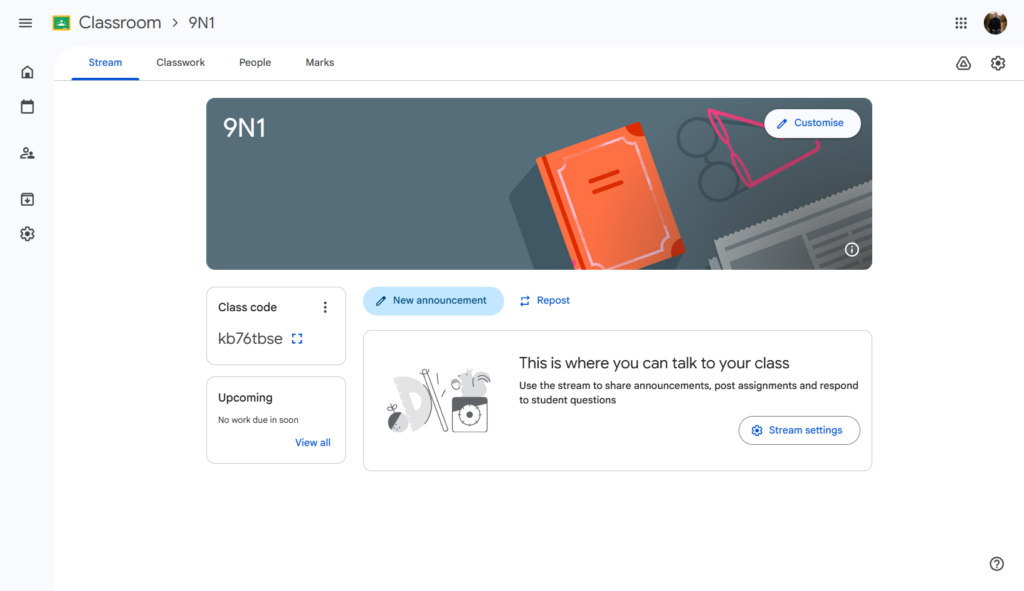
Google Classroom is particularly easy to adopt in schools already using Google accounts and Chromebooks. There’s no server to maintain, no WordPress installation, and very little technical setup for teachers.
That simplicity comes with a narrow focus. Google Classroom isn’t a general-purpose free LMS for businesses, coaches, or independent course sellers. Access to the free education edition depends on meeting Google’s eligibility requirements for educational institutions.
It also isn’t designed around ecommerce, memberships, public course catalogs, or commercial course selling. If you’re running a paid online course business, those missing commercial features are hard to ignore.
Google Classroom is best for schools that already use Google Workspace and want a familiar environment for managing teaching and assignments.
Course sellers and membership businesses have very different requirements, which is where a WordPress LMS such as LifterLMS becomes a more natural choice.
5. Open edX – Best for Large-Scale Open-Source Learning
Open edX is an open-source learning platform built with large-scale online education in mind. The software is free to download and self-manage, with no per-student licensing fee.
It includes course authoring through Open edX Studio, assessments, certificates, learner discussions, analytics, credentials, mobile support, ecommerce options, and extensive customization capabilities.
Open edX can support complex learning environments and large learner populations while giving organizations a high degree of control over how the platform is configured and managed. That makes it a strong fit for universities, governments, major training organizations, and other technically capable institutions.
That level of control comes with a significant technical workload. Running Open edX means providing hosting, infrastructure, deployment, upgrades, monitoring, maintenance, and support. Organizations without their own technical team will usually need a specialist provider.
It can support paid courses, but ecommerce generally requires more setup than creator-focused platforms. It isn’t designed around the needs of someone who wants to launch a simple coaching course or membership site over a weekend.
Open edX is best for organizations that value scale, customization, and open-source control and have the resources to manage the platform properly.
For most smaller businesses and independent creators, that level of technical work is hard to justify.
6. TalentLMS – Best Free LMS for Very Small Teams
TalentLMS is a hosted LMS aimed mainly at employee training, onboarding, compliance, and internal learning.
The free plan is genuinely permanent and doesn’t require a credit card, but the limits are strict: up to 5 users and 10 courses. That’s enough for a very small team, a pilot program, or a proper test before you decide whether to pay.
Within those limits, the free plan is fairly capable. You can create courses, upload SCORM content and videos, assign learners, track progress, and use core training features. TalentLMS also supports tests, certificates, gamification, mobile learning, and email support.
Because TalentLMS is hosted, you don’t need to manage WordPress, install software, configure hosting, or maintain a server. You can create an account and start building training content quickly.
The five-user limit means most organizations will eventually need to upgrade, though. Paid plans raise that limit and add features such as custom branding, multiple branches, advanced reporting, and broader integrations.
That makes TalentLMS a good fit for hosted employee training. If you’re building a public-facing course business on WordPress instead, LifterLMS gives you more control over the site, learner data, and commercial experience.
TalentLMS can support commercial training, but selling courses isn’t really the point of the platform. It’s aimed first and foremost at businesses training employees, partners, or customers.
7. SC Training – Best for Mobile Workplace Training
SC Training, formerly EdApp, is built around mobile-first workplace training.
Its focus is noticeably different from platforms designed for universities or independent course creators. SC Training emphasizes short-form lessons, frontline training, mobile access, gamification, and fast content creation for distributed teams.
The free plan is permanent, but current pricing caps it at 10 learners, even though some broader SC Training marketing pages still refer to unlimited learners. For this comparison, the 10-learner figure is the safer current limit.
Within that limit, you can create and distribute courses, access a large library of editable training content, use AI-assisted lesson creation, add video and audio, apply branding, and use gamification features. That makes the free plan a practical option for a small workplace team that wants to deliver short training without managing its own infrastructure.
SC Training is especially strong for frontline environments where learners are more likely to complete training on a phone than sit at a desktop computer for a traditional online course.
The downside for course creators is that this isn’t really what SC Training is built for. You wouldn’t normally choose SC Training to build a branded membership site, sell public courses, manage subscriptions, or create a WordPress-based learning business.
SC Training makes more sense if your primary goal is employee onboarding, compliance training, safety training, or ongoing workplace learning for a small mobile workforce.
8. Coursebox – Best Free AI-First LMS
Coursebox is built around AI-assisted course creation. It helps users generate course structures and learning materials quickly, rather than starting every lesson from a blank page.
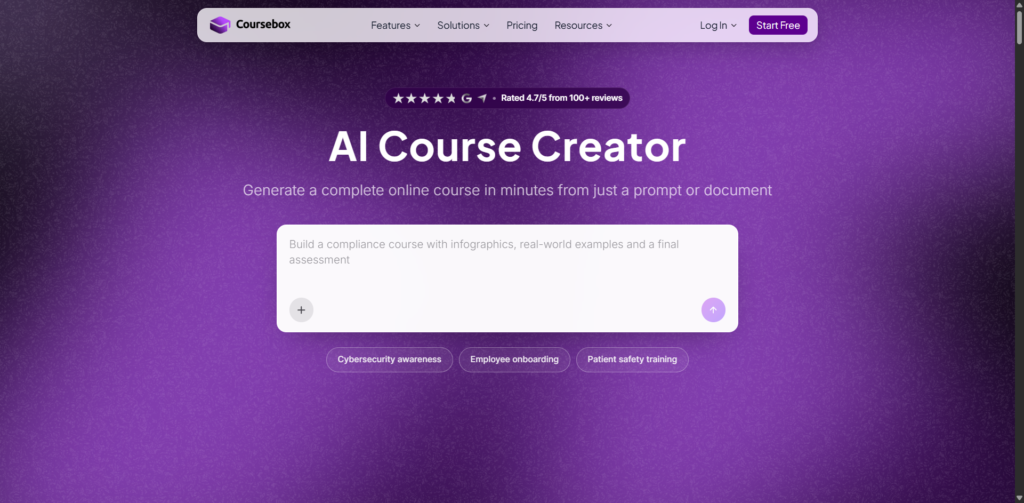
Its free plan supports unlimited learners, but the course-building limits are substantial.
You can create three mini courses. Each is limited to three sections, three pages per section, one quiz, and one assessment. Free accounts also include Coursebox watermarks, a one-time allocation of 30 AI page credits, no AI image generation, no AI tutor messages, and only one minute of AI video generation per month.
There are further restrictions that matter in practice. Free users can’t upload videos or convert documents into courses. If you sell courses through Stripe on the free plan, Coursebox takes a 30% commission.
In practice, the free version works better as a way to try Coursebox than as the long-term home for a growing course catalog.
Coursebox is particularly useful if you want to see how AI-assisted course creation can reduce the work involved in turning existing knowledge into structured learning content.
The free plan stops being practical fairly quickly if you want to build a larger course business. Coursebox Creator removes the watermarks, supports unlimited courses, adds certificates and reporting, and lets you keep 100% of course sales. It currently starts at $25 per month when billed yearly.
Coursebox makes the stronger case when AI-assisted content generation and hosted convenience are the priorities. For a larger WordPress course or membership business, LifterLMS gives you more control and avoids Coursebox’s free-plan sales commission.
9. Canvas LMS – Best for Organizations That Want to Self-Host Canvas
Canvas needs a little explanation in a 2026 free LMS comparison.
Canvas Free-for-Teacher, the hosted free product many educators previously associated with Canvas, was permanently discontinued in May 2026. Instructure has said that a new product designed with former Free-for-Teacher users in mind is expected later in 2026, but that doesn’t make the old free hosted offering available today.
The open-source Canvas LMS, though, is still available.
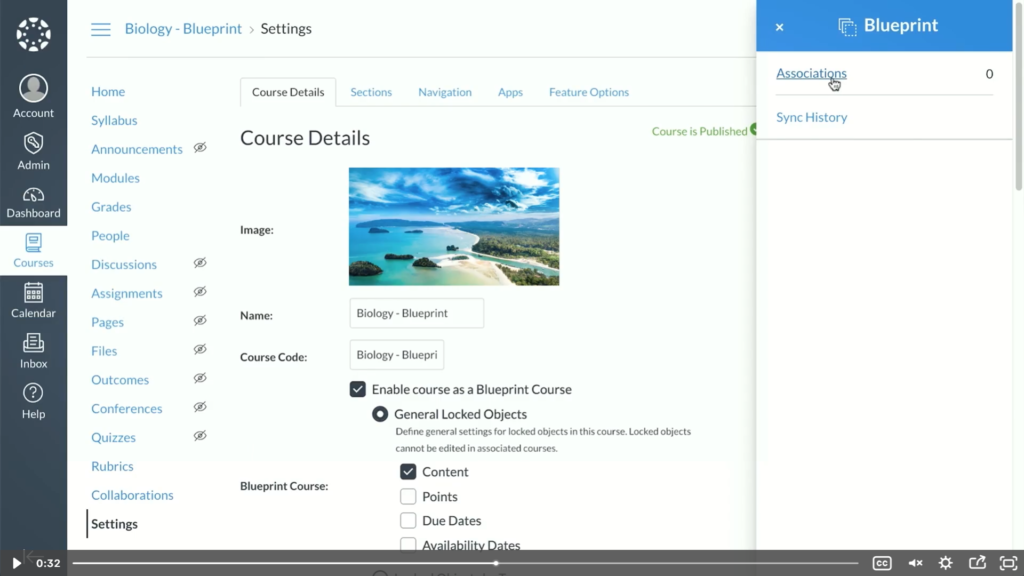
Instructure continues to develop and maintain Canvas as open-source software under the AGPLv3 license. Organizations can download the source code and run Canvas on their own infrastructure. Technically capable organizations can therefore run a mature institutional LMS without paying a software license fee.
Canvas includes the kind of functionality expected from a large education platform, including courses, assignments, quizzes, discussions, integrations, and a substantial API.
Self-hosting Canvas is far more involved than installing a typical WordPress plugin or opening a hosted LMS account. You need infrastructure, technical administration, updates, backups, security, and ongoing maintenance.
For universities, schools, or organizations that already have those resources and specifically want Canvas, that may be acceptable.
For an independent course creator, that usually isn’t practical.
Canvas also isn’t primarily designed around selling courses, memberships, or subscriptions. It makes the most sense when institutional learning requirements and open-source control matter more than ease of setup or ecommerce. Commercial WordPress course businesses are better served by a creator-focused LMS such as LifterLMS.
10. LearnPress – Best Modular Free WordPress LMS
LearnPress is one of the longest-running free WordPress LMS plugins and a direct alternative to LifterLMS for anyone who wants to build courses inside an existing WordPress site.
The core plugin is free and includes the basic tools needed to create courses, lessons, and quizzes. You can also extend it with free add-ons covering features such as course reviews, wishlists, prerequisites, bbPress discussions, BuddyPress communities, student lists, and course migration.
LearnPress takes a modular approach. Rather than placing every advanced feature in the core plugin, it offers additional functionality through separate add-ons and bundles. This can be useful if you want to pay only for specific features.
That modular setup has a catch: the eventual cost can be harder to predict.
The core LMS can remain free, but features such as certificates, advanced gradebooks, Stripe payments, and some ecommerce options require paid add-ons. This means you don’t necessarily move to a single paid LearnPress plan as your site grows. Instead, your first paid step may be purchasing the specific add-on you need.
If you already use WordPress and want a relatively lightweight LMS that you can expand gradually, LearnPress is easy to consider.
You can also end up managing several separate add-ons to get the feature set you want. You may need several add-ons to match the functionality another LMS includes in its core package (such as LifterLMS) or a single paid bundle.
LearnPress can support selling courses, so it’s much closer to LifterLMS than products such as Canvas or SC Training.
You might choose LearnPress instead of LifterLMS if you prefer its interface, theme ecosystem, or modular add-on approach.
LifterLMS is likely to be the stronger choice if memberships, learner engagement, unlimited core usage, and a more unified course-business platform are higher priorities.
That puts LearnPress among the more relevant direct WordPress comparisons in this guide.
11. MasterStudy LMS – Best Feature-Rich Free WordPress LMS
MasterStudy LMS is a WordPress LMS for course creators, training businesses, and education sites that want plenty of course-building tools inside WordPress.
The free version is fairly generous. You can create unlimited courses and lessons, build quizzes, issue certificates, manage student dashboards, track progress, and create instructor profiles. It also includes ecommerce and marketplace-style functionality, which makes it more capable than many free LMS plugins aimed only at basic course delivery.
That breadth will appeal to WordPress users who want more built in from the start.
You can build a substantial LMS with the free plugin, but broader membership functionality, extra integrations, advanced analytics, AI-assisted tools, and other premium course-management features require MasterStudy Pro. If you need those features, that’s the point where you’ll need to move beyond the free version.
Like LifterLMS, MasterStudy runs on your own WordPress site. You’ll need hosting, a domain, backups, security, and normal WordPress maintenance.
The free plugin’s strongest selling point is simply how much it includes. It’s particularly useful if you want to create courses, manage instructors, and experiment with marketplace-style features before paying.
The broader feature set won’t suit everyone. If you want a simpler WordPress LMS, MasterStudy can feel heavier than some of the alternatives. You may also find that some features you eventually rely on require a paid upgrade.
- MasterStudy can support selling courses, so it’s a genuine alternative to LifterLMS for commercial WordPress sites. Consider it if you want a large set of built-in LMS features and like its course-building interface.
- LifterLMS may be the better choice if memberships, learner engagement, extensibility, and a more focused course-business workflow matter more to you.
12. Chamilo – Best Lightweight Open-Source LMS for Institutions
Chamilo is a free, open-source LMS for schools, nonprofits, training providers, and other organizations that want a traditional learning platform without a software license fee.
It’s fully self-hosted, so there’s no vendor-imposed limit on the number of courses or learners you can support. Your practical limits depend on your hosting environment and technical resources.
Chamilo includes course creation, tests and exams, assignments, certificates, forums, surveys, groups, reporting, learner tracking, and support for standards such as SCORM 1.2 and AICC.
Its appeal is a mature institutional feature set without the same infrastructure demands as Open edX, making it more approachable for smaller organizations.
As with most open-source LMS platforms, somebody still has to host and manage it. You’ll need to handle installation, updates, security, backups, performance, and ongoing administration yourself or pay someone else to do it.
Chamilo isn’t primarily designed around commercial course selling. It can be adapted for paid learning scenarios, but ecommerce isn’t its central use case.
It’s better suited to schools, nonprofits, training providers, and organizations delivering structured learning to known groups of users.
Chamilo makes sense if you want a traditional open-source LMS with no license fee and have the technical capacity to run it. If your main goal is selling courses or memberships to the public, creator-focused WordPress options such as LifterLMS and Tutor LMS are closer matches.
13. Sakai – Best Free LMS for Higher Education
Sakai is an open-source LMS built mainly for colleges, universities, and other higher education institutions.
It’s been developed around academic teaching workflows rather than commercial course selling.
The software is free to use, with no license-based limits on courses or learners. Institutions can self-host Sakai or work with a commercial provider for hosting and support.
Its functionality includes course spaces, lessons, assignments, quizzes and tests, gradebook tools, discussions, collaboration features, APIs, and strong LTI support.
That institutional focus is exactly where Sakai is strongest.
Universities often need more than simple course creation. They need tools that support faculty workflows, academic terms, external learning tools, student information systems, and large-scale administration. Sakai is designed with those needs in mind.
It also explains why Sakai is a poor fit for many smaller users. A solo course creator, coaching business, or small training company is unlikely to benefit from the complexity of running an institutional LMS.
Sakai also isn’t built around ecommerce. Selling individual courses, managing subscriptions, and creating marketing funnels are outside its core purpose.
It makes the most sense for higher education institutions that want open-source control and already have technical resources available.
Sakai’s institutional focus means smaller organizations have simpler options. TalentLMS or SC Training are easier choices for internal workplace training, while LifterLMS is a closer match for businesses selling courses through WordPress.
For higher education, that complexity can be justified. For most creators and small businesses, it can’t.
14. ILIAS – Best for Universities and Public-Sector Organizations
ILIAS is a mature open-source LMS aimed at universities, government, public-sector organizations, and other institutions with formal learning and assessment requirements.
The software is free under an open-source license and doesn’t charge per user, per course, or per administrator.
ILIAS includes course management, tests and electronic exams, surveys, learning modules, portfolios, SCORM support, LTI integration, reporting, and mobile browser access.
A major strength is the range of formal learning and assessment tools available without a commercial software license. That’s a good fit for organizations that need tighter control over exams, structured learning programs, learner records, or internal training systems.
It’s also designed to scale beyond small teams. That institutional depth comes with more administrative work.
Like Moodle, Open edX, Sakai, and Chamilo, ILIAS requires hosting and technical management. The absence of a license fee doesn’t remove the need for infrastructure, updates, security, support, and system administration.
ILIAS isn’t designed primarily for selling courses to the public. It can support complex institutional learning, but a creator who wants to launch a paid online course quickly will find far more suitable options elsewhere.
It makes the most sense for universities, government departments, public-sector organizations, and larger institutions that want open-source control.
ILIAS makes sense when formal learning management, assessment, and institutional ownership take priority over ease of setup. Ecommerce, memberships, and public course selling are better handled by creator-focused platforms such as LifterLMS or systeme.io.
15. systeme.io – Best for Selling a First Course on a Free Hosted Plan
systeme.io is really an all-in-one online business platform with course features, rather than a traditional academic LMS.
Its free plan combines course hosting with email marketing, sales funnels, payment processing, communities, and other tools aimed at solo entrepreneurs and small online businesses.
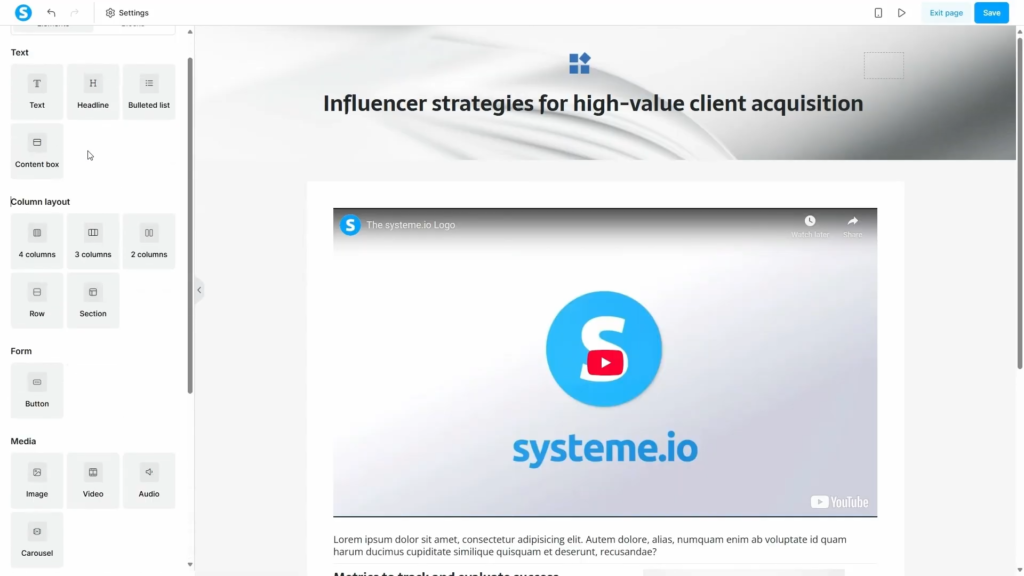
That makes systeme.io particularly relevant if your goal isn’t to manage education at an institutional scale, but simply to sell a course online without piecing together several separate products.
The permanent free plan currently includes one course, up to 2,000 contacts, unlimited students, payment integrations, and no platform transaction fee.
You can create course modules and lessons, drip content over time, add quizzes, and connect the course to sales funnels and email campaigns.
You don’t need WordPress hosting, a separate funnel builder, or a separate email marketing service to get started. For someone testing a first course idea, that can significantly reduce setup work.
What you give up is some of the depth of a dedicated LMS. systeme.io isn’t a full institutional LMS. It lacks the advanced assessment, reporting, learning standards, and academic administration features found in platforms such as Moodle, Sakai, or ILIAS.
It also doesn’t offer the same level of site ownership and WordPress control as LifterLMS.
The free plan’s one-course limit is another important restriction. You can use it to launch and sell your first course, but you’ll need to move to a paid plan as soon as you want to build a larger course catalog.
systeme.io is best for solo creators who want to sell their first course and would prefer a hosted all-in-one business platform.
For creators who prefer ownership and WordPress flexibility over all-in-one convenience, LifterLMS provides a better foundation for a growing course or membership business.
For universities, schools, or formal workplace learning teams, systeme.io shouldn’t be considered a direct substitute for a traditional LMS.
How to Choose the Right Free LMS
Choosing a free LMS is less about finding the longest feature list and more about matching the platform to the way you’ll actually use it. A good place to start is the operating model.
Hosted, WordPress, or open source?
A hosted LMS is usually the easiest place to start.
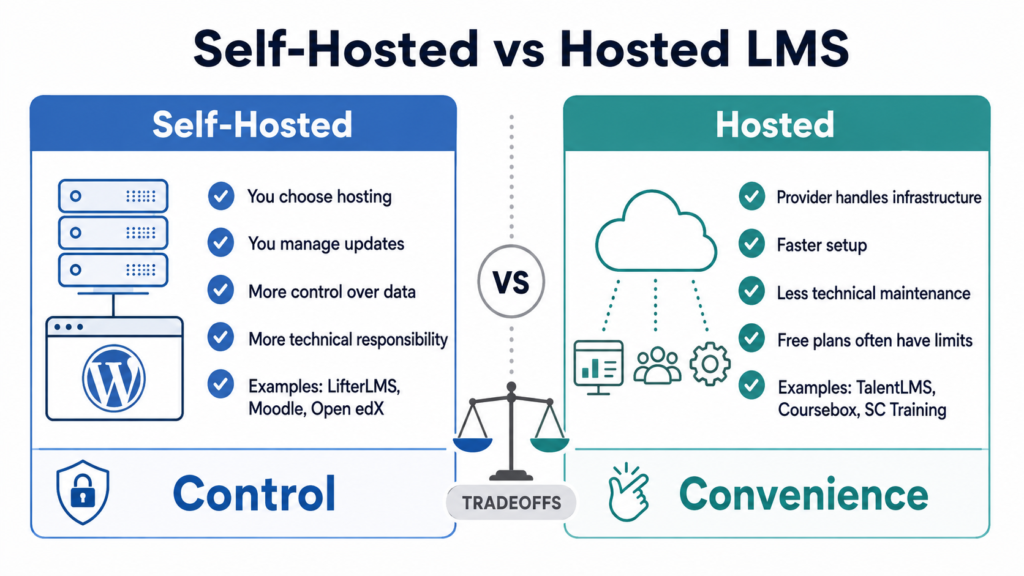
Platforms such as TalentLMS, SC Training, Coursebox, and systeme.io handle the hosting, updates, and infrastructure for you. That reduces technical work, but the free plans usually impose limits on learners, courses, features, or branding.
A WordPress LMS gives you more ownership and control.
LifterLMS, Tutor LMS, LearnPress, and MasterStudy run on your own WordPress site. You control the website, content, branding, and user data, and you aren’t tied to the same type of learner caps found on many hosted plans.
In return for that control, you’re responsible for WordPress hosting, security, updates, backups, and performance.
If you’re weighing those two approaches specifically, our WordPress vs. SaaS LMS guide looks at the differences in ownership, customization, costs, and long-term flexibility.
A traditional open-source LMS such as Moodle, Open edX, Canvas, Chamilo, Sakai, or ILIAS gives you even more control, but usually requires more technical expertise.
These platforms make the most sense when your organization already has the infrastructure and staff to manage them.
Look Beyond the $0 Price Tag
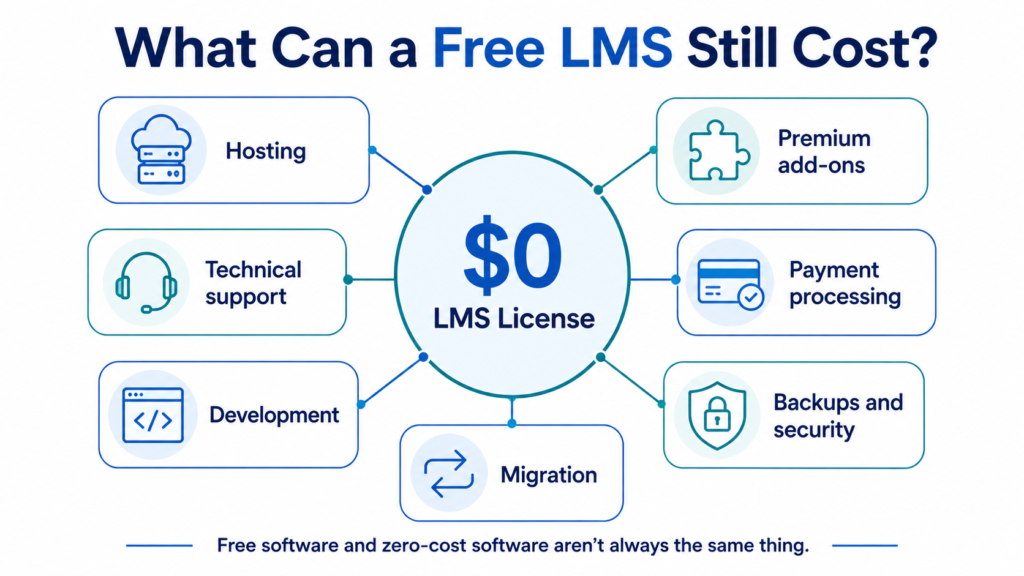
A $0 software price doesn’t mean the whole learning platform will cost you $0.
Look beyond the license price and budget for things such as:
- Hosting
- Premium add-ons
- Payment processing
- Technical support
- Development work
- Backups and security
- Migration
A self-hosted platform with no license fee can end up costing more than a paid hosted LMS if you need ongoing technical support.
A WordPress LMS with modest hosting costs can also be cheaper over time than a hosted LMS that charges by learner.
Check Learner and Course Limits
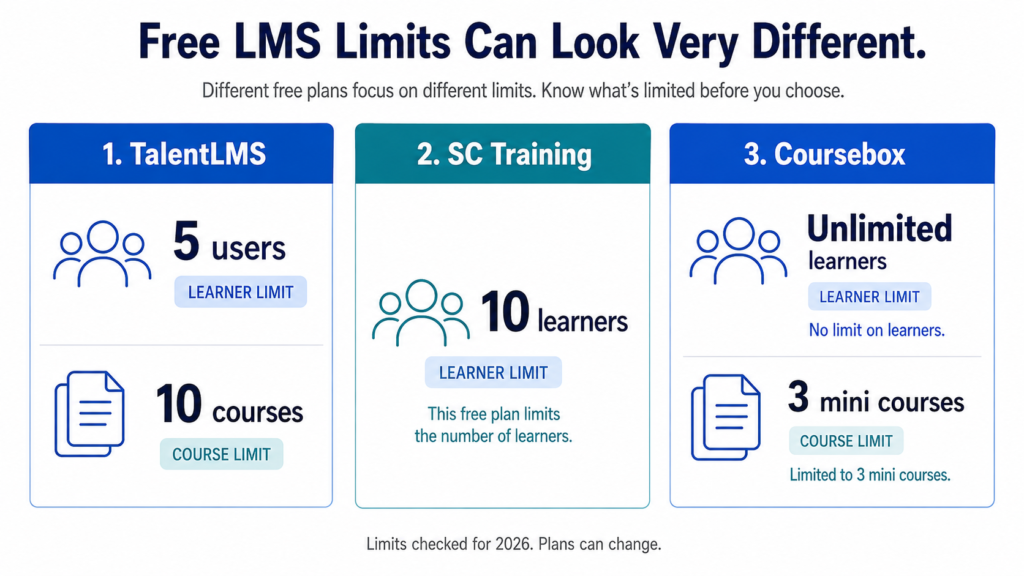
Free hosted plans often use learner or course limits to encourage upgrades.
TalentLMS, for example, limits its free plan to 5 users and 10 courses. SC Training currently limits free accounts to 10 learners. Coursebox allows unlimited learners but restricts users to 3 small courses.
In practice, those limits often matter more than headline feature counts.
Ask yourself:
- How many learners do you have today?
- How many do you expect in 12 months?
- How many courses will you need?
- What happens when you exceed the free limit?
A plan that looks generous for 5 users can become expensive once you’re training 50 or 500.
Consider Ecommerce and Transaction Fees
If you plan to sell courses, spend some time on the payment model before you commit.
Some LMS platforms include ecommerce in the free version. Others require a paid integration or take a percentage of each sale.
You should check:
- Which payment gateways are supported
- Whether Stripe or PayPal requires a paid add-on
- Whether the LMS charges its own transaction fee
- Whether subscriptions are supported
- Whether you can sell bundles or memberships
- Whether coupons and payment plans are available
For a commercial course site, these details can matter more than the headline LMS price.
Check Assessment and Certificate Requirements
A simple course may only need lessons and a few quizzes. Formal training usually needs more.
Look for:
- Question banks
- Passing scores
- Quiz attempts
- Assignment submissions
- Manual grading
- Certificates
- Certificate expiration
- Prerequisites
- Compliance tracking
- Detailed completion rules
If certificates are essential, make sure they’re included in the free version rather than assuming every LMS provides them.
Decide How Much Reporting You Need
A solo creator may only need basic progress tracking.
Businesses and institutions often need detailed reporting for managers, auditors, or compliance teams.
Check whether the LMS can report on:
- Course completion
- Quiz results
- Time spent learning
- Individual learner progress
- Group performance
- Certificates
- Enrollment
- Activity history
Also, check whether reports can be exported.
Check Integration and Learning Standard Requirements
Most independent course creators won’t need to think about SCORM, xAPI, or LTI. Many universities, corporate training departments, and organizations using third-party learning content will.
If those standards matter to you, verify support before choosing the platform.
The same applies to integrations with:
- CRM systems
- HR platforms
- Email marketing tools
- Ecommerce systems
- Single sign-on
- Student information systems
Don’t assume an integration exists because the LMS has a large app ecosystem.
Think About Branding and Ownership
Free hosted plans often keep the provider’s branding in place or limit your use of a custom domain.
For internal employee training, that may be fine. It matters a lot more when customers are paying for the course.
Data ownership is another part of the decision.
- With a self-hosted WordPress or open-source LMS, you generally control the database and hosting environment.
- With a hosted LMS, your data lives on the provider’s platform and is subject to its export, retention, and migration options.
Factor in Support
Support is another area where free plans often cut back.
That may mean:
- Documentation only
- Community forums
- Email support
- No onboarding
If your organization can’t afford downtime or troubleshooting delays, paid support may be worth more than a free license.
Plan for Growth
The cheapest option today can become an expensive one later.
Before committing, look at what happens when you need:
- More learners
- More courses
- Better reporting
- Ecommerce
- Memberships
- Advanced permissions
A free plan is much more useful when the upgrade path still makes sense once you grow.
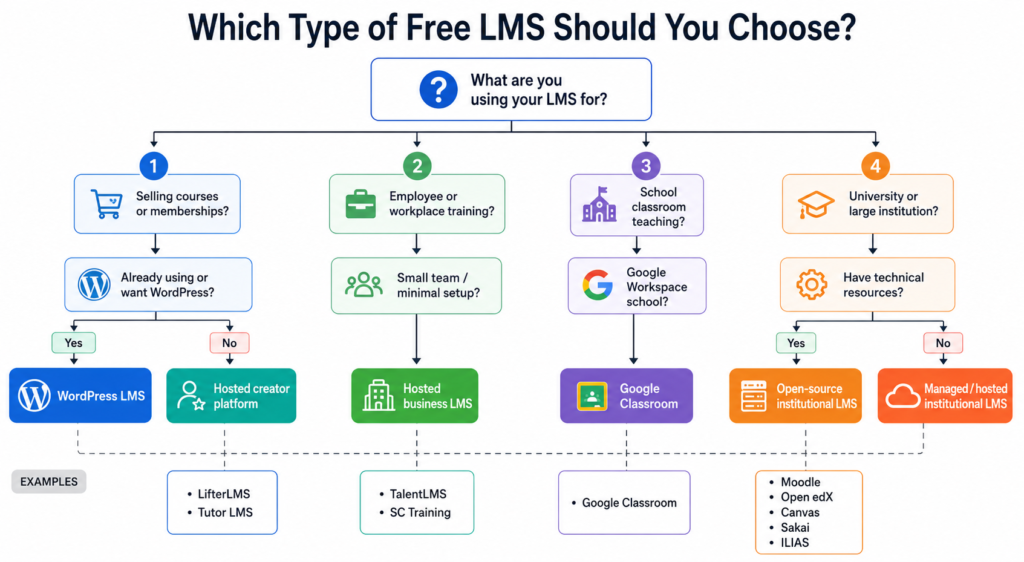
Which Type of LMS Should You Choose?
For independent course creators, a WordPress LMS such as LifterLMS is usually the strongest option if you want control, ecommerce, and room to grow.
For membership businesses, prioritize platforms that support recurring access, multiple courses, groups, and flexible enrollment rules. LifterLMS is especially well-suited to this model.
For small businesses, a hosted platform such as TalentLMS may be easier if you only need internal training and don’t want to manage a website.
For workplace training teams, SC Training is a better fit when mobile learning, frontline workers, and short training modules are the priority.
For schools, Google Classroom is difficult to beat when the institution already qualifies for Google Workspace for Education and mainly needs assignment and classroom workflows.
For universities, Moodle, Sakai, Canvas, and ILIAS are more natural choices than creator-focused LMS platforms.
For technical organizations with development resources, Moodle, Open edX, Canvas, or another open-source LMS offers the greatest control over infrastructure and customization.
Choose for your current learners and resources, but make sure the upgrade or scaling path still works if those needs change.
When Is a Free LMS Enough?
A free LMS can be all you need if its limits match the way you plan to use it.
You may not need to pay if you’re:
- Testing an online course idea
- Training a very small team
- Running courses through a school or university with existing technical resources
- Comfortable managing a self-hosted system
- Building a WordPress course site that doesn’t yet need premium integrations
- Delivering a limited number of courses through a hosted free plan
Paying starts to make sense when the free option creates more work than it saves, or starts getting in the way of growth.
You may need a paid LMS or paid add-ons when you require:
- More learners or courses
- Advanced reporting
- Automated enrollment
- More payment options
- Subscriptions or recurring memberships
- Better support
- Advanced integrations
- Custom branding
- Compliance or certification features
Don’t pay just because an upgrade exists. Pay when the extra features solve a problem you actually have.
Frequently Asked Questions About Free LMS Platforms
No single free LMS is best for every use case.
LifterLMS is our top choice for WordPress course creators because its free core provides a substantial LMS without imposing a per-user pricing model.
Moodle is a stronger choice for many schools and institutions that want an established open-source LMS. Google Classroom works well for qualifying schools using Google Workspace. TalentLMS is easier for a tiny business team that wants a hosted system with minimal setup.
Treat the rankings as a starting point, then choose around your actual use case.
Yes, if by “completely free” you mean there’s no software license fee. Running the platform can still cost money.
Open-source platforms such as Moodle, Open edX, Canvas, Chamilo, Sakai, and ILIAS can be used without paying a software license fee.
You still need somewhere to host them, and you may incur costs for infrastructure, maintenance, development, security, and technical support.
WordPress LMS plugins such as LifterLMS can also be used without buying the core software, but you still need a WordPress site and hosting.
LifterLMS is our top free WordPress LMS choice for course creators and membership businesses.
The free core gives course creators and membership businesses plenty of room to get started without paying a per-user fee.
Tutor LMS, LearnPress, and MasterStudy LMS are also credible free WordPress alternatives. The best choice depends on which course-building workflow, integrations, ecommerce tools, and upgrade path fit your site.
Yes. Moodle LMS is free, open-source software.
If you host Moodle yourself, there’s no Moodle software licensing fee.
MoodleCloud is different. It’s Moodle’s managed hosted service and isn’t permanently free. It currently offers a 28-day trial, with paid plans starting after the trial ends.
So Moodle can be free software without being a zero-cost system to run.
Google Classroom is available at no cost through Google Workspace for Education Fundamentals for qualifying educational institutions.
For eligible schools, that makes Google Classroom a strong free option.
It isn’t a general-purpose free LMS for independent course sellers or businesses, though, and it isn’t designed around selling courses or memberships.
This changed in 2026.
Canvas Free-for-Teacher, which previously gave individual educators free hosted Canvas accounts, has been permanently discontinued.
The Canvas LMS source code remains open source, so technically capable organizations can still self-host Canvas without paying a software license fee.
That’s not the same as getting a ready-to-use hosted Canvas account for free.
Yes.
TalentLMS offers a permanent free plan for up to five users and 10 courses, which can work for a very small team.
SC Training is another option for small workplace training programs, particularly when mobile learning and short lessons are important.
Businesses that want to sell training publicly rather than train employees may be better served by a WordPress LMS such as LifterLMS or a creator-focused hosted platform.
Yes, although the payment model varies a lot from one LMS to another.
Some free LMS products include basic course-selling capabilities. Others require paid payment-gateway integrations, ecommerce plugins, or premium plans.
Check the commercial terms just as carefully as the course-building features.
Look at:
• Transaction fees
• Payment gateway costs
• Subscription support
• Membership support
• Course limits
• Sales commissions
• Checkout customization
For example, Coursebox allows sales on its free plan but currently takes a substantial commission, while some WordPress LMS products let you build the learning platform for free but charge for particular payment integrations.
With open-source LMS software, you get access to the software itself and typically host it on infrastructure you control.
That gives you greater control over customization, data, hosting, and development, but you’re also responsible for maintaining the system.
A free hosted LMS runs on the vendor’s infrastructure.
The vendor handles hosting and software maintenance, but usually restricts the number of learners, courses, features, storage, or branding available on the free tier.
Neither approach is automatically better. It comes down to how much you value convenience versus control.
No. LearnDash doesn’t currently offer a permanently free version of its WordPress LMS plugin.
Its entry-level Essentials plan costs $259 per year. Because there’s no free version, LearnDash isn’t included in our rankings of the best free LMS platforms.
Which Free LMS Should You Choose?
The right choice depends on the kind of learning experience you’re building.
For schools and universities, platforms such as Google Classroom, Moodle, Open edX, Canvas, Sakai, and ILIAS may be a better fit, depending on your scale and technical resources.
If you want a hosted platform with almost no setup, options such as TalentLMS, SC Training, Coursebox, or systeme.io may make more sense.
But if you’re building an online course, coaching program, training business, or membership site on WordPress, LifterLMS is a strong place to start.
Its free core gives you enough to build a complete learning experience before deciding whether you need any paid extensions.
Start Building With LifterLMS for Free
You can start building with LifterLMS without buying a license.
Install the free LifterLMS core on your WordPress site and start building courses, lessons, quizzes, certificates, memberships, and learner experiences.
As your site grows, you can add payment integrations, automation, advanced reporting, and other premium features when they become useful.
Already comparing plans and add-ons?



