

💸

Introductory Pricing: Save 50% on your first year of any new order. Use coupon code:

FIRSTYEAR50

 
Choose a Plan
LifterLMS Create & Sell Online Courses with WordPress
LifterLMS Logo
LifterLMS Logo
  • Software
    • Features
    • Demo
    • Services
  • Solutions
    • Certifications & Compliance
    • Healthcare & Medical
    • Course Creators
    • Coaches
    • Schools
    • Companies
    • Nonprofits
    • Community Builders
    • Agencies
  • Pricing
    • Plans & Pricing
    • Help Me Choose A Plan
  • Learn
    • Academy
    • Blog
    • Podcast
    • Book
    • Is LifterLMS For You?
    • Community Events
    • Knowledge Base
    • Videos
    • Changelog
    • Developer
  • About
    • Success Stories
    • Showcase
  • Contact
  • My Account
    • Login
    • Rate & Review
    • Refer & Earn
  • Shopping Cart
    • View Cart
    • Checkout
  • Choose a Plan
Knowledge Base / Frequently Asked Questions / How do I download the LifterLMS Powerpack graphics pack and other add-ons from the LifterLMS website

How do I download the LifterLMS Powerpack graphics pack and other add-ons from the LifterLMS website

To download the LifterLMS Powerpack graphics pack and any other purchase from the LifterLMS website, please follow the instructions below:

Step 1: Log into your account on the LifterLMS website here

Step 2: Navigate to the Downloads area of your account here

Step 3: Click the “Download” tab
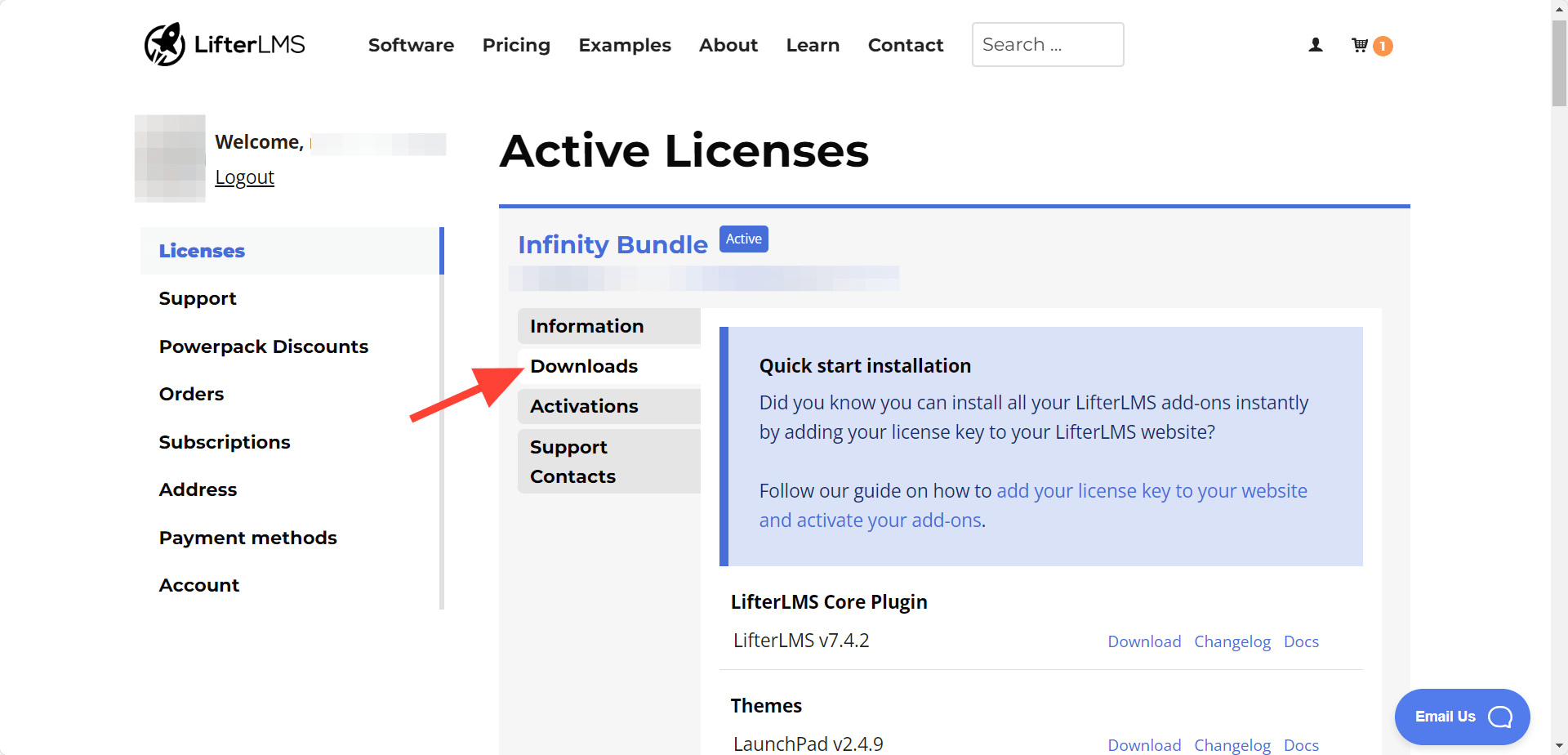
 

LifterLMS Downloads


Step 5: Scroll a bit for LifterLMS Graphics Pack and the click on download. Download any item you would like to download
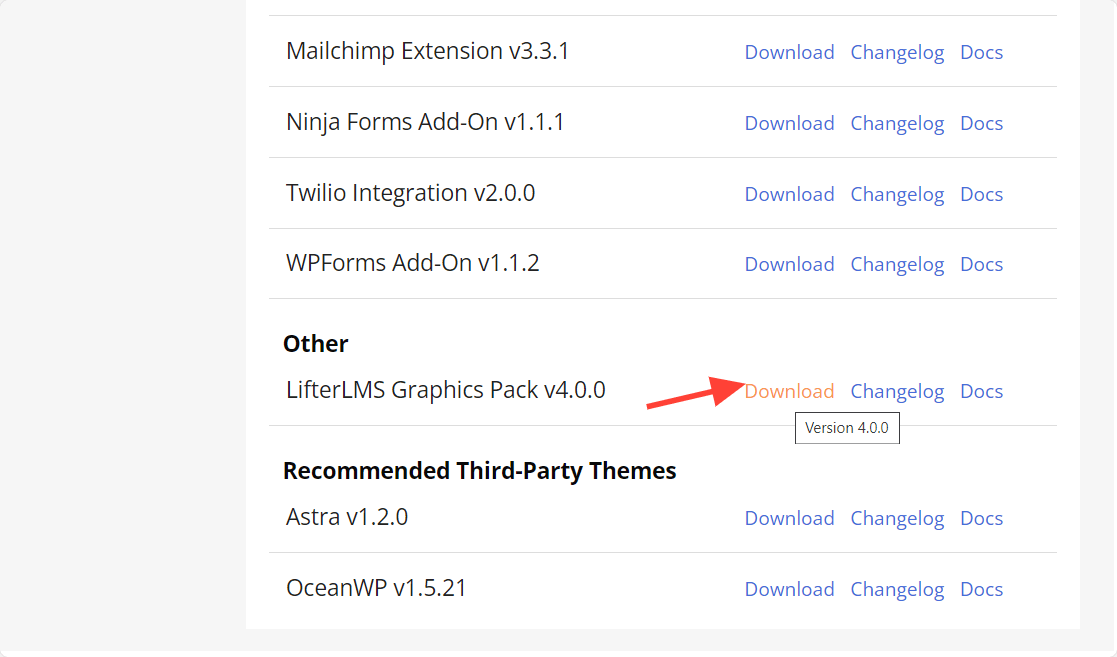
LifterLMS Graphics Power Pack

Using Images from the LifterLMS Powerpack Graphics Pack

To use images from the LifterLMS Powerpack graphics pack, unzip the zip file for the graphics pack on your computer. You can upload and use images from the graphics pack as needed on your site. If you need instructions on how to add an image to your WordPress media library, you can find more information on that here.



Stop wasting time shopping for WordPress LMS software.

DOWNLOAD the free WordPress LMS Buyer's Guide

Send It To Me
WordPress LMS Buyer's Guide Download Cover Images
Last Updated on October 16, 2023
Was this article helpful?

Categories

  • Frequently Asked Questions
    • Feature Friday
    • LifterLMS
    • LifterLMS Add-ons
    • LifterLMS Authorize.Net
    • LifterLMS Infinity Bundle
    • LifterLMS LaunchPad
    • LifterLMS Mailchimp
    • LifterLMS PayPal
    • LifterLMS PDFs
    • LifterLMS Powerpack
    • LifterLMS Stripe
    • LifterLMS WooCommerce
    • Sky Pilot Theme
    • Support
  • Getting Started
    • General
    • General WordPress
      • Lite LMS by LifterLMS
    • Getting Help and Support
    • My Account
    • Troubleshooting
  • LifterLMS
    • Blocks
    • Developer Documentation
    • Getting Started
    • Known Conflicts
    • Privacy and Security
    • Shortcodes
    • Theme Compatibility
    • Troubleshooting
    • Tutorials
    • Widgets
  • LifterLMS Add-ons
    • Aircraft
    • Assignments
    • Authorize.Net
    • Formidable Forms
    • Gravity Forms
    • Kit (formerly ConvertKit)
    • LifterLMS Advanced Coupons
    • LifterLMS Advanced Quizzes
    • LifterLMS Advanced Videos
    • LifterLMS Continuing Education
    • LifterLMS Course Cohorts
    • LifterLMS Custom Fields
    • LifterLMS Events
    • LifterLMS Gifts
    • LifterLMS Groups
    • LifterLMS Labs
    • LifterLMS Notes
    • LifterLMS PDFs
    • LifterLMS Private Areas
    • LifterLMS Private Site
    • LifterLMS Social Learning
    • Mailchimp
    • Ninja Forms
    • PayPal
    • Sky Pilot Theme
    • Stripe
    • Twilio
    • WooCommerce
    • WPForms
  • LifterLMS Features
    • Courses
    • Engagements
    • Memberships
    • Notifications
    • Payments & Access Plans
    • Quizzes
    • Reporting
    • Templates
  • LifterLMS Integrations
    • bbPress
    • Beaver Builder
    • BuddyPress
    • Elementor
  • LifterLMS LaunchPad
    • Getting Started
    • Settings
    • Troubleshooting
    • Tutorials
  • Translate LifterLMS
    • Getting Started
    • Translating Add-Ons and Themes
    • Translation FAQs

Add-On

  • Name: LifterLMS Powerpack

Add-On Details

  • Version: 4.0.0
  • Developer: LifterLMS LifterLMS\'s logo
Purchase
  • Shop
    • LifterLMS Pricing
      • Pricing
      • LifterLMS Add-Ons
    • LifterLMS Add-ons
      • Advanced Coupons
      • Advanced Videos
      • Advanced Quizzes
      • Aircraft
      • Assignments
      • Authorize.Net
      • Continuing Education
      • Course Cohorts
      • Formidable Forms
      • Gravity Forms
      • Kit
      • Gifts
      • Groups
      • Mailchimp
      • Ninja Forms
      • Notes
      • Office Hours
      • PayPal
      • PDFs
      • Powerpack
      • Private Areas
      • Private Site
      • Sky Pilot
      • Social Learning
      • Stripe
      • WooCommerce
      • WPForms
      • Zapier
      • Third Party Add-ons
    • LifterLMS
      • Free Download
    • Hosting
      • LifterLMS Hosting
  • About
    • Solutions
      • Certifications & Compliance
      • Healthcare & Medical
      • Course Creators
      • Coaches
      • Schools
      • Companies
      • Nonprofits
      • Community Builders
      • Agencies
    • Features
      • 30 Minute Video Presentation
      • 30 Day Demo Site
    • Compare
      • LearnDash vs. LifterLMS
      • Sensei LMS vs. LifterLMS
      • Tutor LMS vs LifterLMS
      • LearnPress vs. LifterLMS
      • MemberPress vs. LifterLMS
    • Company
      • LifterLMS Brand Assets
      • Praise
      • Press
      • Changelog
      • Showcase
      • Trusted By
  • Support
    • Find Help
      • Documentation
      • Submit Support Ticket
      • Installation
      • Glossary
    • Developers
      • Code Reference
      • REST API
      • Changelog
    • My Lifter
      • My Account
      • My License Keys
    • Resources
      • Best WordPress LMS Plugins
      • Best WordPress LMS Themes
      • WordPress LMS Buyer’s Guide
      • LifterLMS Quickstart Course
      • Education Entrepreneur Playbook
      • Kajabi vs. WordPress
      • Teachable vs. WordPress
      • Recommended Resources
      • Getting Started Links
    • LifterLMS Experts
      • Find an Expert
      • Apply
      • Feedback
  • Connect
    • Learn More
      • Academy
      • Blog
      • Contributors
      • Podcast
      • Slack
      • Webinars
    • Contact Us
      • Call Sales 1-(800)-867-0906
      • Q&A Livestream
      • Community Events
      • Technical Support
      • Affiliate Program
      • Submit Case Study
      • General Contact
      • Careers
      • Sales
      • Partnerships
      • Feature Requests
      • Scholarship Application

© 2014 - 2026 LifterLMS · Privacy Policy · Terms of Use · Accessibility  · Trademark


Hosted by Pagely


There's a Course Inside All of Us™

Try LifterLMS for $1

  • Software
    • Features
    • Demo
    • Services
  • Solutions
    • Certifications & Compliance
    • Healthcare & Medical
    • Course Creators
    • Coaches
    • Schools
    • Companies
    • Nonprofits
    • Community Builders
    • Agencies
  • Pricing
    • Plans & Pricing
    • Help Me Choose A Plan
  • Learn
    • Academy
    • Blog
    • Podcast
    • Book
    • Is LifterLMS For You?
    • Community Events
    • Knowledge Base
    • Videos
    • Changelog
    • Developer
  • About
    • Success Stories
    • Showcase
  • Contact
  • My Account
    • Login
    • Rate & Review
    • Refer & Earn
  • Shopping Cart
    • View Cart
    • Checkout
  • Choose a Plan

You’re Almost There…

For free instant access to your LifterLMS video demo made exclusively for people looking to switch from another LMS they are not happy with, enter your first name and email below…

Best LMS To Switch To Demo - Play Button

You’re Almost There…

For free instant access to your LifterLMS video demo made exclusively for agencies and WordPress professionals, enter your first name and email below…

Best LMS For Agencies Demo - Play Button

You’re Almost There…

For free instant access to your LifterLMS video demo made exclusively for do-it-yourself course creators, enter your first name and email below…

Best DIY LMS Demo - Play Button