

Your course or membership may be exactly what someone needs.
They’ve read the sales page, understood the outcome, and pictured themselves putting the lessons into practice.
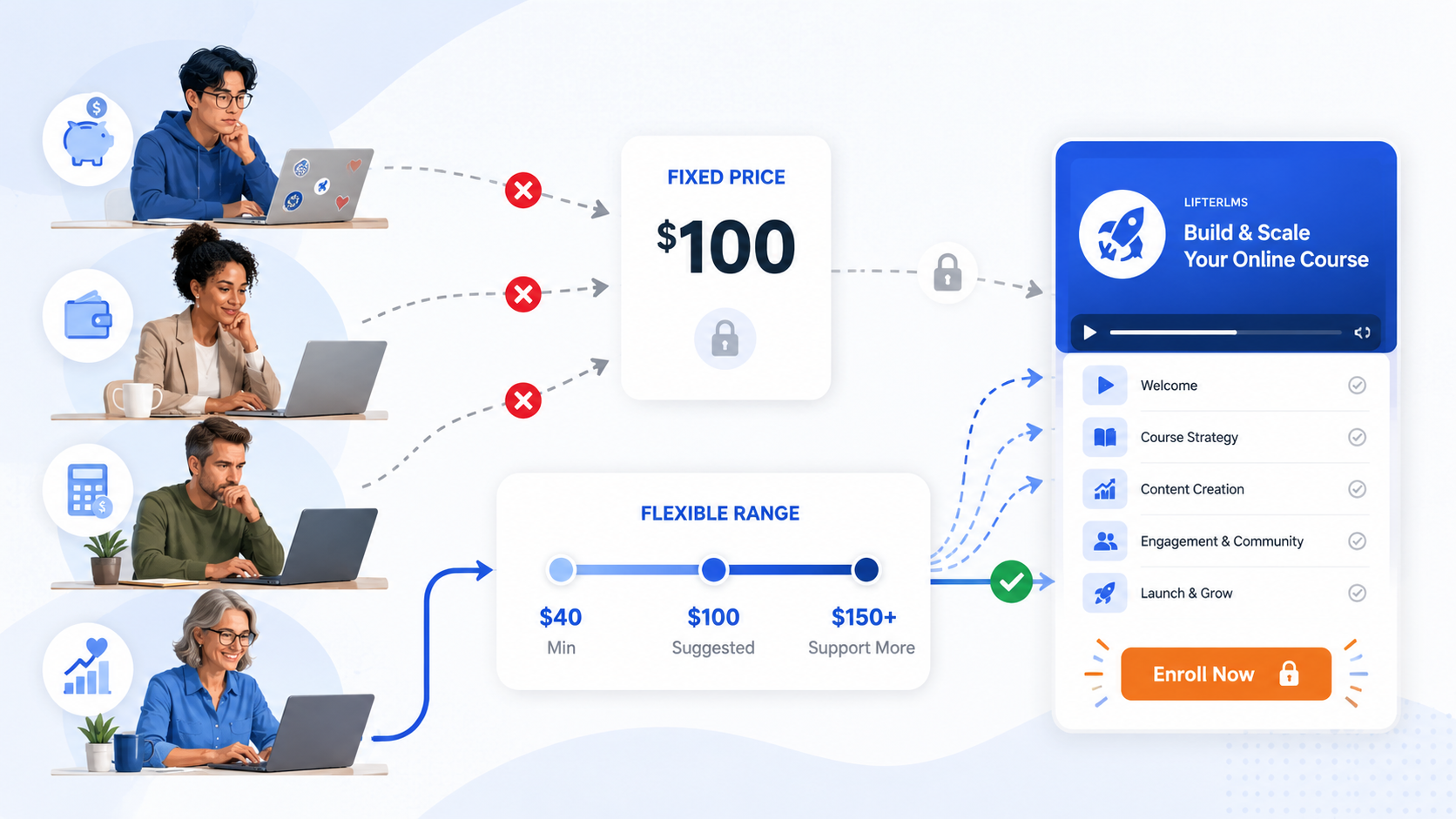
Then they reach the price and leave without enrolling.
That doesn’t always mean your course costs too much. It may simply cost more than that particular learner can afford right now.
Lowering the price for everyone isn’t necessarily the answer. That can reduce your revenue from people who were already willing to pay the full amount. It may also make it harder to communicate the value of your course.
At the other end of the scale, some learners may happily pay more than your listed price. They believe in your work, value the outcome, or want to help you make the course available to others.
A fixed price gives neither group much room to move.
LifterLMS Name Your Price gives you another option. It lets learners choose what they pay for a course or membership while keeping their choice within boundaries you control.
That can make your education more accessible, help you reach learners with different budgets, and create new ways to generate income from the work you’re already doing.
The Fixed-Price Problem
Fixed pricing is simple.
You choose an amount. The learner either pays it or doesn’t.
That works well for many courses and memberships, but it also assumes that everyone in your audience approaches that price from roughly the same financial position.
They don’t.
- A professional in a high-income market and a learner in a country with lower average wages may see the same course price very differently.
- Two people in the same town may have completely different budgets.
- A nonprofit supporter may view their payment as a contribution, while another learner simply needs the most affordable route into the material.
Your pricing can’t account for every individual circumstance, and frankly, your checkout page already has enough to do.
The result is a difficult choice.
You can maintain one fixed price and accept that some suitable learners will be excluded. Or you can reduce the price for everyone, including those who could have paid more.
Neither option is ideal when your goal is to increase access without undermining the financial health of your course business.
Name Your Price Gives You a Third Option
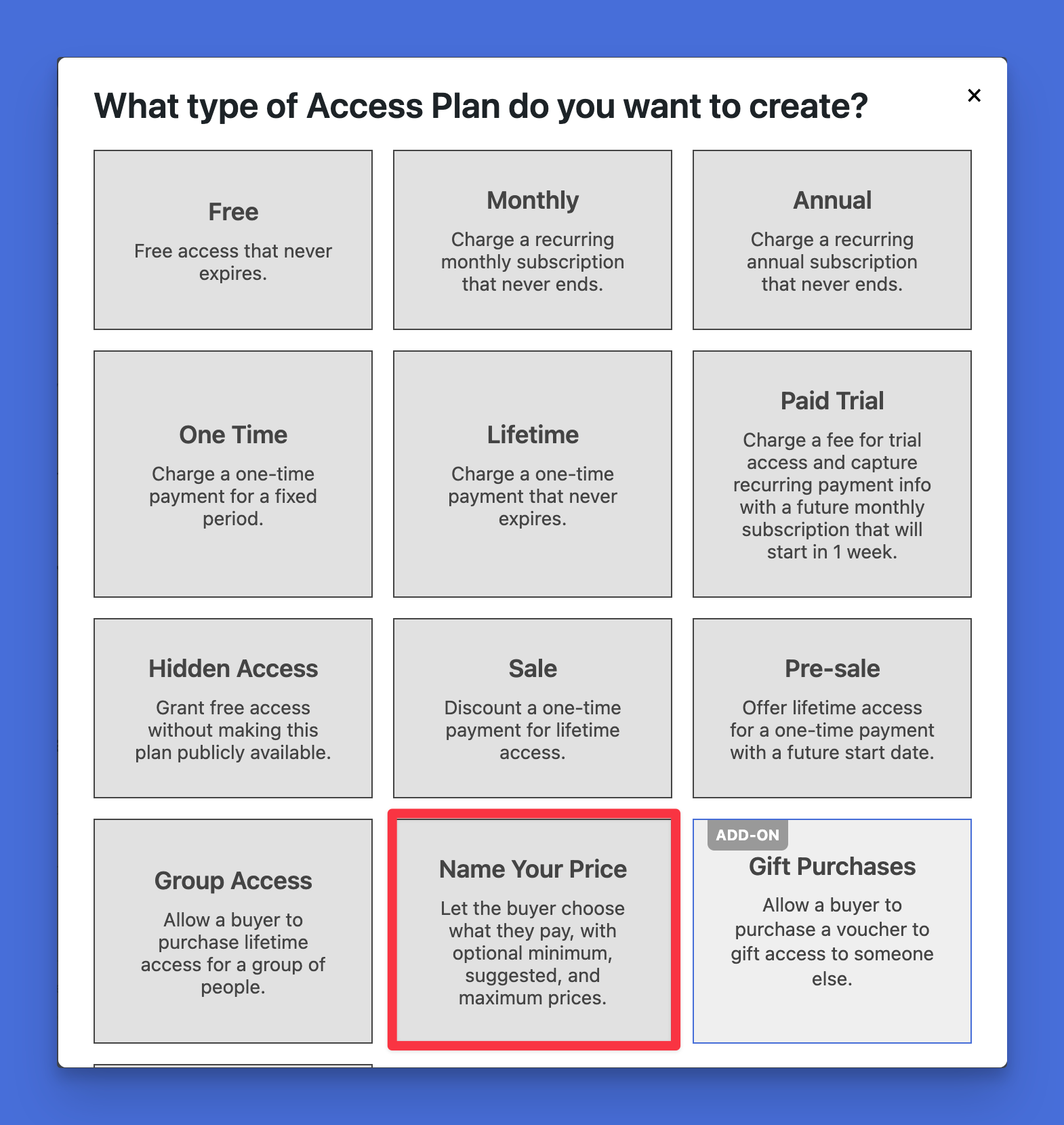
LifterLMS Name Your Price adds flexible pricing to your LifterLMS access plans.
Instead of presenting every learner with one non-negotiable amount, you can let them enter their own price.
You still set the rules.
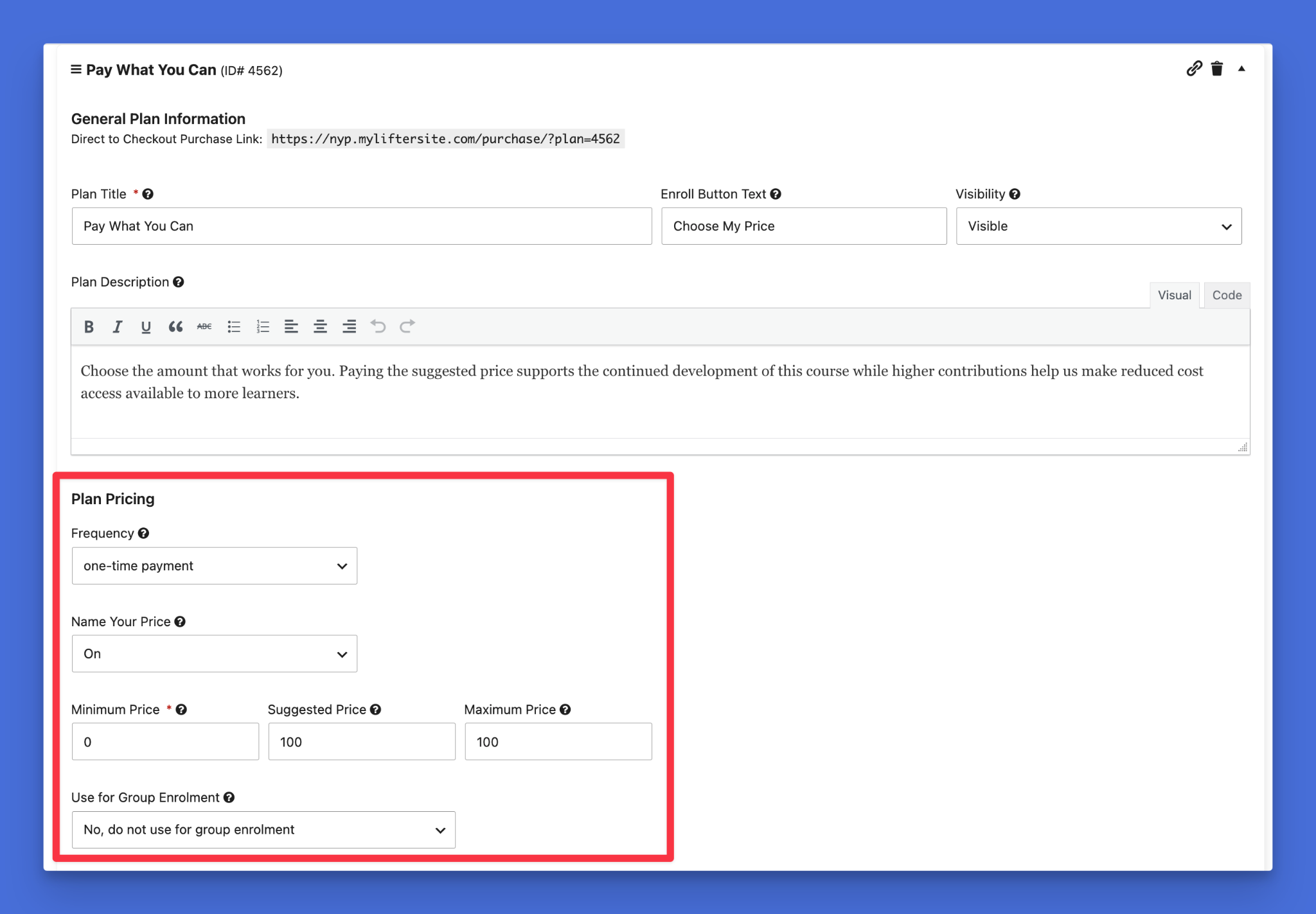
For each Name Your Price access plan, you can define:
- A minimum price
- A suggested price
- A maximum price
The learner can choose an amount within the range you’ve created.
- The minimum protects the lowest amount you’re prepared to accept.
- The suggested price gives learners a useful reference point and communicates what you believe the course is worth.
- The maximum places an upper boundary on the payment when one is needed.
You can also set the minimum price to zero to allow free access as part of a genuine pay-what-you-can offer.
This isn’t the same as giving learners complete control over your pricing.
You decide where the acceptable range begins and ends. The learner chooses only within those boundaries.
Why Wouldn’t Everyone Choose the Minimum?
This is usually the first concern with flexible pricing.
If learners can choose what they pay, won’t they all enter the lowest possible amount?
Some will.
That doesn’t automatically make the strategy unsuccessful.
When someone pays your minimum instead of leaving without buying, you haven’t necessarily lost the difference between the minimum and your former fixed price. You may have gained a customer who would otherwise have paid nothing.
Other learners won’t automatically choose the lowest amount because price decisions involve more than saving as much money as possible.
People also consider what feels fair, what they believe something is worth, and what their payment supports.
The way you present your pricing matters.
The Suggested Price Provides an Anchor
Imagine asking someone what a course is worth without giving them any guidance.
They may have no idea where to begin.
Is $20 reasonable? What about $100? Would $500 be absurd? Should they spin a wheel?
A suggested price removes much of that uncertainty.
It gives learners a reference point. They can then decide whether their circumstances call for a lower payment, whether the suggested amount feels right, or whether they’d like to contribute more.
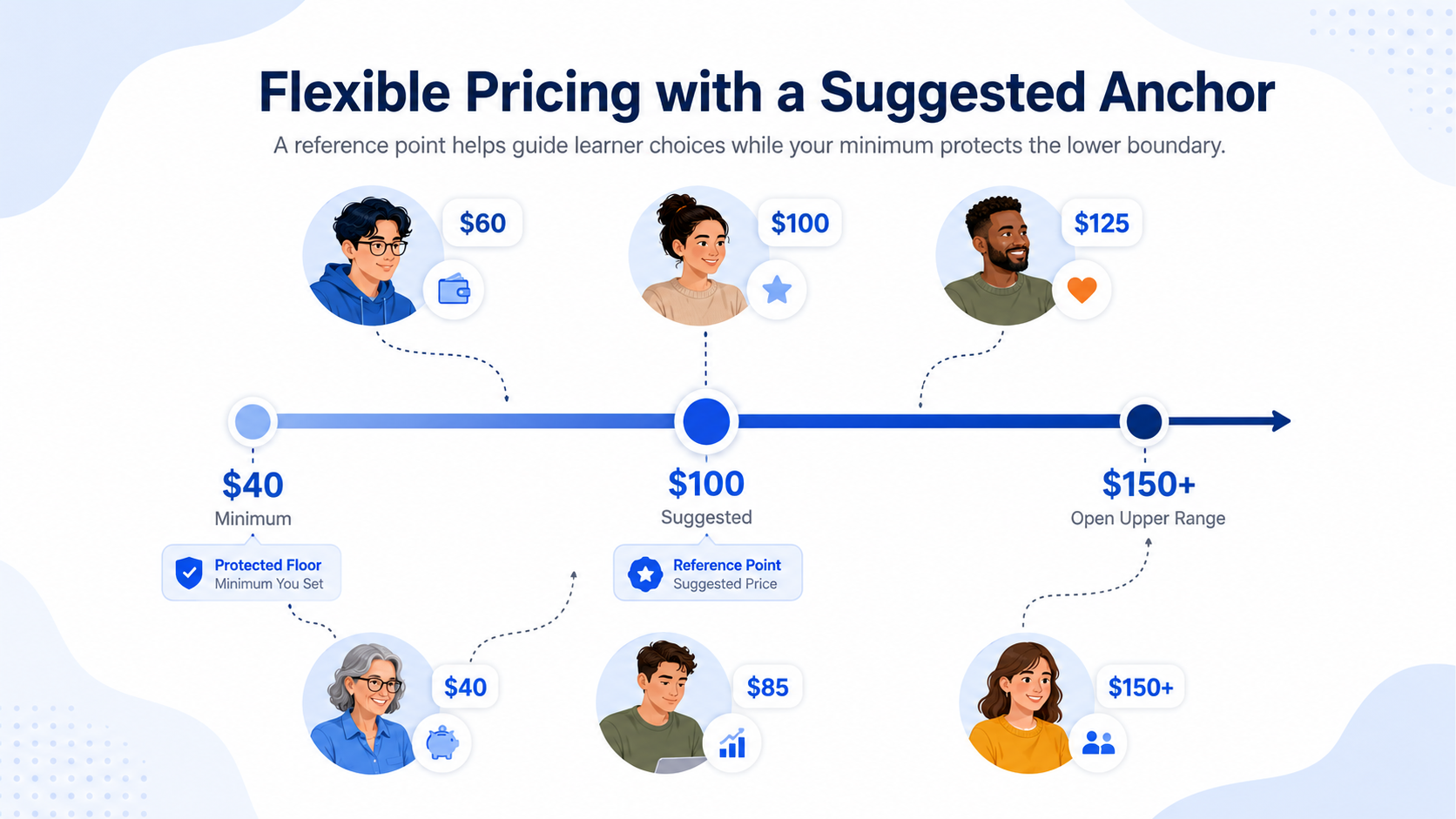
Suppose your access plan includes:
- A minimum price of $40
- A suggested price of $100
- No maximum price
The $40 minimum establishes the lowest acceptable payment.
The $100 suggestion indicates the standard amount you believe reflects the course’s reasonable value.
Learners aren’t choosing in a vacuum. They’re choosing in relation to the figure you’ve provided.
Choice Can Reduce Resistance
A fixed price creates a simple but unforgiving decision:
Pay this amount or leave.
Name Your Price changes the question.
Instead of asking whether they can justify one exact figure, the learner can ask:
What amount can I reasonably pay?
That sense of control can make the purchase feel more manageable.
The learner still has to decide whether the course is right for them. They still have to make a payment when your minimum is above zero. You’re simply removing one rigid point of friction from the process.
For someone who wants the course but can’t afford the standard price, that flexibility may be enough to turn an abandoned visit into an enrollment.
Why Flexible Pricing Doesn’t Always Mean Lower Payments
When you give learners a fair and meaningful choice, some will want to respond fairly.
They may choose the suggested price even though a lower option is available. Others may pay more than that because they appreciate the flexibility you’ve offered.
This is especially relevant when you’ve built a relationship with your audience.
A learner who regularly reads your content, attends your webinars, or has already benefited from your teaching may not approach the price as an anonymous transaction. They may see their payment as a way to support work they value.
You’ve shown that you trust them to make a reasonable choice, and some will return that trust.
Not everybody, of course. There will always be someone who sees a $40 minimum, enters $40, and congratulates themselves on a job well done. That’s why the minimum exists.
Some Learners Want to Support Your Work
For some learners, paying for a course or membership isn’t only about receiving access.
Their payment may also support:
- An independent course creator
- A nonprofit organization
- A community education project
- The continued development of free resources
- Lower-cost places for other learners
- Future courses and learning materials
A conventional price lets someone buy the course, but flexible pricing also lets them support the work that goes into it.
This patron-style model is already familiar to people who support writers, artists, podcasters, open-source projects, and other independent creators.
Name Your Price brings the same principle into your LifterLMS courses and memberships, giving committed learners a direct way to support your work.
The way you explain the offer can strengthen that connection.
For example:
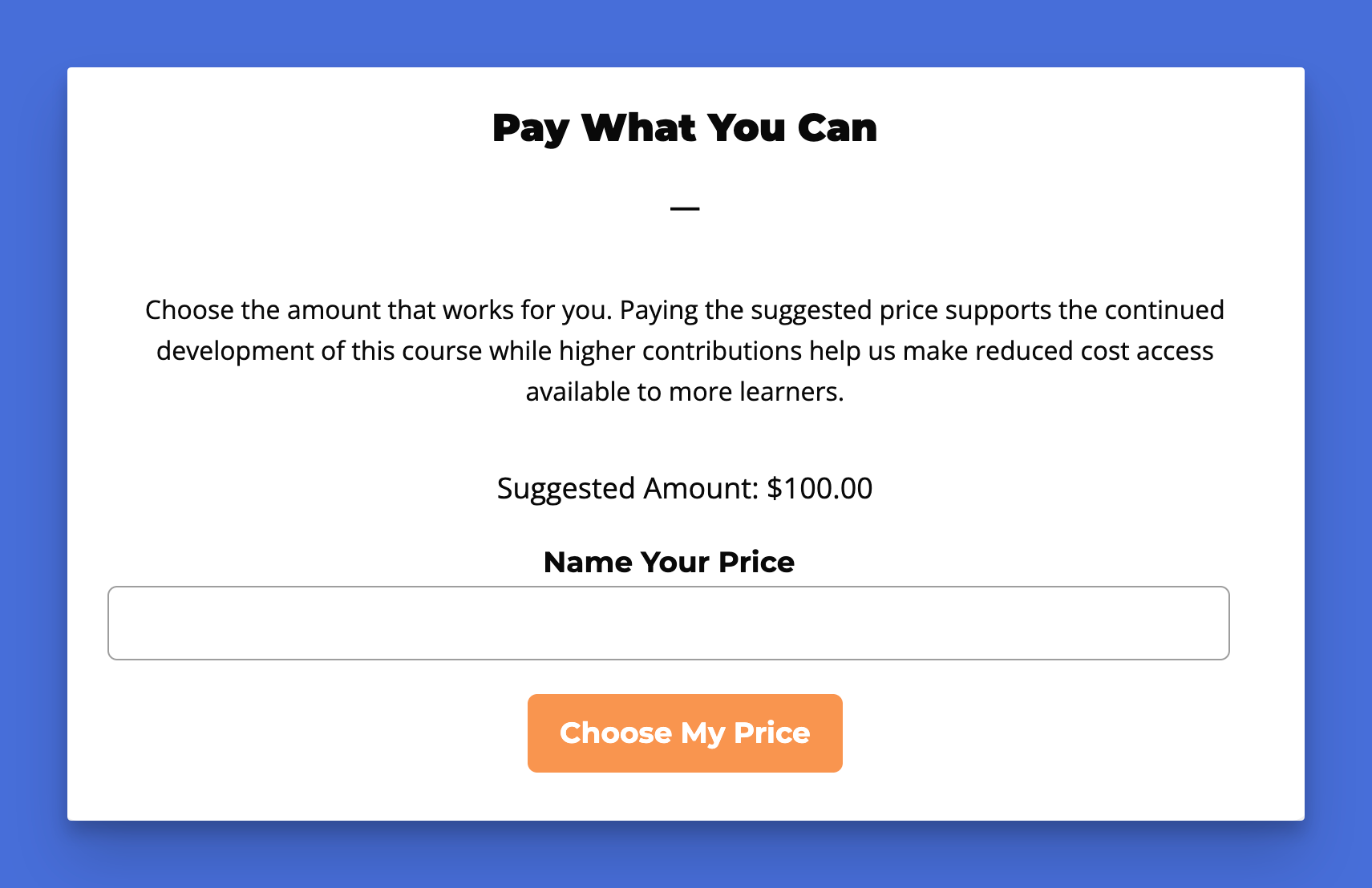
“Choose the amount that works for you. Paying the suggested price supports the continued development of this course. Higher contributions help us offer reduced-cost access to more learners.”
That copy explains what their payment means and makes it clear that choosing a lower amount isn’t something they need to feel awkward about.
More Flexible Pricing Can Mean More Revenue
Name Your Price isn’t only an accessibility feature. Used carefully, it can also support sales and revenue growth.
It creates several possible income opportunities:
- Recovering enrollments from people who couldn’t pay the original fixed price
- Receiving higher payments from learners who want to support your work
- Reaching audiences in markets with different levels of purchasing power
- Bringing more people into your wider course or membership ecosystem
- Learning what your audience is willing to pay
Consider a simplified example:
You sell a course for $100.
With fixed pricing:
- Two learners buy at $100
- Two interested learners decide they can’t afford it
- One of the buyers would willingly have paid $130
Your total revenue is $200.
You then offer the course with a $40 minimum and a $100 suggested price.
This time:
- One learner pays $100
- One learner pays $70
- One learner pays $50
- One supporter pays $130
Your total revenue is $350.
These figures are only an illustration. Flexible pricing won’t automatically produce that result, but this example shows why focusing only on the lowest permitted price can be misleading.
A $50 payment isn’t a $50 loss when that learner would otherwise have left without enrolling. It’s a $50 sale, a new learner, and a possible long-term customer.
The more useful question isn’t whether every learner pays your former fixed price, but whether the pricing model improves your overall mix of enrollments, income, audience reach, and learner results.
6 Ways to Use LifterLMS Name Your Price
Flexible pricing can support several types of course and membership businesses.
You don’t need to apply it across your entire site. You can use it for a specific course, membership, campaign, or audience while keeping pricing fixed elsewhere.
1. Offer sliding-scale course pricing
A sliding scale gives learners with different financial circumstances access to the same course.
You could set:
- Minimum price: $50
- Suggested price: $125
- Maximum price: $200
The learner chooses an amount within that range.
This can work well for:
- Career development programs
- Professional skills training
- Coaching courses
- Community education
- Mission-led programs
- Courses serving international audiences
The minimum protects the financial needs of your business. The suggested price communicates your normal expectation. The range creates room for individual circumstances.
You don’t have to create several separate access plans labeled low income, standard, and supporter.
Learners can make the choice themselves.
2. Reach learners across different markets
A single course can attract learners from countries with very different levels of purchasing power.
A price that feels reasonable in one market may be out of reach in another.
Name Your Price doesn’t perform automatic currency conversion, detect a learner’s location, or calculate a regional price. It isn’t a formal price-localization system.
Learners can consider their own financial circumstances and choose an amount within the range you’ve set. This can help you serve an international audience without maintaining a complicated collection of regional offers.
3. Create a pay-what-you-can course
Set the minimum price to zero when your priority is making the course available, regardless of someone’s ability to pay.
Learners who can contribute may choose the suggested amount or more. Those who can’t pay can still enroll.
This can suit:
- Nonprofit education
- Public-interest training
- Community programs
- Introductory courses
- Scholarship campaigns
- Crisis-response resources
The released add-on allows free Name Your Price purchases when the minimum is set to zero.
This gives you more options than choosing between a completely free course and a fixed paid course.
4. Accept contributions through educational content
For a nonprofit or community organization, the payment may be better framed as a contribution than a conventional product price.
The learner receives something useful in return, but they can also choose how much they’d like to support the organization.
For example, a nonprofit could offer a public education course with:
- A minimum price of $0
- A suggested contribution of $25
- No maximum
Someone who needs the information can access it for free.
Someone else may contribute $25, $50, or more because they support the cause.
The same access plan can serve both people without forcing either into an unsuitable price.
5. Give your strongest supporters a way to pay more
Your listed price can also act as a ceiling, even when you didn’t intend it to.
A learner who would happily contribute $150 to support your work will usually pay the $100 you request. They can’t choose a higher amount when the checkout doesn’t offer that option.
Name Your Price removes that invisible ceiling.
This can work well for creators who:
- Have an established community
- Publish substantial free educational content
- Serve a mission-led audience
- Run independent or creator-owned learning platforms
- Want supporters to help fund future resources
You don’t need to pressure anyone to pay more. Give them the option. Explain what additional contributions support. Let them decide.
6. Learn what people believe your course is worth
Pricing a new course can involve a surprising amount of educated guesswork.
You can study competitors, estimate the learner’s expected outcome, calculate your costs, and use the LifterLMS course pricing calculator.
At some point, the market still gets a vote. Name Your Price can help you gather practical information about willingness to pay.
Note: Willingness to pay is the maximum amount a learner is prepared to spend on your course, based on the value they expect to receive. It isn’t a single number. Two learners can want the same course just as much and still see very different prices as reasonable, because their budgets and circumstances differ. When you understand what your actual audience is willing to pay, your pricing is based on evidence rather than guesswork.
Review the amounts learners choose over time. You may spot patterns that help you refine your minimum, suggested price, or future fixed-price offers.
- If most learners choose the suggested price, it may be a good fit for your audience.
- If many pay more, you may have room to raise your standard price.
- If most choose the minimum, review whether the suggested price suits the audience, whether the sales page communicates enough value, and whether you’re attracting the right learners.
How to Choose Your Minimum Price
Your minimum price shouldn’t be an arbitrary token amount.
It needs to reflect what your business can reasonably accept.
Consider:
- Payment processing costs
- Support time
- Live calls or personal feedback included with the course
- Software and platform costs
- Instructor or staff time
- The number of learners you can serve
- The value of bringing someone into your wider audience
A primarily self-paced course may give you more room to offer a low minimum, whereas a coaching program that includes weekly one-to-one support will probably need a higher floor.
Ask yourself:
What’s the lowest amount I can accept without resenting the sale?
That question may not appear in many pricing textbooks, but it’s useful.
A flexible model should feel fair to the learner and sustainable for you.
How to Set the Suggested Price
The suggested price is one of the most important parts of your offer and shouldn’t be treated as placeholder text that happens to contain a number.
Use it to communicate the amount you believe represents a fair payment for most learners.
Your suggested price might be:
- The course’s previous fixed price
- The amount you’d normally charge
- The price that covers the full cost of delivering the program
- The contribution level that supports future course development
Keep the explanation brief and honest.
For example:
“The suggested price is $100. Choose a lower amount if the full price isn’t manageable right now, or contribute more to help us keep this program accessible.”
This makes the pricing model easier to understand, and also helps prevent the minimum from becoming the only figure learners notice.
Should You Set a Maximum Price?
You don’t always need a maximum. Leaving the upper limit open allows committed supporters to contribute as much as they choose.
A maximum can still be useful when:
- You don’t want learners accidentally entering an excessive amount
- Your pricing needs to remain within an approved range
- You’re offering several clearly defined contribution levels
- A very high payment could create unrealistic expectations about support or access
For many creator-led courses and memberships, an open upper range will make sense, whereas for structured programs, institutional training, or tightly controlled offers, setting a maximum may provide greater clarity.
Explain Why You’re Offering Flexible Pricing
Don’t add a price field and expect every learner to immediately understand your strategy. Tell them why the choice exists.
Your explanation can be as simple as:
“We want this course to be available to learners with different financial circumstances. Choose an amount within the available range. Paying the suggested price supports the course, while higher payments help us offer reduced-cost access to others.”
This explanation removes uncertainty, reassures learners who need to pay less, and gives supporters a clear reason to contribute more. It also connects the pricing choice to the purpose behind your offer.
Without that context, learners may wonder whether they’ve misunderstood the checkout form. Clear copy makes the choice feel intentional.
Flexible Pricing Still Gives You Control
You can enable Name Your Price only on the access plans where flexible pricing makes sense. Your other courses and memberships can continue using fixed prices.
The learner chooses the amount, but only within the framework you create.
When Name Your Price Is a Good Fit
Name Your Price may be right for your offer when:
- Suitable learners are leaving because of the price
- You serve people with widely different incomes
- Your audience spans several international markets
- You want to offer sliding-scale access
- You run a nonprofit or community organization
- You want to accept voluntary contributions
- Your audience has asked for more affordable access
- You want to test what learners are prepared to pay
- Some supporters may willingly contribute above your standard price
You don’t have to replace every fixed price on your site.
You might use Name Your Price for:
- One introductory course
- A community membership
- A limited campaign
- A nonprofit training program
- An older course with lower ongoing delivery costs
- A limited number of reduced-price places
Start with an offer where the model makes sense and review the results.
When Fixed Pricing May Still Be Better
Flexible pricing isn’t the right choice for every course.
A fixed price may remain more suitable when:
- Every buyer must pay the same contracted amount
- Your program has high per-learner delivery costs
- Your offer depends heavily on discounts or coupon campaigns
- Price consistency is central to your positioning
- A learner-selected price would make the offer harder to understand
- You require automatic location-based pricing
Name Your Price plans don’t use sale pricing or coupons. The minimum price acts as the creator’s stated floor, so applying another discount would undermine that boundary.
The add-on is also designed for the native LifterLMS checkout. It isn’t a replacement for WooCommerce pricing extensions or a regional price-localization service.
Look Beyond the Price of One Sale
Course creators often judge pricing by asking one question:
How much did this person pay?
With Name Your Price, it helps to look more broadly.
Consider:
- How many additional learners enrolled?
- How many would otherwise have left?
- Did some learners pay above the suggested amount?
- Did lower-paying learners complete the course?
- Did they later buy another offer?
- Did the model help you reach a new audience?
- Did it support your mission without creating unsustainable costs?
A learner who pays less today may become a long-term customer, community member, referral source, or success story. You shouldn’t underprice your work, but the value of an enrollment may extend beyond the first transaction.
Give More Learners a Way to Say Yes
You don’t have to choose between charging full price and giving your course away.
Set a minimum that protects your business, provide a suggested amount that communicates value, and let learners choose based on their circumstances. Their chosen amount may be lower, equal to, or higher than your suggestion, but more suitable learners have a realistic way to enroll.
LifterLMS Name Your Price is available as a standalone add-on. It’s also included in the Earth Bundle and the larger LifterLMS bundles shown on the LifterLMS pricing page.
Get LifterLMS Name Your Price and all of our other add-ons with the LifterLMS Infinity Bundle:



