


Hosting an LMS can place different demands on a WordPress server than hosting a typical blog or business website.
LifterLMS sites may need to handle logged-in students, course progress, quiz submissions, enrollments, ecommerce activity, and other dynamic requests. That makes hosting performance about more than simply serving cached pages quickly.
The right host for your site will depend on factors such as the number of students you serve, how much activity happens at the same time, your budget, and how much server management you want to handle yourself.
In this guide, we’ll compare some of the leading hosting options for LifterLMS sites in 2026 and look at where each one may fit best.
What to Look for in Hosting for LifterLMS
Before comparing providers, it helps to understand the basic requirements and some of the hosting features that can matter as an LMS site grows.
Minimum System Requirements
LifterLMS runs within WordPress, so your hosting environment needs to meet the platform’s current system requirements. At the time of writing, the recommended minimum versions are:
- WordPress 6.7 or higher
- PHP 8.3
- MySQL 8.0 or greater, or MariaDB 10.6 or greater
- Nginx or Apache with the mod_rewrite module
LifterLMS supports all PHP versions receiving active or security support, as well as the five most recent major WordPress releases.
PHP Workers and Concurrent Activity
PHP workers process dynamic PHP requests that cannot simply be served from a page cache. An LMS can generate plenty of this activity through student dashboards, quizzes, enrollments, checkout pages, course progress, and admin tasks.
The number of PHP workers available is therefore worth considering, especially if you expect many students to be active at the same time.
Persistent Object Caching Can Help
Persistent object caching can reduce repeated database work by keeping frequently requested data in memory.
Technologies such as Redis and Memcached can be particularly useful for dynamic WordPress sites with frequent database activity. If you expect a busy LMS site, check whether your host supports persistent object caching and whether it is included with your plan.
Storage and Bandwidth Considerations
LMS sites can accumulate substantial amounts of data over time, including:
- Course files and downloadable resources
- Student uploads and assignments
- Database records related to enrollments and progress
- Backups and staging copies
Video can consume considerable storage and bandwidth, so many course creators host video through a dedicated video platform rather than directly on the WordPress server.
When comparing plans, look at storage capacity, storage performance, bandwidth policies, backup storage, and any limits that may affect a growing course site.
Best Hosting Providers for LifterLMS in 2026
The following options take different approaches to WordPress hosting, so the best fit will depend on your site, budget, traffic, and technical requirements.
1. Rocket.net – Our Top Pick
Starting Price: $30/month (Starter plan)
Rocket.net is our top recommendation for a particularly simple reason: it’s the hosting platform we currently use for LifterLMS.com.
LifterLMS moved to Rocket.net in summer 2026 after working through several different hosting environments as the site and business grew. Following the move, our homepage response time was roughly cut in half, while testing showed that important uncached areas such as checkout and wp-admin continued to perform well under load.
Rocket.net also includes Cloudflare Enterprise with its hosting platform, which can help with performance, caching, and security.
Support was another important part of our decision. On the Enterprise plan used by LifterLMS.com, our team has access to Rocket.net support through a shared Slack channel.
Rocket.net became part of Hosting.com in August 2025, with founder Ben Gabler continuing to lead the Rocket.net product.
For LifterLMS users, that firsthand experience is why Rocket.net ranks at the top in this comparison.
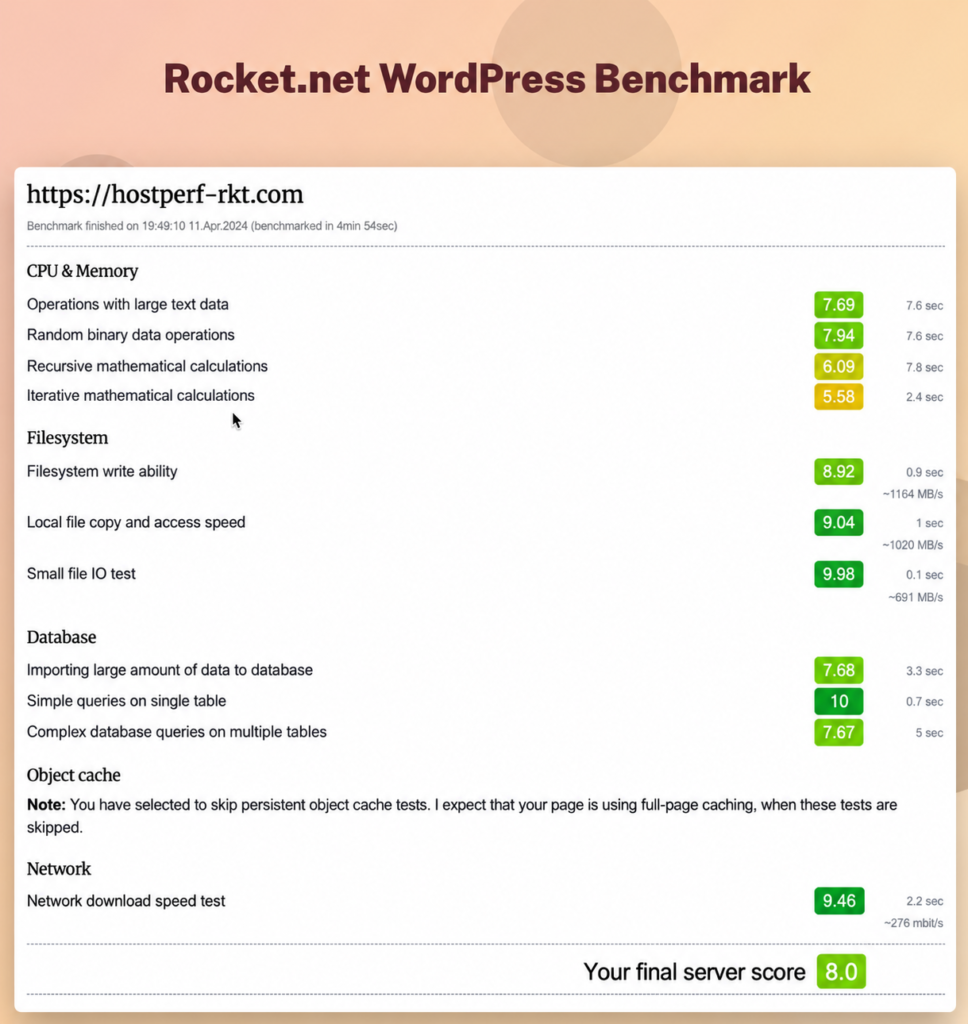
LMS-Friendly Features:
- Unlimited PHP workers on all plans
- Enterprise-grade CDN included (Cloudflare Enterprise)
- Unmetered visitors
- 99.99% uptime guarantee
- Automatic image optimization
- Built-in WAF (Web Application Firewall)
Pricing Breakdown:
- Starter: $30/month (1 site)
- Pro: $60/month (3 sites)
- Business: $100/month (10 sites)
Potential Drawbacks:
- Higher entry price point than budget options
- Plan upgrades may be required as resource needs grow
Verdict: Rocket.net is our top overall recommendation and currently powers LifterLMS.com. It combines managed WordPress hosting with Cloudflare Enterprise and has performed well for the dynamic parts of our own site. It costs more than some budget hosting options, but it is a strong choice for established LifterLMS sites that want managed hosting rather than direct server administration.
2. LifterLMS Hosting (Coming Soon)
Availability: Coming soon (currently available through the waitlist)
Best For: LifterLMS users who want their LMS software and hosting supported by the same team.
LifterLMS Hosting is an upcoming managed hosting option designed specifically for LifterLMS sites.
The LifterLMS team has spent more than 12 years running demanding LMS and ecommerce properties across five different hosting environments. That experience has given us a close view of what happens when course sites grow, traffic spikes, students log in, purchases are processed, and large amounts of dynamic activity hit the server at once.
LifterLMS Hosting is designed to bring the LMS and hosting sides together so site owners can work with one company that understands both the software and the server environment it runs on.
The service is not publicly available yet. If you’d like to be notified when LifterLMS Hosting launches, join the LifterLMS Hosting waitlist.
Join the LifterLMS Hosting Waitlist
3. HostWP.io
Starting Price: $19.99/month
Best For: Budget-conscious course creators who want managed WordPress hosting with caching and performance features included.
HostWP.io specializes in managed WordPress hosting and has created a dedicated hosting plan for LifterLMS users.
Its plans include technologies such as LiteSpeed, Redis object caching, and NVMe storage, with server resource allocations published for individual plans. HostWP also offers managed migrations and provides a WordPress migration plugin.
HostWP is one of the lower-cost options in this comparison, which may make it worth considering for course creators who want managed WordPress hosting without starting at the price of some larger providers.
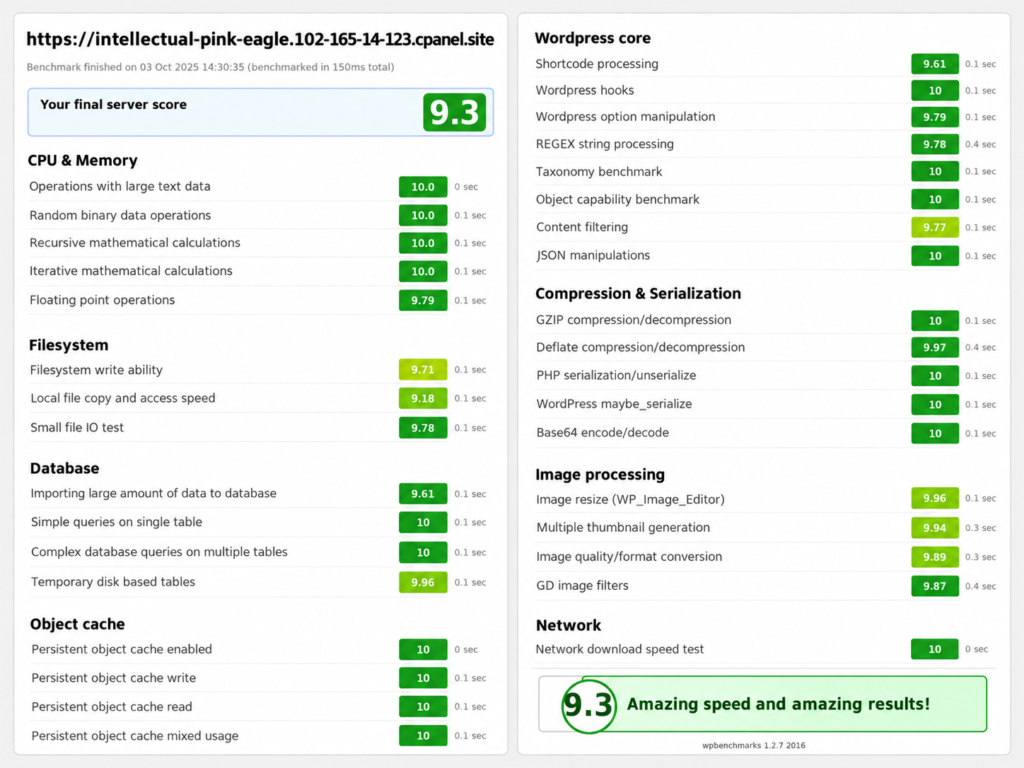
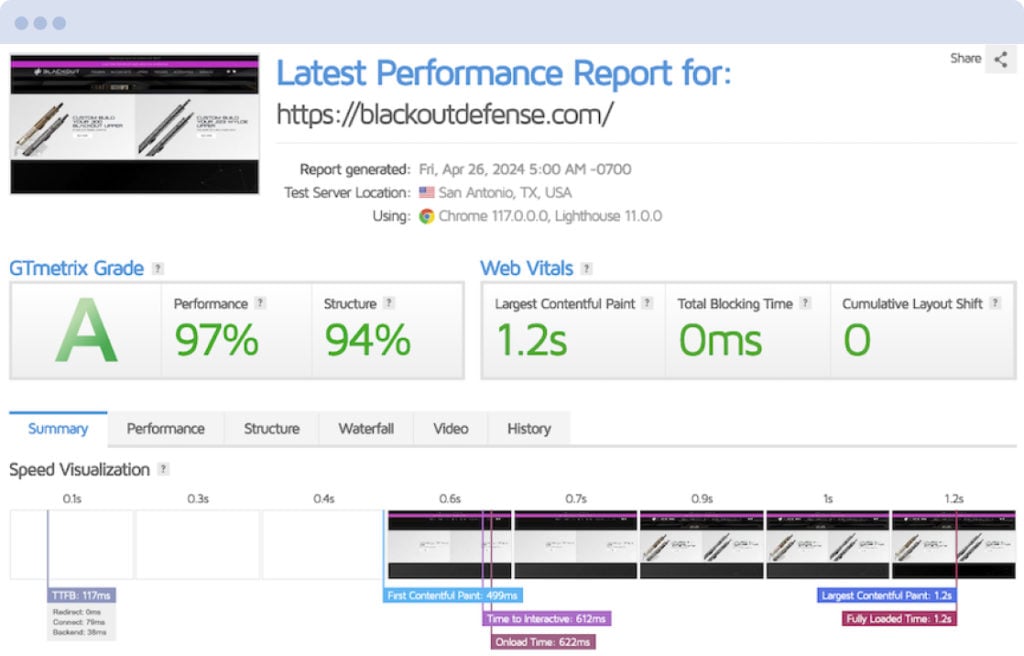
HostWP provided the benchmark below from a test run without a WordPress page-caching plugin. Because HostWP supplied this test rather than LifterLMS conducting it independently, treat it as an example of HostWP.io’s own performance testing rather than a direct comparison with the other providers in this guide.
LMS-Friendly Features:
- LiteSpeed Enterprise web server
- Redis object caching included on all plans
- Multiple PHP versions with one-click switching
- Free CDN and DNS management
- Free migrations included
Pricing Breakdown:
- Pro: $19.99/month after the $1 first month (5 sites, 20GB NVMe, 1TB bandwidth)
- Earlybird: $24.99/month after the $1 first month (10 sites, 30GB NVMe, 2TB bandwidth)
- Business: $34.99/month after the $1 first month (25 sites, 50GB NVMe, 4TB bandwidth)
- Agency: $49.99/month after the $1 first month (unlimited sites, 100GB NVMe, 4TB bandwidth)
- Premium: starts at $89.99/month
Potential Drawbacks:
- Relatively new player in the managed WordPress space
- Limited publicly available benchmark data compared to established hosts
- No autoscaling features (fixed resources per plan)
Verdict: HostWP is worth considering if price is a major factor and you want managed hosting with features such as LiteSpeed, NVMe storage, and Redis. It is a newer provider than many of the other companies in this comparison, so it does not yet have the same long-term track record or volume of independent performance data.
4. Levamo (formerly Rapyd Cloud)
Starting Price: $29/month
Best For: Larger or busier LMS sites that prioritize performance and can justify higher-tier pricing.
Levamo, formerly Rapyd Cloud, focuses on managed hosting for dynamic WordPress sites.
Levamo was created by the team behind BuddyBoss, giving the company direct experience with dynamic WordPress sites built around logged-in users, communities, and online learning.
To handle these heavy workloads, Levamo doesn’t just rely on standard Nginx or Apache setups. Instead, its stack uses LiteSpeed Enterprise servers, MariaDB, and KeyDB/Redis caching.
This type of server stack is intended to support dynamic WordPress workloads, making Levamo an option worth considering for busy LMS and community sites.
LMS-Friendly Features:
- 9.3 WP Benchmark Score
- 2,958 queries per second handling capability
- Optimized for WooCommerce and LMS workloads
- Built for logged-in user performance
Pricing Breakdown:
- Starter: $29/month (1 site, 25K monthly visits, 10GB SSD storage)
- Business: $99/month (3 sites, 75K monthly visits, 25GB SSD storage)
- Performance: $299/month (20 sites, 500K monthly visits, 75GB SSD storage)
- Enterprise: $649/month (30 sites, 1.8M monthly visits, 200GB SSD storage)
Potential Drawbacks:
- Higher-tier plans become expensive quickly
- Limited plan options compared to competitors
- Less transparent about specific PHP worker allocations
- Smaller company with fewer public case studies
Verdict: Levamo is aimed at dynamic WordPress sites with logged-in users and offers plans designed for increasingly demanding workloads. Its published benchmark results may be useful when comparing its performance claims with other providers, but the higher-tier plans become expensive, which may make it a better fit for larger LMS and community sites than smaller course businesses.
5. RunCloud
Starting Price: $9/month (plus cloud server costs)
Best For: Technical users who want more control over their server and cloud provider.
Unlike the managed WordPress hosts in this list, RunCloud is a server management platform. You connect it to cloud infrastructure from a provider such as DigitalOcean, Vultr, or another supported service, then manage your WordPress server through RunCloud.
This makes it a different proposition from providers such as Rocket.net or Kinsta. You gain more control over the underlying server, but you also take on more responsibility.
This approach gives you control over the server resources and caching configuration, which can be useful when tailoring a server to the demands of a growing LifterLMS site.
LMS-Friendly Features:
- Full control over server configuration
- Choose your own cloud provider and server specs
- Server-side caching options, including Redis and Memcached
- Staging environments
- Automated backups
- Git deployment support
Pricing Breakdown:
- Essentials: $9/month (1 server)
- Professional: $19/month (50 servers)
- Business: $49/month (100 servers)
- Enterprise: $399/month (500 servers)
- Cloud server costs are separate and depend on the provider and server specification
Potential Drawbacks:
- Requires technical knowledge (server administration)
- You retain more responsibility for the underlying server than with fully managed WordPress hosting
- Complex setup compared to traditional managed hosting
- Server security and maintenance require more hands-on involvement
Verdict: RunCloud is a strong option for users who want greater control over their cloud server and are comfortable taking on more technical responsibility. It can offer more flexibility than traditional managed WordPress hosting, but it requires more setup and ongoing server management.
6. Servebolt
Starting Price: €99/month (~$107 USD)
Best For: Larger LMS sites with demanding performance requirements and higher hosting budgets.
Servebolt focuses on managed hosting for high-performance WordPress sites, with an emphasis on scalability and security.
Servebolt launched in 2015 with a clear focus on speed, security, and scalability for high-performance WordPress sites. Originating in Norway, the company focuses on managed hosting for agencies, ecommerce sites, and other demanding WordPress workloads.
Under the hood, Servebolt utilizes a highly optimized cloud stack featuring Nginx, PHP-FPM, and MariaDB. Servebolt combines its Bolt Cache technology with CDN capabilities designed to improve content delivery and reduce the load on the origin server.
LMS-Friendly Features:
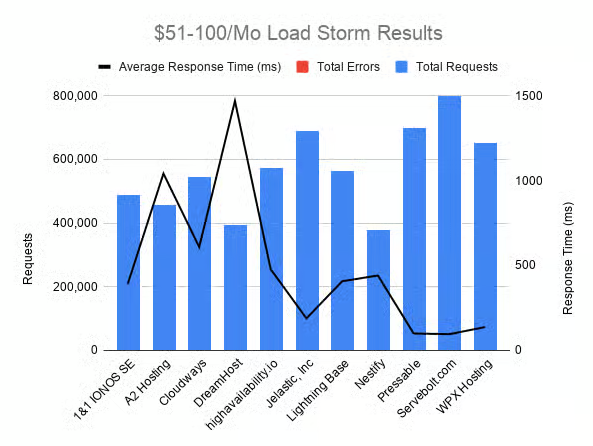
- Hosting designed for high-performance WordPress workloads
- 500,000 dynamic requests on Pro plan
- 256MB PHP memory limit
- Enterprise-grade security
- Scalable plans for higher workloads
- Servebolt Optimizer plugin for WordPress
Pricing Breakdown:
- Pro: from €99/month (10GB storage, 500,000 dynamic requests, 5 live sites)
- Business: from €349/month (40GB storage, 1,000,000 dynamic requests, 25 live sites)
- Scale: from €699/month (100GB storage, 3,000,000 dynamic requests, 50 live sites)
- Enterprise: custom pricing
Potential Drawbacks:
- Expensive entry point (€99/month)
- Pricing in EUR can fluctuate with exchange rates
- Storage limits are relatively low for the price
- Overkill for smaller LMS sites
Verdict: Servebolt is positioned toward high-performance WordPress sites and carries a higher starting price than many of the alternatives in this guide. It is likely to make more sense for larger LMS sites with demanding performance requirements than for smaller course sites with modest traffic.
7. Kinsta
Starting Price: $35/month for a single-site plan
Best For: Established course creators who want managed WordPress hosting with performance monitoring and support.
Kinsta entered the market in 2013 and quickly established itself as a premium managed WordPress host. Over the years, they have become a go-to choice for high-traffic websites and complex LMS platforms, thanks to their strong emphasis on performance, proactive security, and developer-friendly features.
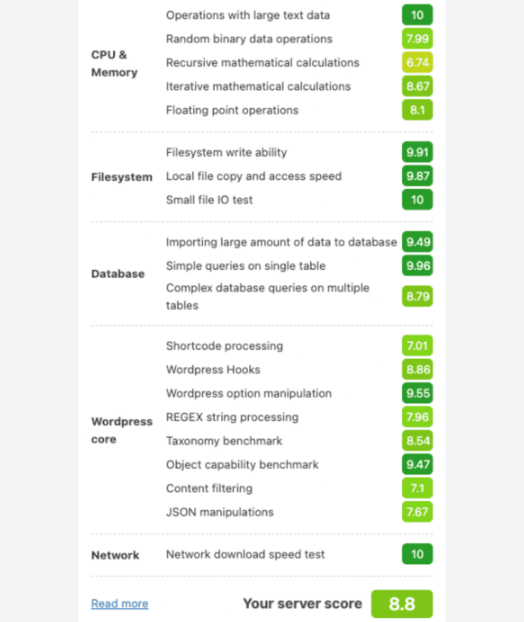
Their infrastructure runs entirely on Google Cloud Platform’s premium tier, using a container-based architecture rather than shared hosting. This stack combines Nginx, MariaDB, PHP, and Kinsta’s own caching system. Kinsta also provides performance monitoring and managed WordPress features that can be useful for established LMS sites.
LMS-Friendly Features:
- Google Cloud Platform infrastructure (Premium Tier)
- PHP threads (workers) are adjustable per plan
- Kinsta APM for performance monitoring
- Redis add-on available (extra cost)
- Free CDN and SSL
- Automatic daily backups
Pricing Breakdown:
- Single-site plans start at $35/month
- Multi-site plans start at $70/month
- Agency plans start at $340/month
Potential Drawbacks:
- Usage limits depend on the billing model and plan selected
- Redis object caching costs extra
- PHP memory limit is 256MB on most plans
Verdict: Kinsta offers managed WordPress hosting with performance monitoring, backups, and support. Depending on the billing model and plan you choose, usage limits and paid add-ons such as Redis may increase the cost for busier LMS sites. If your traffic regularly approaches the allowance on your chosen plan, factor potential overage costs or plan upgrades into your hosting budget.
8. Convesio
Starting Price: From $50/month
Best For: Higher-traffic LMS sites that may benefit from autoscaling options.
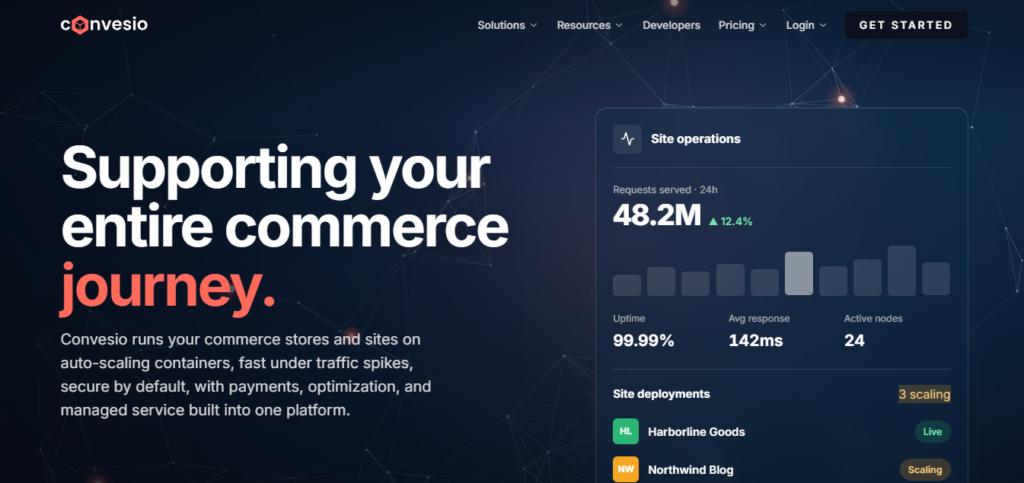
Convesio differentiates itself with its container-based architecture and scaling features.
Convesio launched with a unique approach to WordPress hosting, focusing on container-based architecture rather than traditional server setups. Founded to solve the scaling challenges that high-traffic WordPress sites face, they’ve positioned themselves as a specialized solution for membership sites, eLearning platforms, and other dynamic WordPress applications that need automatic scaling during traffic spikes.
Convesio uses a container-based architecture designed to add resources as demand changes. That makes its autoscaling approach particularly relevant to sites that experience sudden or unpredictable traffic increases.
LMS-Friendly Features:
- Autoscaling options for changing resource demands
- Self-healing infrastructure
- Container-based architecture
- Real-time resource allocation based on CPU/memory usage
- Built for enterprise WordPress deployments
Pricing Breakdown:
- Express plans: from $50/month
- Agency plans: from $150/month
- Ultra plans: from $600/month
- Custom plans: from $2,000/month
Potential Drawbacks:
- Complex pricing structure
- Steep learning curve
- Overkill for smaller sites
- Limited documentation compared to competitors
- Newer platform with a shorter long-term track record
Verdict: Convesio’s main differentiator is its approach to scaling. Higher-tier plans offer features designed to handle changing resource demands, making the platform particularly relevant to sites with unpredictable traffic. For smaller sites with steady traffic, that level of complexity may be unnecessary.
9. Pressidium

Starting Price: $21/month (Starter plan)
Best For: Growing LMS sites that want enterprise features at mid-tier pricing.
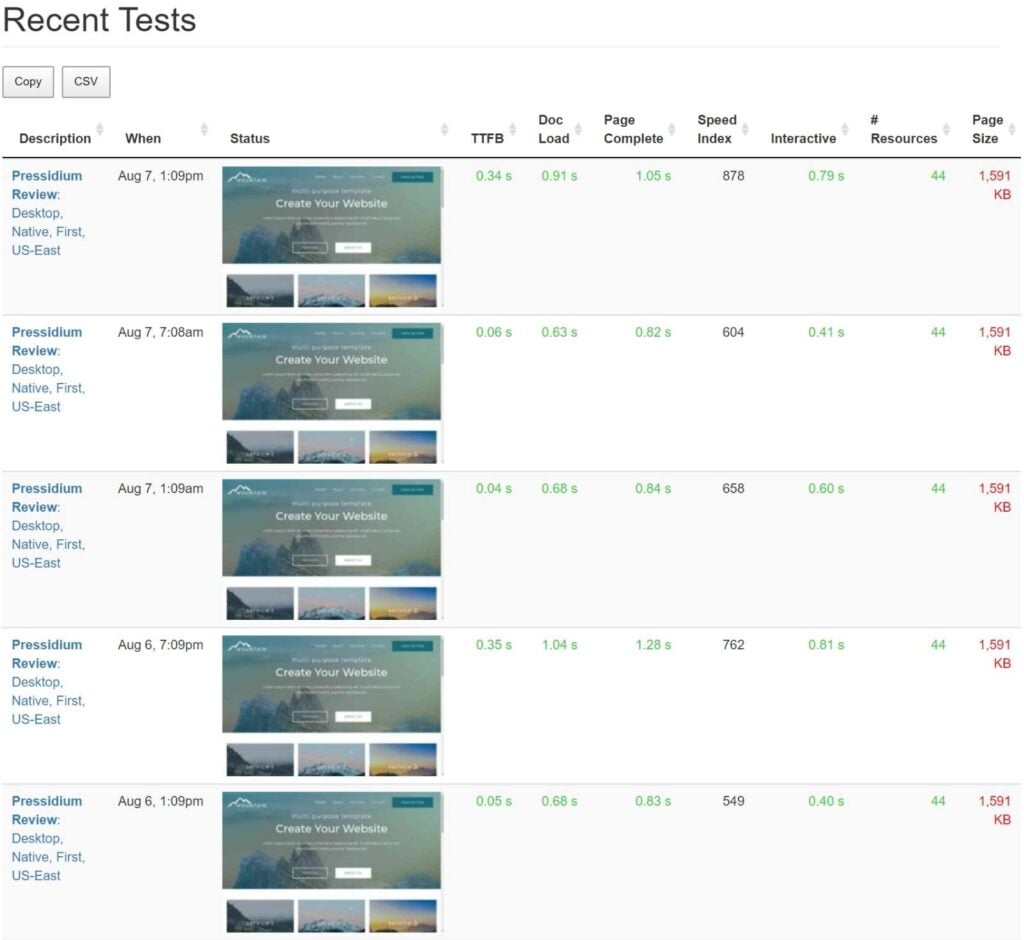
Pressidium has been serving WordPress sites since 2014, building a reputation as an enterprise-grade managed hosting provider. Pressidium focuses on managed WordPress hosting for sites that need high availability, managed security, and infrastructure designed for heavier traffic.
Under the hood, Pressidium runs on a multi-tiered architecture featuring Nginx, PHP-FPM, and MySQL with Galera clustering for high availability. Its hosting platform includes caching and CDN features designed to support WordPress performance across different geographic regions.
LMS-Friendly Features:
- High-performance infrastructure
- Enterprise-grade security
- Free site migrations
- Daily backups
- Staging environments
- Object caching included
Pricing Breakdown:
- Starter: $21/month (1 site, 10GB storage, designed for 50K unique visits/month)
- Pro: $42/month (3 sites, 20GB storage, designed for 100K unique visits/month)
- Growth: $67/month (5 sites, 30GB storage, designed for 200K unique visits/month)
- Advanced: $92/month (8 sites, 40GB storage, designed for 300K unique visits/month)
- Agency plans: from $125/month
- Premium Sites: from $167/month
- Enterprise: from $750/month
Potential Drawbacks:
- Plan-based visit allowances
- Premium plans are expensive for single sites
- Less transparent about PHP worker allocations
- Smaller market presence than Kinsta or WP Engine
Verdict: Pressidium has a relatively low $21/month entry price, with plans that increase in capacity as traffic and storage requirements grow. Larger LMS sites should compare the cost of those higher tiers with competing managed hosting options.
10. Cloudways
Starting Price: $14/month
Best For: Technical users who want managed hosting flexibility with multiple cloud provider options.
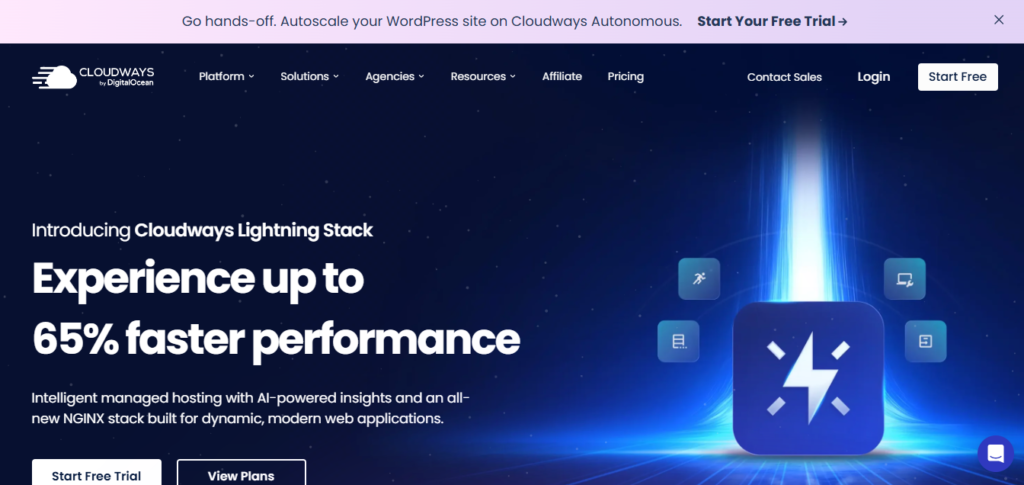
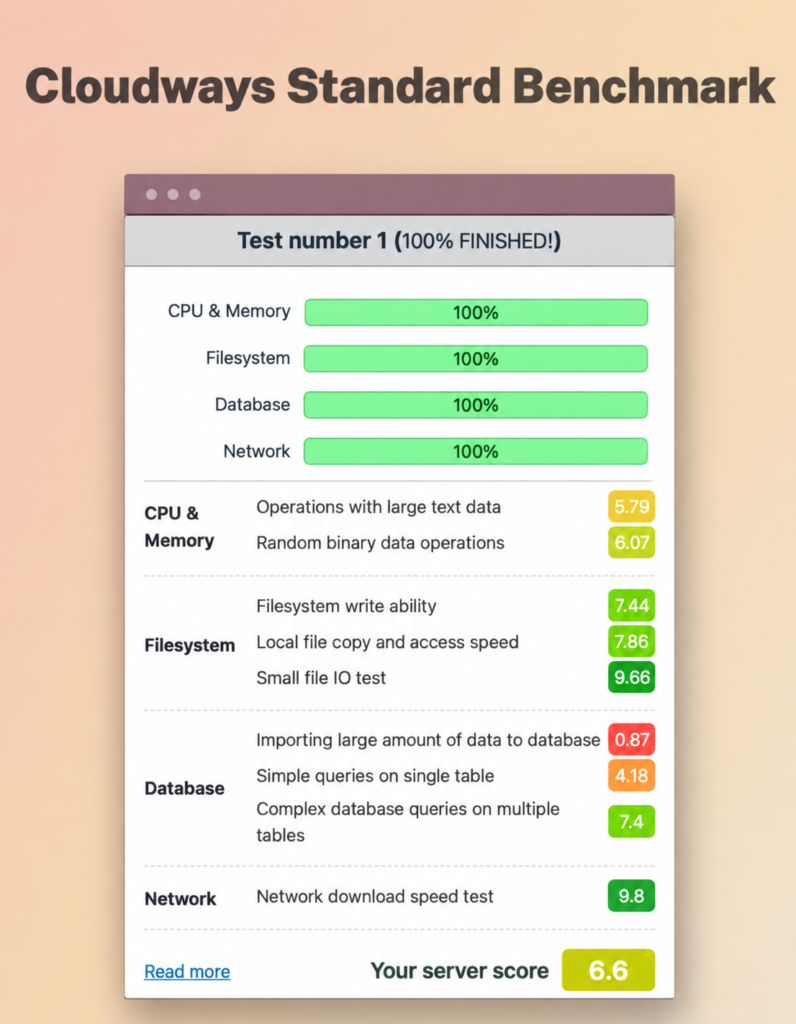
Cloudways operates differently from traditional managed hosts by providing a management layer on top of major cloud providers like DigitalOcean, Vultr, AWS, and Google Cloud. Since their acquisition by DigitalOcean, they’ve become an even more integrated solution for developers and tech-savvy WordPress users who want managed hosting convenience with the flexibility and pricing control of raw cloud infrastructure.
Their server stack is highly customizable, offering both Nginx and Apache options along with MariaDB, PHP-FPM, and Memcached or Redis for object caching. Cloudways allows users to choose server resources and configure caching options such as Redis, giving technical users more control over how their hosting environment is configured.
LMS-Friendly Features:
- Multiple cloud provider options
- SSD storage
- Redis Cache and Object Cache Pro
- Free SSL and CDN
- Automated backups
- Staging environments
- 24/7 support
Pricing Breakdown:
- Micro: $14/month
- Small: $28/month
- Medium: $54/month
- Large: $99/month
- Other server sizes and cloud-provider configurations are available
Potential Drawbacks:
- More technical than traditional managed hosting
- Pricing can get complex with multiple add-ons
- Not specifically optimized for LMS (general-purpose)
- No autoscaling on standard plans
Verdict: Cloudways offers a wide range of server configurations and pricing options, especially on DigitalOcean and Vultr. You can choose exactly the server specs you need and scale vertically as your LMS grows. It is a general-purpose managed cloud hosting platform rather than a hosting service built specifically for LMS sites.
11. WP Engine
Starting Price: $26/month (Startup plan)
Best For: Established businesses that want managed WordPress hosting with developer tools and higher-tier options.
WP Engine has provided managed WordPress hosting since 2010 and has expanded its platform through acquisitions, including Flywheel and StudioPress.
Their proprietary EverCache technology runs on Nginx and is specifically engineered for WordPress, intelligently caching static content while keeping dynamic elements fresh. For LifterLMS sites, WP Engine combines WordPress-specific caching with a global CDN, while dynamic requests continue to be processed by the hosting environment.
LMS-Friendly Features:
- Proven track record with enterprise clients
- Global CDN included
- Advanced security features
- Git integration
- Staging environments
- 24/7 expert support
- Genesis Framework and themes included
Pricing Breakdown:
- Startup: $26/month (1 site, 25,000 visits, 10GB storage, 75GB bandwidth)
- Professional: $42/month (3 sites, 75,000 visits, 15GB storage, 150GB bandwidth)
- Growth: $84/month (10 sites, 100,000 visits, 20GB storage, 240GB bandwidth)
- Scale: $217/month (400,000 visits, 50GB storage, 550GB bandwidth)
- Core Hosting: $312/month
- Core package: from $400/month
- Enterprise: custom pricing
Potential Drawbacks:
- Strict visitor limits with overage charges
- Limited storage on lower plans
- Higher pricing than some managed WordPress alternatives
- Premium add-ons cost extra
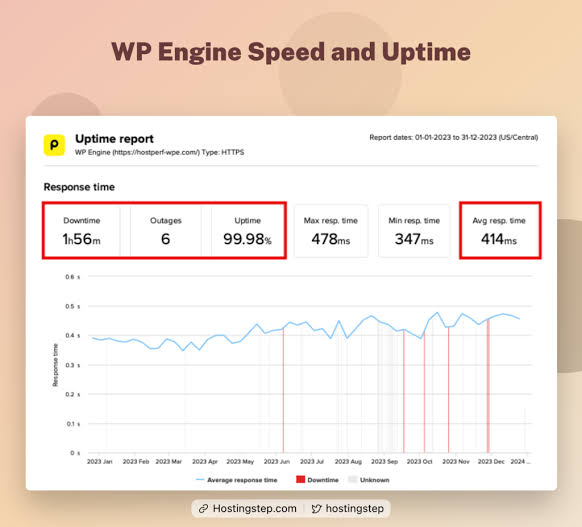
Verdict: WP Engine is an established managed WordPress provider with developer tools, staging environments, support, and plans for larger businesses. Sites approaching their plan’s visit allowance should account for possible overage charges or the cost of moving to a higher tier. WP Engine may suit established businesses that value managed hosting and developer tools, while smaller course sites may find lower-cost options elsewhere in this comparison.
LifterLMS Hosting Provider Comparison
| Provider | Starting Price | Hosting Type | Object Caching | Traffic/Usage Limits | Best For |
| Rocket.net | $30/month | Managed WordPress hosting | Included | Unmetered visitors | LifterLMS users who want managed hosting and the current LifterLMS.com hosting choice |
| LifterLMS Hosting | Join The Waitlist | Managed LifterLMS hosting | To be announced | To be announced | LifterLMS users who want hosting from the same team that builds the LMS |
| HostWP.io | $19.99/month | Managed WordPress hosting | Redis included | Plan-based bandwidth allowances | Budget-conscious course creators looking for managed WordPress hosting |
| Levamo | $29/month | Managed WordPress hosting | KeyDB/Redis available on higher-tier plans | Plan-based monthly visit limits | Higher-performance LMS and community sites |
| RunCloud | $9/month plus server costs | Server management platform | Redis and Memcached available | Depends on the chosen cloud server | Technical users who want control over their server and cloud provider |
| Servebolt | From €99/month | Managed WordPress hosting | Redis Cache available | 500,000 dynamic requests on Pro plan | Larger LMS sites with demanding performance requirements |
| Kinsta | $35/month | Managed WordPress hosting | Redis available as a paid add-on | Billing can be based on bandwidth or visits | Established course creators who want managed WordPress hosting and support |
| Convesio | From $50/month | Managed WordPress hosting with autoscaling | Object caching included | Plan-based scaling and resource limits | Sites with unpredictable traffic spikes |
| Pressidium | $21/month | Managed WordPress hosting | Object caching included | Plan-based visit allowances | Growing LMS sites looking for managed hosting at a mid-range price |
| Cloudways | $14/month | Managed cloud hosting platform | Redis Cache and Object Cache Pro available | Plan-based server resources | Technical users who want more control without managing a raw server |
| WP Engine | $26/month | Managed WordPress hosting | Built-in caching via EverCache | 25,000 visits/month on Startup plan | Established businesses that want managed WordPress hosting and developer tools |
The providers above aren’t the only hosting options available to LifterLMS users. You can also explore other hosting providers recommended by the LifterLMS community, including Tangible XP, MemberHost, WP Tonic, Pressable, GridPane, and Hostinger, in our recommended hosting resources.
How to Choose the Right Host for Your LifterLMS Site
Rocket.net is our top overall recommendation, but different hosting approaches may make more sense depending on your budget, technical experience, and the demands of your site.
For New Course Creators on a Smaller Budget
- Compare lower-cost options such as HostWP and Cloudways.
- Check the resources included with the entry-level plan rather than choosing on price alone.
- Make sure you can move to a larger plan as your student base and traffic grow.
For Course Creators Who Prioritize Managed Hosting
- Start with Rocket.net if you want our current overall recommendation.
- Compare plan limits, support, backups, caching, and available server resources based on the size of your site.
- If you want a lower-cost option, compare HostWP and other managed providers against the resources your site actually needs.
- For more managed hosting choices, see our recommended hosting resources, which include options such as WP Tonic, Pressable, MemberHost, and Hostinger.
For LifterLMS Users Who Want Hosting From the LMS Team
- LifterLMS Hosting is coming soon and is currently waitlist-only.
- It is being built specifically around LifterLMS and the demands of dynamic LMS sites.
- Join the LifterLMS Hosting waitlist to be notified when it becomes available.
For Larger or Higher-Traffic LMS Sites
- Compare providers such as Convesio and Servebolt if autoscaling or higher-performance hosting is a priority. You may also want to consider Tangible XP, which is included in LifterLMS’s recommended hosting resources for high-traffic LMS sites with many concurrent users.
- Ask each provider how its plans handle dynamic traffic, concurrent activity, resource limits, and traffic spikes.
- Base your choice on your own expected workload rather than headline visitor allowances alone.
For Developers Who Want More Control
- RunCloud with your choice of cloud provider
- Complete control over server configuration
- Choose your cloud infrastructure and server resources separately
For Established Businesses (Proven Reliability)
- Kinsta or WP Engine
- Established managed WordPress platforms with support and developer tools
- Extensive documentation and community
Critical Factors Most People Overlook
1. Concurrent Users vs Total Visitors
Monthly visitor allowances do not tell you everything about how a host will handle a busy LMS.
If many students are taking quizzes, checking out, accessing dashboards, or performing other dynamic actions at the same time, the server may need to process numerous PHP and database requests within a short period.
When comparing hosts, ask how the relevant plan handles concurrent dynamic activity rather than relying on monthly visitor numbers alone.
2. Database Performance
LMS sites generate frequent database activity through actions such as quiz submissions, progress updates, enrollments, and account activity.
Look for hosts that offer:
- Fast MySQL/MariaDB performance
- Adequate database connections
- Object caching (Redis) to reduce database load
3. Support Response Time
If your LMS experiences a problem during a launch or another busy period, fast access to knowledgeable support can matter.
Test support before committing:
- Send a pre-sales question and time the response
- Check if support is 24/7 or business hours only
- Look for WordPress-specific expertise, not generic hosting support
4. Migration Support
If you’re moving an existing LMS, downtime during migration can disrupt active students.
Look for hosts that offer:
- Free professional migrations
- Staging environments to test before going live
- Backup strategies during the migration process
Final Thoughts
Choosing the right hosting for LifterLMS depends on the size of your site, the amount of dynamic activity it needs to handle, your budget, and how much server management you want to take on yourself.
Rocket.net is our top overall recommendation because it currently powers LifterLMS.com and has performed well for our own combination of public pages, ecommerce, wp-admin activity, and other dynamic workloads.
If you want more control over the underlying server, platforms such as RunCloud offer a very different approach. Other managed providers in this guide may suit different budgets and requirements, so compare their current plans carefully before making a decision.
We’re also building LifterLMS Hosting for users who want their LMS software and hosting supported by the same team. It isn’t publicly available yet, but you can join the LifterLMS Hosting waitlist to be notified when it launches.
Whatever provider you choose, look beyond headline page-load speeds. Pay attention to dynamic performance, caching, resource limits, backups, support, scalability, and what happens when multiple students are using your site at the same time.
Try LifterLMS With Hosting Built Around Your LMS
Your hosting plays a major role in how your course site performs as it grows. LifterLMS Hosting is being built specifically for LifterLMS users who want their LMS software and hosting supported by the same team.
Join the waitlist to be notified when LifterLMS Hosting becomes available.



