

A learner explores your course, reaches checkout, and looks ready to enroll…
…only to disappear before completing the purchase.
Sometimes life simply gets in the way. A meeting starts, dinner is ready, or they decide to come back later and never do. Other times, hesitation creeps in. They want more time to think, compare options, or revisit the decision another day.
The important thing to remember is that an abandoned checkout isn’t always a lost sale.
That is exactly what Cart Abandonment Recovery for LifterLMS is designed to help with.
Rather than letting interested learners quietly disappear, the Cart Abandonment Recovery add-on helps you reconnect automatically with people who were already close to enrolling. Through follow-up emails, configurable timing, and optional incentives, it helps recover revenue that might otherwise be lost.
Because sometimes the difference between an abandoned cart and a new student isn’t stronger marketing or a lower price: it is simply reconnecting at the right moment.
Why Cart Abandonment Happens in Online Education
Before looking at recovery strategies, it helps to understand something important:
Cart abandonment is normal.
In ecommerce, abandoned carts happen all the time.
Someone starts checkout, gets distracted, changes priorities, or simply decides to think about it later. The same is true for online education, but course creators often experience it differently because enrollment feels more personal.
After all, someone who reaches your checkout has already shown serious intent, which is why abandoned enrollment can feel particularly frustrating.
There are several common reasons learners abandon checkout:
1. Life gets in the way
Many learners are fitting education around already busy lives.
A work meeting starts, school pickup happens, dinner is ready, or someone fully intends to come back later and simply forgets.
2. Decision hesitation
Course purchases often involve more consideration than typical ecommerce products.
Learners may want time to think through the investment, compare alternatives, discuss it with someone else, or simply feel more confident before committing.
3. Price sensitivity
Even when someone genuinely wants your course, budget can influence timing.
Sometimes the intention to buy is still there, just not at that exact moment.
4. Technical friction
Unexpected login issues, payment concerns, unclear checkout steps, or simple distractions during checkout can interrupt momentum.
An abandoned checkout doesn’t always mean someone lost interest, which is exactly what makes recovery worth paying attention to.

What Is The Cart Abandonment Recovery Add-on in LifterLMS?
The Cart Abandonment Recovery add-on helps course creators reconnect with learners who begin checkout but leave before completing enrollment.
Rather than letting those potential students quietly disappear, the system works in the background to automatically follow up and encourage them to return.
When enabled, LifterLMS can capture learner details during checkout and trigger a sequence of automated follow-up emails designed to bring them back and complete their purchase. These reminders can be timed, customized, and even paired with optional incentives if appropriate for your business.
Recovery emails can act as simple reminders:
“You were interested in this course – would you like to continue where you left off?”
In practical terms, the Cart Abandonment Recovery add-on helps course creators automatically reconnect with interested learners, recover potentially lost enrollments, experiment with different recovery approaches, and gain better visibility into what happens after someone leaves the checkout page.
How The Cart Abandonment Recovery Add-on Works
The Cart Abandonment Recovery add-on is designed to be simple.
The process begins when a learner starts checkout for a course, membership, or training program and enters their email address. If they leave before completing payment, LifterLMS can recognize that the checkout was abandoned and trigger a recovery sequence.
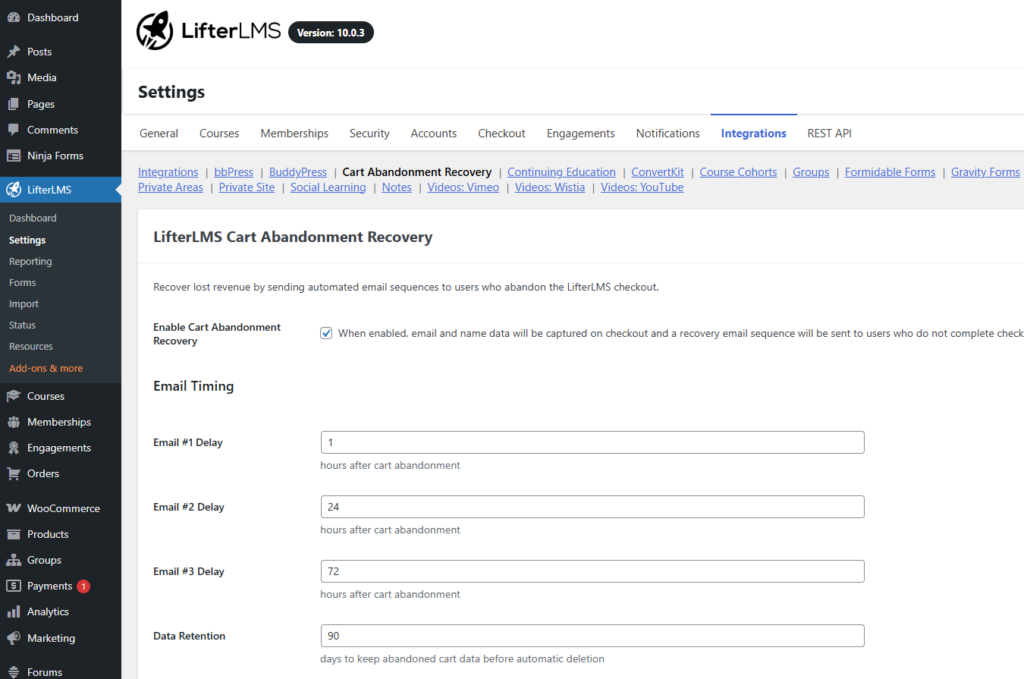
Automated follow-up emails encourage learners to return and complete enrollment, with configurable timing that gives you control over when reminders are sent.
For example, you might choose to:
- Send an initial reminder shortly after checkout is abandoned
- Follow up the next day while interest is still high
- Send a final reminder several days later
If the learner returns and completes checkout, recovery emails stop automatically.
Why Course Creators Should Care About Recovery Emails
By the time someone reaches checkout, a significant amount of work has already happened.
Whether your learners found you through SEO, YouTube videos, email marketing, webinars, referrals, or paid ads, they have already moved through the hardest part of the decision-making process. They discovered your course, spent time evaluating it, and reached the point where enrolling felt worth considering.
That is why abandoned checkout can feel particularly frustrating. The learner was already close to enrolling. But in many cases, an abandoned checkout has very little to do with the quality of your course.
Rather than leaving learners to remember your course on their own, a well-timed reminder can bring them back to a decision they were already close to making.
For course creators, this can represent meaningful recovered revenue from learners who were already closer to enrolling than they may have realized.
Setting Up The Cart Abandonment Recovery Add-on in LifterLMS
One advantage of the Cart Abandonment Recovery add-on is that it doesn’t require a complex setup process. Once enabled, the feature can begin working quietly in the background, helping reconnect with learners who leave during checkout.
That said, spending a few minutes configuring the settings thoughtfully can make a meaningful difference to how effective recovery feels.
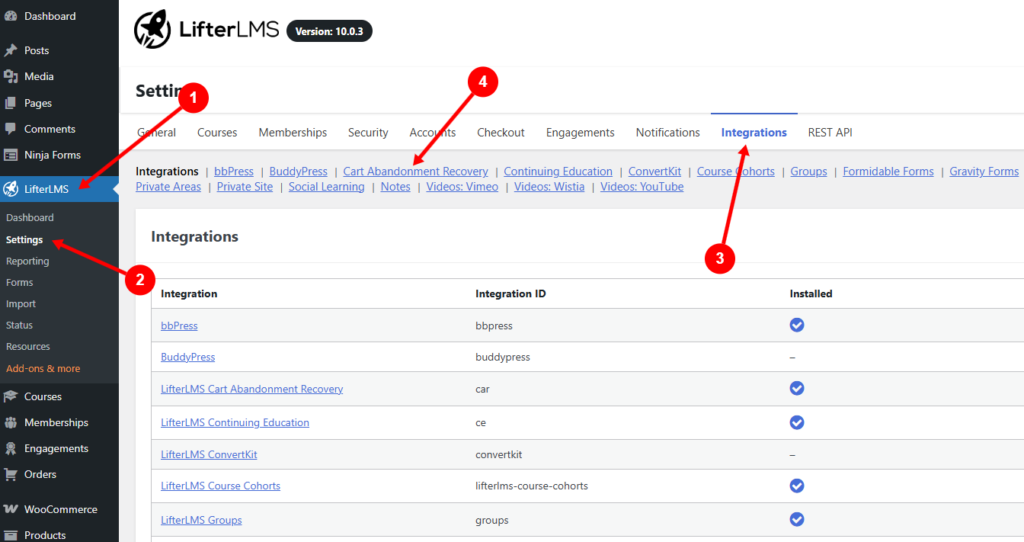
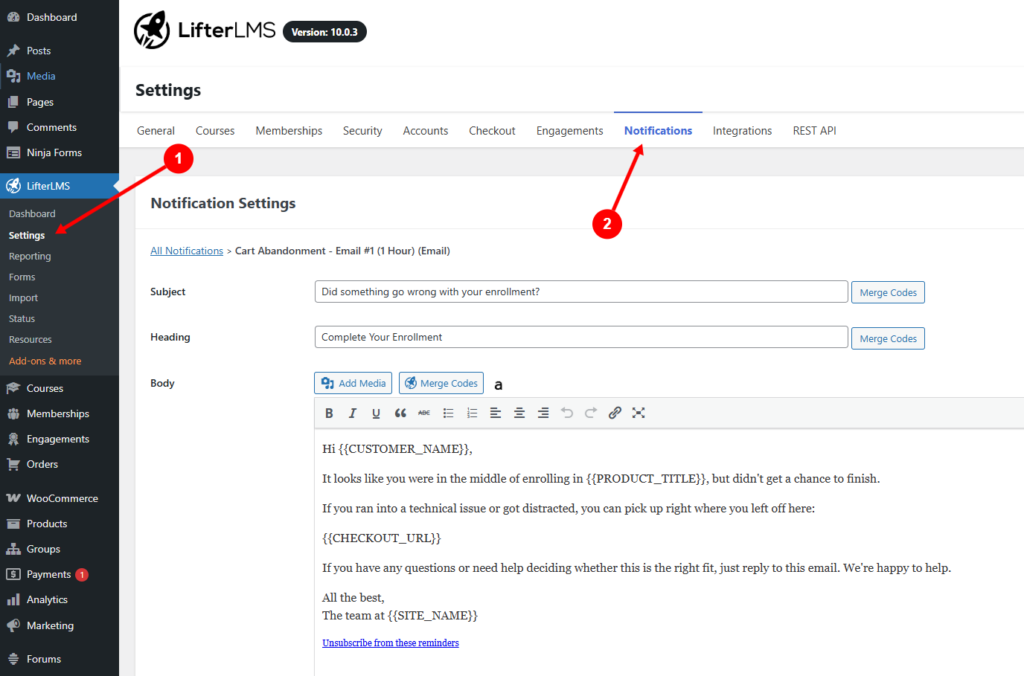
You can access the Cart Abandonment Recovery add-on settings from:
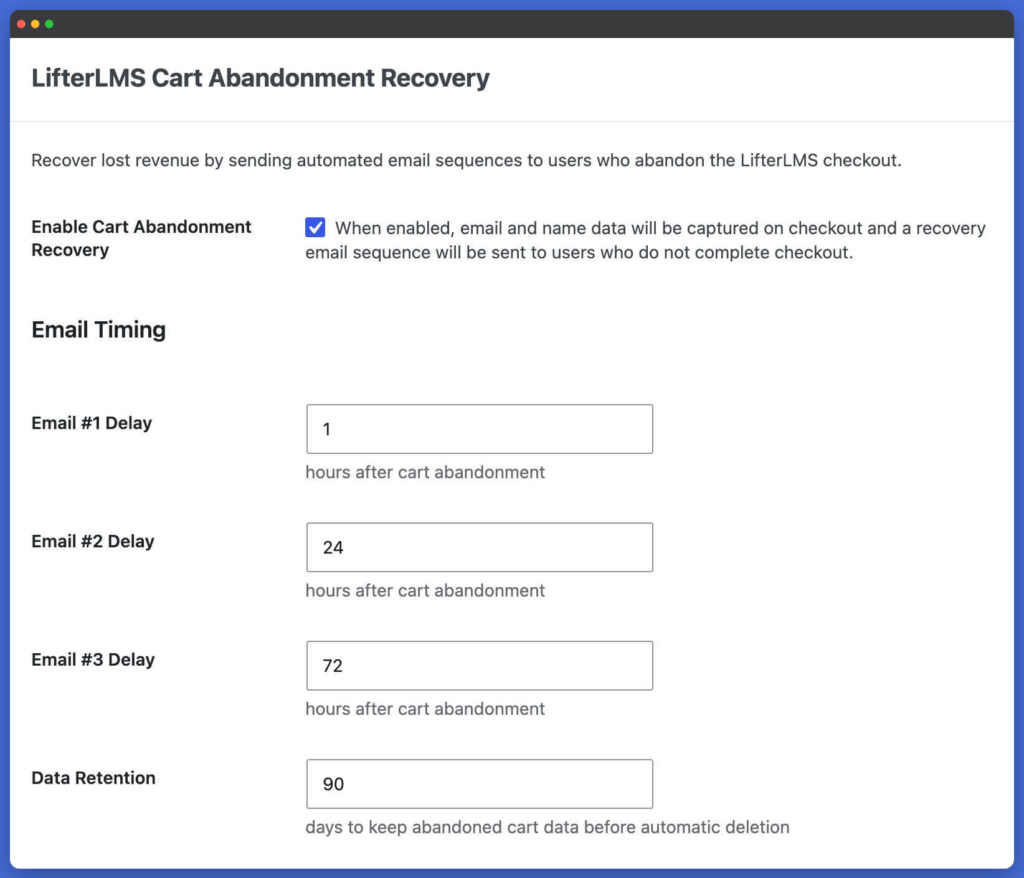
LifterLMS > Settings > Cart Abandonment Recovery
From here, you can configure recovery timing, customize email behavior, enable optional incentives, and monitor performance.
Configure Recovery Timing
One of the biggest decisions when setting up recovery emails is timing.
Send recovery emails too quickly, and they can feel intrusive. Wait too long, and the learner may have already moved on or forgotten why they were interested in the first place.
LifterLMS lets you configure the timing of your recovery sequence to better match the types of courses or memberships you sell.
A common approach might look something like this:
- A gentle reminder shortly after checkout is abandoned
- A second email the following day
- A final follow-up a few days later
The ideal timing often depends on your audience.
For example, someone considering a lower-cost mini-course may respond well to quicker reminders, while higher-ticket coaching or certification programs may benefit from giving learners more time to think before following up.
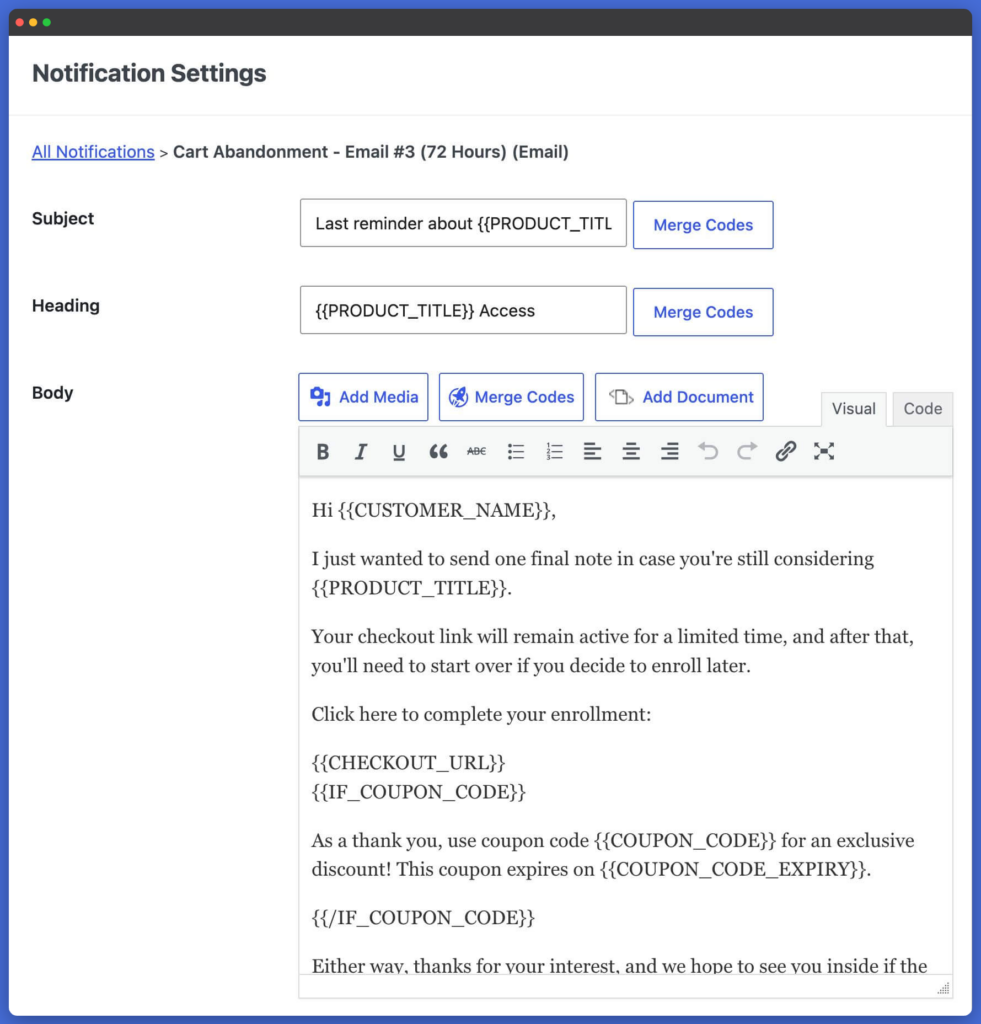
Customize Recovery Emails
In many cases, the most effective recovery emails are simple. A short reminder that someone left before completing enrollment is often enough to bring learners back.
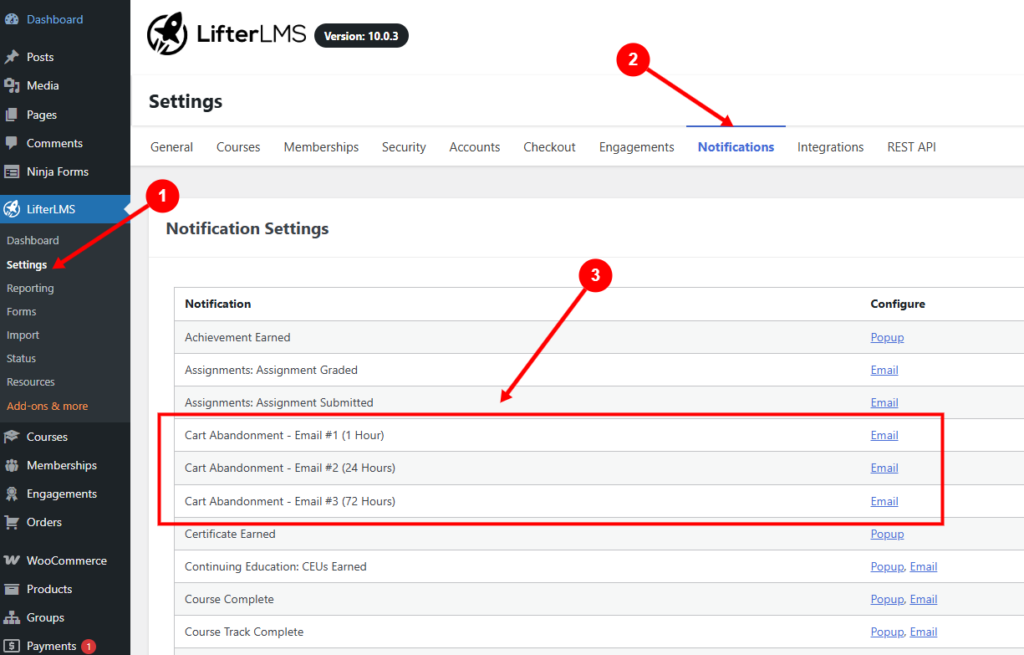
As you customize your emails, it can help to think about different stages of hesitation.
For example:
Email one may simply remind learners that their enrollment was not completed.
Email two can address common hesitation or reinforce the value of the course.
Email three may include an optional incentive or stronger encouragement to return.
Consider Whether to Offer an Incentive
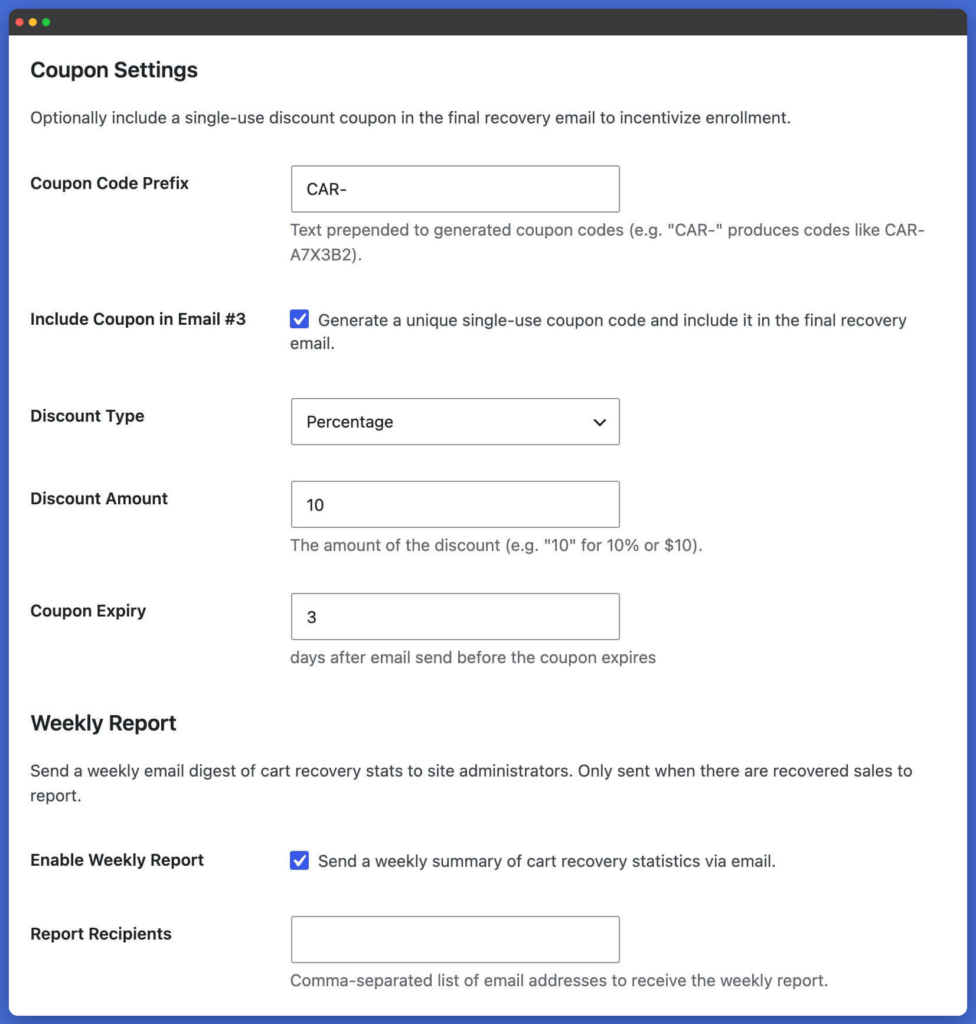
LifterLMS also lets you include incentives, such as discounts or coupons, in recovery campaigns.
This can work well in some situations, particularly for:
- Limited-time enrollments
- Seasonal promotions
- Higher-priced offers where hesitation is common
At the same time, incentives aren’t always necessary.
Many abandoned checkouts happen because of distraction rather than price sensitivity, which means a simple reminder may be enough to recover the sale.
If you do experiment with discounts, it is worth testing carefully. You want incentives to encourage action without unintentionally training learners to wait for offers before enrolling.
Monitor Recovery Performance
Once the Cart Abandonment Recovery add-on is running, it’s worth paying attention to the results.
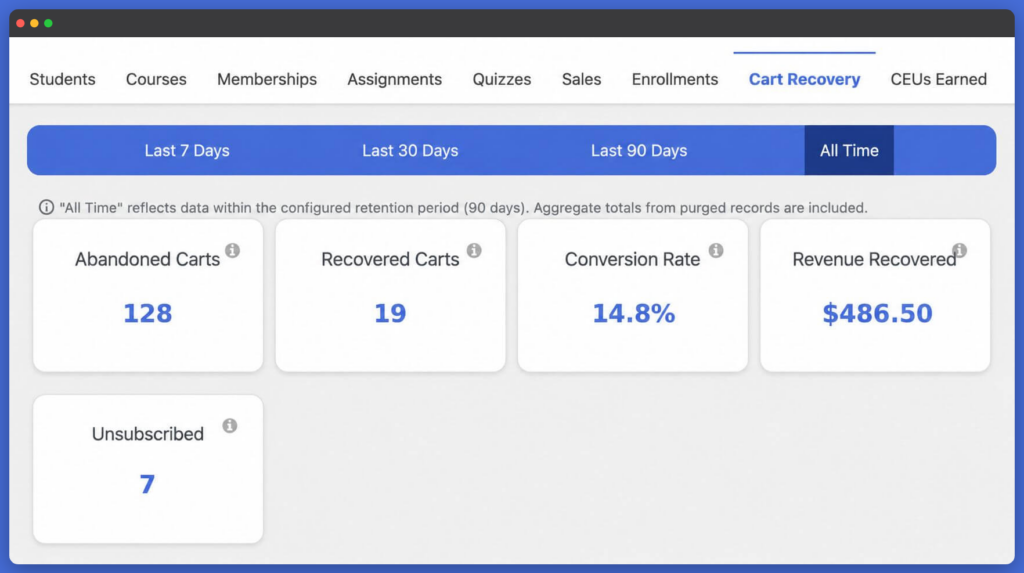
LifterLMS provides reporting to help you understand how recovery emails are performing and how much revenue is being recovered over time.
That visibility matters because it helps answer practical questions such as:
- Are learners responding better to certain timings?
- Are discounts actually improving recovery?
- Which courses experience the most abandonment?
- How much revenue is being recovered automatically?
Sometimes small adjustments can lead to meaningful improvements.
What Makes a Good Recovery Email?
Recovery emails tend to work best when they feel timely and relevant rather than overly sales-focused.
This is particularly true for online education, where learners are often making a bigger commitment than a typical ecommerce purchase. Someone enrolling in a course isn’t simply buying a product. They’re deciding whether to invest time, effort, and money into achieving a goal.
That means recovery emails should build confidence, not pressure.
One of the easiest mistakes course creators make is turning recovery emails into aggressive sales messages filled with urgency, countdowns, and repeated pressure to buy.
In many cases, that approach creates resistance rather than trust.
A stronger approach is to think of recovery emails as helpful reminders. Because the learner has already shown interest, the goal is simply to make returning feel easy.
Start with a simple reminder
The first email often works best when it feels lightweight and practical.
Something as simple as:
“Looks like you were partway through enrollment. If you would like to continue, your checkout is ready.”
Address hesitation naturally
If a learner has still not returned, a second email can help reinforce value and reduce uncertainty.
This might include:
- What learners typically gain from the course
- Common outcomes or transformations
- Frequently asked questions
- Clarification around pricing, timing, or expectations
Rather than pushing harder, this stage is about increasing confidence.
Use incentives carefully
Discounts can sometimes help recover hesitant buyers, but they should be used thoughtfully.
In some situations, offering a limited-time coupon can provide the final encouragement someone needs to commit.
In others, it can unintentionally reduce perceived value or teach learners to delay purchases in the hope of receiving an offer later.
For many creators, a simple reminder sequence without discounts is often enough.
Ultimately, good recovery emails feel human. They acknowledge that people get distracted, hesitate, and occasionally need a reminder without making them feel pressured or guilty for leaving checkout.
You’re Probably Closer to More Sales Than You Think
For many course creators, abandoned checkout can feel like a lost opportunity. In reality, many learners who leave were already closer to enrolling than it first appears.
Learners often leave checkout for reasons that have little to do with your course itself. Life gets busy, hesitation creeps in, or timing simply is not right.
That is exactly why Cart Abandonment Recovery matters.
Rather than treating unfinished checkout as a lost opportunity, it creates a simple, automated way to reconnect with learners who were already close to enrolling. A well-timed reminder can help someone return to a decision they had already been seriously considering without adding more manual work to your marketing or enrollment process.
For many creators, even recovering a small percentage of abandoned enrollments can represent meaningful additional revenue over time, particularly when so much effort has already gone into attracting learners in the first place.
The best part is that getting started takes only a few minutes.
Once configured, the Cart Abandonment Recovery add-on works quietly in the background, helping recover missed opportunities while you focus on building courses, supporting students, and growing your learning business.
The Cart Abandonment Recovery add-on is just one of the improvements introduced alongside the latest release.
Explore everything new in LifterLMS 10, including updates designed to create a better experience for both course creators and learners.
Explore What’s New in LifterLMS 10
Not using LifterLMS yet? Download the free core plugin to start building your first course, or compare plans to unlock advanced tools for selling courses, memberships, certifications, coaching, ecommerce, and more.
Frequently Asked Questions About The Cart Abandonment Recovery Add-on
What counts as an abandoned cart in LifterLMS?
An abandoned cart typically occurs when a learner begins the checkout process, provides contact details such as an email address, but leaves before completing enrollment or payment.
Rather than treating that checkout as permanently lost, the Cart Abandonment Recovery add-on can automatically follow up and encourage the learner to return.
Can I customize the Cart Abandonment Recovery addon emails?
LifterLMS lets you customize recovery emails to better match your brand, tone, and enrollment goals. This gives you flexibility over how follow-ups feel, whether you prefer simple reminders or more detailed messaging around course benefits and outcomes.
How many recovery emails should I send?
There is no single perfect answer, but most course creators find that a short sequence of one to three emails works well.
For example, you might:
- Send an initial reminder shortly after checkout is abandoned
- Follow up the next day
- Send a final reminder a few days later
The right timing often depends on the price, complexity, and commitment level of your course.
Can I include a discount or coupon in recovery emails?
LifterLMS lets you include incentives, such as discounts or coupons, as part of your recovery strategy.
That said, discounts are not always necessary. Many abandoned checkouts happen because of distraction or timing rather than pricing concerns, so a reminder alone may sometimes be enough.
Does the Cart Abandonment Recovery add-on stop after enrollment?
Once a learner returns and completes checkout, recovery emails stop automatically. This helps avoid duplicate messages or awkward follow-ups after someone has already enrolled.
Does the Cart Abandonment Recovery add-on work for memberships and courses?
The Cart Abandonment Recovery add-on can be used for courses, memberships, coaching offers, certification programs, and other paid learning experiences managed through LifterLMS.
Can I change recovery email timing?
You can configure the timing of recovery emails to better suit your audience and enrollment process.
Some creators prefer quicker reminders for lower-cost offers, while others allow more time between follow-ups for higher-ticket programs where learners may need longer to decide.
Will the Cart Abandonment Recovery add-on work with all learners?
Not always. Recovery works best when a learner begins checkout and provides enough information, such as an email address, for follow-up communication to happen.
If someone leaves immediately without entering details, recovery may not be possible.
Can I turn the Cart Abandonment Recovery add-on off later?
You can disable the Cart Abandonment Recovery add-on at any time if you decide it isn’t the right fit for your enrollment strategy.
How do I know if recovery emails are working?
LifterLMS includes reporting to help you understand recovery performance, including recovered revenue and how learners respond to recovery campaigns.
This visibility can help you fine-tune email timing, messaging, and incentives over time.



